
An e signature document is a legally valid digital file signed electronically, carrying the same legal weight as a handwritten signature under the U.S. ESIGN Act and the Uniform Electronic Transactions Act (UETA). These two federal and state standards establish that electronic signatures on contracts, agreements, and forms are enforceable in court. The practical payoff is significant: switching from print-sign-scan to an online signing workflow reduces document completion time from 15 minutes to roughly 30 seconds. That is a 97% reduction in time spent on a single signature cycle. For freelancers, realtors, and agencies managing dozens of client agreements each month, that time adds up fast. The electronic signature process also removes geographic barriers, making remote document signing a standard part of professional practice rather than an exception.
What does an e signature document require to get started?
Getting your first signed document back quickly depends on having the right setup before you hit send. The good news is that the prerequisites are minimal.
Supported file formats are the first consideration. PDF is the preferred format for any digital signature agreement because it preserves layout across all devices and operating systems. Most e-signature platforms also accept Word (.docx) files, though converting to PDF before uploading prevents formatting surprises on the signer's end.
Choosing the right tool matters more than most professionals realize. The market breaks into three broad categories:
- Free basic tools: Allow signing 1 file per day with limited or no audit trail. Good for occasional, low-stakes documents.
- Pay-per-use platforms: Charge per envelope or document. Practical for professionals who send fewer than 10 documents per month.
- Subscription-based professional platforms: Offer unlimited sending, full audit trails, signer authentication, and workflow automation. Best for agencies and realtors with high document volume.
| Feature category | Free basic tools | Pay-per-use | Subscription professional |
|---|---|---|---|
| Daily sending limit | 1 file/day | Unlimited | Unlimited |
| Audit trail | None or basic | Partial | Full |
| Signer authentication | None | Basic | Advanced |
| Workflow automation | None | Limited | Full |
| Cost | $0 | Per document | Monthly/annual |
Essential prerequisites before you send any document: finalize the content completely, confirm all signer email addresses, and prepare a short message explaining what the signer needs to do. Sending a document that is still under negotiation creates legal ambiguity and wastes everyone's time.
Pro Tip: Use a professional business domain email address as your sender address. Sending from a business domain increases trust with signers and reduces the chance your request lands in a spam folder.

How to create, send, and manage a signed document step by step
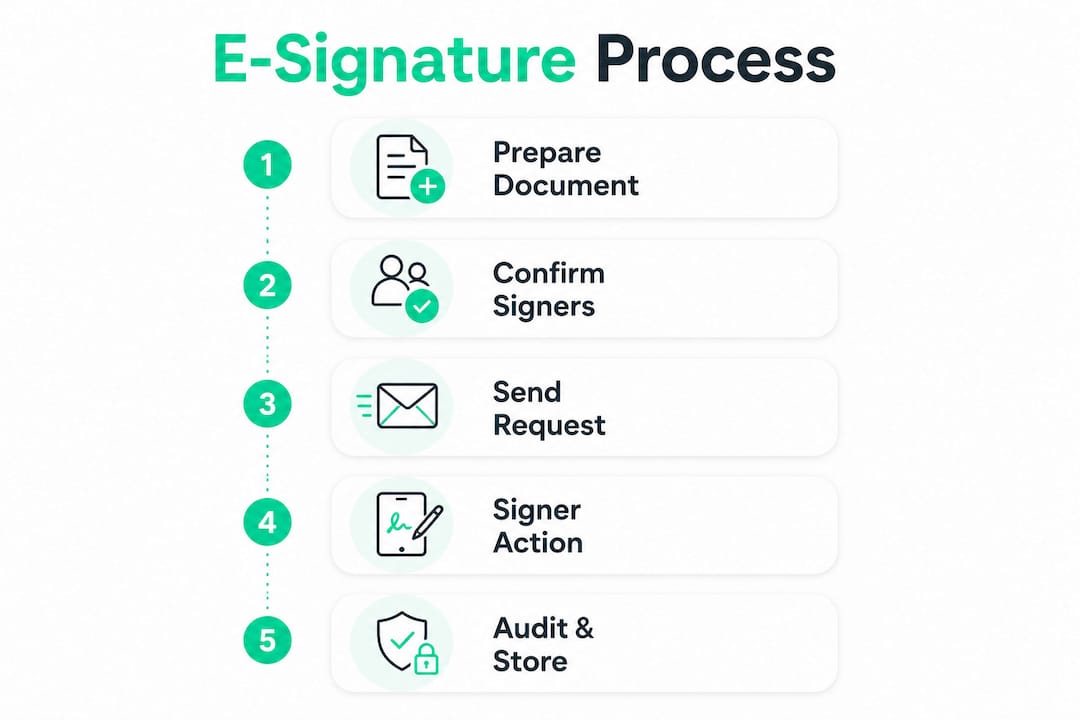
The full electronic signature process takes under five minutes when your document is ready. Most signers complete their part in under five minutes as well, with no account creation or software installation required on their end.
- Upload your finalized document. Log in to your chosen e-signature platform and upload your PDF or .docx file. Double-check that the document is the final version before proceeding.
- Add signer information. Enter each signer's full name and email address. For documents requiring multiple signers, set the signing order so that the second signer only receives the document after the first has completed their part.
- Place signature fields. Drag and drop signature fields, date fields, and initials boxes onto the correct pages. Some platforms auto-detect signature lines; always verify placement manually.
- Write a personal message. Add a short, clear note to the signer explaining what the document is and what you need from them. A one-sentence explanation reduces confusion and speeds up response time.
- Review and send. Preview the document from the signer's perspective before sending. Confirm field placement, signer details, and your message are all correct.
- Track signing status. Most professional platforms show real-time status: sent, viewed, signed, or declined. Set an expiration date at this stage so the request does not sit open indefinitely.
- Download the completed document. Once all parties have signed, download the fully executed file along with its audit trail. Store both in your client records.
Pro Tip: Set a signing deadline of 5–7 business days on every request. Documents without expiration dates frequently fall into limbo, delaying closings and creating confusion about which version is current.
The audit trail attached to a professionally signed document records who signed, when they signed, and from which IP address. This detail is what separates a professional e-signature workflow from simply pasting a signature image onto a PDF.
How to send an electronic signature via email for free
Free tools work well for professionals who sign documents occasionally or need a quick solution without a subscription. The key is understanding their limits before you rely on them for client-facing work.
How free signing tools work:
- You upload a PDF directly in your browser.
- You add your signature by typing, drawing, or uploading an image.
- The tool places the signature on the document.
- You download the signed file and attach it to an email manually.
Some free tools process documents entirely within your browser, never uploading your file to a remote server. This local processing model offers a real privacy advantage when handling sensitive client contracts or financial agreements. The document never leaves your device.
The trade-off is clear. Free platforms often cap usage at one file per day and provide no audit trail, no signer authentication, and no automated reminders. If a dispute arises over whether a document was signed, a downloaded PDF with a signature image provides weak legal evidence compared to a platform-generated audit trail.
"Placing an image of your signature on a PDF is not the same as an electronic signature workflow. A true e-sign process includes authentication, a timestamped audit trail, and expiration controls that protect both parties."
Pro Tip: When sending a free-signed document via email, rename the file clearly (e.g., "ClientName_Contract_Signed_2026.pdf") and request a reply confirmation from the signer. This creates a basic email record of receipt.
For low-risk documents like simple project briefs or single-party acknowledgments, free tools are entirely adequate. For contracts involving payment, intellectual property, or liability, a professional platform with full security features is the right choice.
Common mistakes that delay or invalidate signed documents
The most expensive mistakes in the electronic signature process are not technical. They are process failures that happen before the document is even sent.
Sending documents too early is the most common error. A contract sent while terms are still being negotiated creates a signed version of an incomplete agreement. Always get written confirmation that both parties agree on the final terms before initiating the signing workflow.
Skipping signer order configuration causes real delays on multi-party documents. Without a defined signing order, all signers receive the document simultaneously, which leads to confusion about who should sign first and can create conflicting versions.
Using a personal Gmail or Yahoo address as your sender address reduces trust immediately. Signers who receive a signature request from a generic email are more likely to treat it as phishing and ignore it. A professional domain address signals legitimacy.
Additional pitfalls to avoid:
- Failing to verify signer email addresses before sending, which results in undelivered requests.
- Not including clear instructions in the message field, leaving signers unsure what to do.
- Forgetting to set an expiration date, which leaves requests open indefinitely.
- Confusing a simple electronic signature with a cryptographically backed digital signature for high-stakes documents.
"For high-risk documents like real estate contracts or legal agreements, a simple e-signature may not be enough. Cryptographically backed digital signatures with certificate-based authentication provide non-repudiation that holds up under legal scrutiny."
When a signer claims they never received the request, check the email address first, then resend from your platform's dashboard rather than forwarding the original email. Most professional platforms log delivery status, so you can confirm whether the message was delivered before troubleshooting further. Realclient's client portal approach addresses this by keeping all document activity visible in one place, so nothing gets lost in an email thread.
Key Takeaways
A professionally managed e signature document workflow reduces signing time by 97% while providing the audit trail and authentication that make signed agreements legally defensible.
| Point | Details |
|---|---|
| Legal foundation | The ESIGN Act and UETA make electronic signatures enforceable across the U.S. |
| Speed advantage | Signing time drops from 15 minutes to roughly 30 seconds with an online workflow. |
| Free tool limits | Free platforms cap usage and lack audit trails, making them unsuitable for high-stakes contracts. |
| Audit trail value | Professional platforms record who signed, when, and from where, which is critical for dispute resolution. |
| Process discipline | Set signer order, expiration dates, and a professional sender address before every send. |
Why I think most professionals underestimate the audit trail
Most freelancers and agencies I have worked with treat e-signatures as a convenience feature. They focus on speed, which is fair, because getting a contract back in 30 seconds instead of three days genuinely changes how you run your business. But the audit trail is where the real value sits, and it is almost always overlooked until something goes wrong.
A signed PDF with no audit trail is a weak document. If a client disputes a contract six months later, your ability to prove when they signed, from which device, and after viewing which version of the document is what wins that argument. A signature image pasted onto a PDF proves nothing. Professional audit trails record timestamped events for every action taken on the document.
The privacy angle also matters more than most people think. When you upload a sensitive client contract to a cloud-based tool, that document lives on someone else's server. For most documents, that is an acceptable trade-off. For contracts involving financial terms, personal data, or proprietary information, a browser-based local processing tool or a platform with strong encryption and a clear data retention policy is the right call.
My practical advice: match the tool to the document's risk level. A simple project brief can go through a free tool. A retainer agreement, a real estate purchase contract, or any document with payment terms deserves a platform that gives you a full audit trail, signer authentication, and encrypted storage. The cost difference between free and professional is small. The legal difference is not.
— Real
How Realclient fits into your signing workflow
Chasing signatures across email threads wastes time you could spend on client work. Realclient builds e-signature collection directly into a branded client portal so your clients sign contracts, view project updates, and download files from one place.

Realclient processed over $48 million in invoices through its portals last year, which reflects how many independent professionals have moved their entire client workflow, including document signing, off scattered email and into a single organized system. The platform includes audit trails, secure document sharing, and payment processing, all without requiring your clients to install anything. You can review pricing options to find the plan that fits your volume, or browse the showcase to see how other freelancers and agencies have set up their portals.
FAQ
What makes an e signature document legally valid?
An e signature document is legally valid in the U.S. under the ESIGN Act and UETA when it captures the signer's intent, identity, and consent. A professional platform's audit trail provides the evidence needed to enforce the agreement.
How do I send an electronic signature via email for free?
Upload your PDF to a free browser-based signing tool, add your signature, download the signed file, and attach it to an email. Free tools work for low-stakes documents but lack audit trails and daily usage beyond one file per day on many platforms.
What is the difference between an electronic signature and a digital signature?
An electronic signature is any electronic mark indicating intent to sign. A digital signature uses cryptographic certificates to authenticate the signer's identity, providing stronger legal non-repudiation for high-stakes agreements.
How long does the electronic signature process take?
The full process takes under five minutes for the sender to set up and under five minutes for the signer to complete, with no account creation required on the signer's end.
Why is my signature request going to spam?
Signature requests sent from generic personal email addresses are more likely to trigger spam filters. Sending from a professional business domain address significantly improves delivery and open rates.