
Automated follow ups are pre-scheduled, behavior-triggered messages sent to clients or prospects without manual effort each time. The business case is stark: 80% of sales require at least five follow-up attempts to close, yet 44% of salespeople quit after just one. That gap is where revenue disappears. Follow-up automation tools close it by running consistent, personalized outreach sequences that adapt to client behavior, whether someone opened your email, ignored your invoice, or went quiet after a proposal. This article covers how to build those sequences, avoid the technical traps that kill deliverability, and apply multi-channel strategies that actually move clients to respond.
How do automated follow-up sequences work?
Automated follow-up sequences are triggered message chains that fire based on specific client actions or inactions. A trigger might be a sent proposal with no reply after three days, an unpaid invoice approaching its due date, or a new lead who filled out a contact form. The sequence then sends a series of messages at widening intervals until the client responds or the sequence ends.
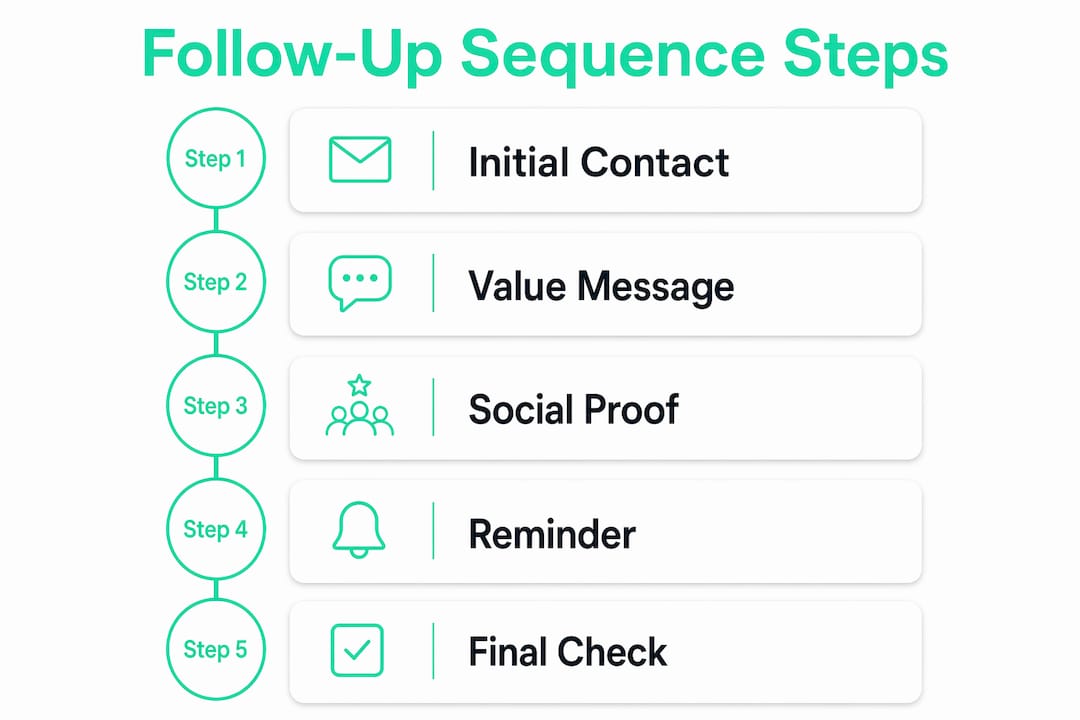
The standard cadence that produces results follows a 3–5 message structure spaced across two to three weeks. A typical layout looks like this:
- Day 0: Send the initial message with your core offer or request.
- Day 3: Send a short follow-up that adds one piece of value, such as a relevant case study or a specific answer to a common objection.
- Day 7: Shift the angle. Ask a direct question or reference something specific about the prospect's situation.
- Day 14: Send a "closing the loop" message that signals you won't follow up again. This often generates the highest reply rate of the sequence.
- Day 21 (optional): A final check-in for high-value prospects only.
Each message must assume the recipient missed the previous one. Writing as if they never saw your last email removes any passive-aggressive tone and keeps the conversation fresh.
The most critical technical rule in any sequence is the stop-on-reply condition. When a client responds, the sequence must halt immediately. Failing to configure this correctly means clients receive follow-up messages after they've already replied, which destroys trust fast.
Pro Tip: Rotate your message angles across the sequence. Use value delivery in message two, social proof or a short result in message three, and a direct yes/no question in message four. Repeating the same "just checking in" angle is the fastest way to get ignored.
Multi-channel touchpoints also lift results. Behavioral triggers across platforms improve timing significantly. If a client opens your email but doesn't reply within 24 hours, an SMS or WhatsApp nudge sent the next morning often converts where email alone failed. The key is sequencing channels intelligently, not blasting every channel at once.

What technical setup do automated email reminders require?
Deliverability is where most automated outreach fails. A well-written sequence sent from a poorly configured domain lands in spam and generates zero replies. Getting the technical foundation right is not optional.
The core requirements for reliable delivery:
- Domain warming: New sending domains must be warmed up over two to four weeks. Start with low daily volumes and increase gradually. Sending limits of around 30 emails per inbox daily protect your sender reputation during this phase.
- Spin syntax: Vary your message text using spin syntax, where the system randomly selects from multiple phrase options. This prevents spam filters from flagging identical messages sent in bulk.
- Plain-text formatting: Plain-text emails achieve roughly 42% higher open rates than HTML marketing templates. They look personal, and spam filters treat them more favorably.
- Bounce and reply monitoring: Track bounce rates weekly. A bounce rate above 5% signals a list quality problem. High bounce rates damage your domain reputation quickly.
- Spam word audits: Before launching any sequence, run your templates through a spam checker. Words like "free," "guaranteed," and "act now" trigger filters even in otherwise clean messages.
Pro Tip: Use a dedicated subdomain for automated outreach, such as mail.yourdomain.com, rather than your primary domain. If your sender reputation takes a hit, your main domain stays protected.
The table below summarizes the key technical parameters for a healthy sending setup:
| Parameter | Recommended setting |
|---|---|
| Daily send limit per inbox | 30 emails maximum |
| Domain warm-up period | 2–4 weeks |
| Bounce rate threshold | Below 5% |
| Message format | Plain text preferred |
| Stop-on-reply | Immediate, automatic |
Intelligent triggering takes this further. Rather than firing messages on a fixed timer, advanced systems monitor CRM activity, email opens, and calendar data to send follow-ups only when a contact is genuinely overdue for one. This approach reduces message fatigue and keeps your sender reputation clean.
Why does multi-channel outreach outperform email alone?
Email is the backbone of most customer follow-up strategies, but relying on it exclusively leaves results on the table. Clients live across multiple platforms, and meeting them where they are increases the chance of a response.
The practical benefits of a multi-channel approach include:
- Behavioral cross-platform triggers: A client who opens your email but doesn't click gets an SMS follow-up the next day. A client who views your proposal in a client portal but doesn't sign gets a WhatsApp message 48 hours later. These triggers respond to real behavior, not arbitrary schedules.
- Pause on manual interaction: Automated multi-channel cadences pause automatically when a sales rep or freelancer manually contacts the client. This prevents the embarrassing situation where a client receives an automated "just following up" message minutes after a phone call.
- CRM logging for accountability: Every touchpoint gets recorded. You can see exactly which message in a sequence generated a reply, which channel converted best, and where clients dropped off. That data improves every future sequence.
- Escalation rules: Set rules that escalate a contact to a personal outreach task after a sequence completes with no reply. Automation handles the volume; you handle the high-value exceptions.
The most effective multi-channel sequences use email as the primary channel, SMS for time-sensitive nudges, and LinkedIn or WhatsApp for relationship-building touchpoints. Mixing channels also reduces inbox fatigue, since clients who tune out email may respond immediately to a text.
Where do automated follow ups deliver the clearest business results?
The return on follow-up automation shows up most clearly in four business scenarios. Each one involves repetitive, time-sensitive outreach that humans consistently handle inconsistently.
| Business scenario | What automation does | Result |
|---|---|---|
| Sales lead nurturing | Sends value-add messages at set intervals after first contact | Closes deals that would have gone cold |
| Invoice and payment reminders | Schedules reminders up to 90 days before or after due date | Reduces manual collections work |
| Appointment confirmations | Sends confirmation, reminder, and post-appointment follow-up | Cuts no-show rates |
| Proposal and quote follow-ups | Triggers sequence when proposal is sent but not signed | Increases close rate on sent proposals |
Sales lead nurturing is where the math is most compelling. A standard cold outreach sequence boosts reply rates by 31% when using optimal delays across the sequence. For a freelancer sending 20 proposals a month, that lift translates directly to more signed contracts without additional prospecting effort.
Invoice reminders are the most underused application. Freelancers and agencies routinely lose hours chasing late payments manually. Automation schedules those reminders with one-click payment links, and the sequence stops the moment payment is received. Realclient's portal integrates payment processing directly, so the reminder and the payment action live in the same place for the client.
Appointment confirmation sequences reduce no-shows by sending a confirmation immediately after booking, a reminder 24 hours before, and a follow-up message after the appointment to gather feedback or schedule the next step. Each message fires automatically, and the sequence adapts if the client reschedules.
For client tracking across projects, automation also handles post-project check-ins. A message sent 30 days after project completion asking for a testimonial or referral costs nothing to send and consistently generates results that manual follow-up misses.
Key Takeaways
Automated follow ups work because they replace inconsistent human memory with consistent, behavior-triggered sequences that run without manual effort and stop the moment a client responds.
| Point | Details |
|---|---|
| Use a 3–5 message cadence | Space messages at days 3, 7, 14, and 21 with widening gaps to avoid pushiness. |
| Stop-on-reply is non-negotiable | Configure sequences to halt immediately when a client responds to prevent trust damage. |
| Plain text beats HTML | Plain-text emails open at roughly 42% higher rates and avoid spam filters more effectively. |
| Warm your domain first | New sending domains need 2–4 weeks of gradual volume increases before full sequence launch. |
| Multi-channel lifts results | Combining email with SMS or WhatsApp based on behavioral triggers outperforms email alone. |
Automation without personality is just noise
The most common mistake I see freelancers and agencies make is treating automation as a set-and-forget system. They build a sequence, turn it on, and assume the work is done. The sequences that actually convert are the ones that get reviewed every 60 days.
Properly designed automation delivers consistent, professional follow-through that matches human-level quality without the memory lapses or mood swings. That's the real promise. But it only holds if the messages themselves are written with a specific person in mind, not a generic "valued client."
The future of follow-up automation moves toward intelligent triggering that monitors CRM data, email behavior, and calendar activity to send messages only when a contact is genuinely overdue. Fixed-timer sequences will feel outdated within two years. The professionals building their systems now around behavioral triggers are the ones who will have a real advantage.
My honest advice: start with one sequence, not five. Build your invoice reminder sequence first. It has a clear trigger, a clear goal, and a measurable outcome. Once you see it working, you'll have the confidence and the data to build the rest.
— Real
How Realclient fits into your follow-up strategy
Automated follow-up sequences work best when client communication lives in one place. Scattered emails and disconnected tools create gaps where follow-ups get missed and clients lose confidence.

Realclient gives freelancers, realtors, and agencies a branded client portal where project updates, file sharing, contracts, and payments all live together. Clients get a single place to act on your follow-ups, whether that means signing a contract, downloading a deliverable, or paying an invoice. With over $48 million invoiced through Realclient portals, the platform has a proven track record of turning follow-up friction into fast action. See how it works for your business or check the portal pricing options to get started.
FAQ
What are automated follow ups?
Automated follow ups are pre-scheduled, behavior-triggered messages sent to clients or prospects without manual effort each time. They fire based on triggers like no reply after a set number of days, an unpaid invoice, or a signed contract.
How many follow-up messages should a sequence include?
The most effective sequences include 3–5 messages spaced across two to three weeks, with widening gaps between each message. More than five messages in a short window typically reduces reply rates.
Why do plain-text emails perform better in automated sequences?
Plain-text emails achieve roughly 42% higher open rates than HTML templates because they appear personal and pass through spam filters more reliably. Marketing-style templates trigger spam detection and signal mass sending to email providers.
What is stop-on-reply and why does it matter?
Stop-on-reply is a sequence rule that halts all further automated messages the moment a client responds. Without it, clients receive follow-up messages after they've already replied, which damages your credibility and the client relationship.
How do I avoid my automated emails going to spam?
Warm your sending domain over 2–4 weeks, keep daily sends below 30 per inbox, use plain-text formatting, and run your templates through a spam word checker before launching. Monitoring bounce rates weekly keeps your sender reputation healthy.