The fastest, most reliable way to send appointment reminders for clients is an integrated scheduling system that fires automated SMS and email reminders, supports two-way replies or a reschedule link, and stays synced with your calendar. You do not need three separate tools. One connected platform handles all of it, and you can have your first reminder running the same day you set it up.
Here is what a solid reminder setup requires:
- Automated SMS and email channels so clients get the message on whichever channel they actually open
- Calendar sync (Google Calendar or Outlook) so reminders fire based on real appointment data
- Two-way messaging or a reschedule link so a client who cannot make it can act immediately instead of ghosting
- Customizable templates with merge fields (client name, time, location, prep notes) for messages that feel personal
- Basic compliance support including SMS consent capture and, for healthcare providers, HIPAA-capable messaging
Realclient bundles all five of these features inside a single branded client portal, with bank-grade security and a free trial so you can test the full workflow before committing to a plan.
Key Takeaways
Automated appointment reminders with two-way messaging and a multi-touch cadence are the most reliable way for small service businesses to cut no-shows and protect daily revenue.
| Point | Details |
|---|---|
| Use a multi-touch cadence | Send confirmation at booking, a 24-hour reminder, and a 1-hour nudge for the highest show rates. |
| Two-way messaging saves slots | A reschedule link or reply option converts potential no-shows into future bookings instead of lost revenue. |
| Compliance is non-negotiable | Capture SMS consent at booking, include opt-out language in every text, and use secure links for any PHI. |
| Track five core metrics | Monitor delivery rate, confirmation rate, reschedule rate, no-show rate, and revenue recovered monthly. |
| Realclient integrates it all | Realclient bundles scheduling, automated reminders, two-way messaging, e-signatures, and payments in one branded portal. |
Table of Contents
- What should you look for in a reminder solution?
- How do you set up appointment reminders in five steps?
- Compliance and privacy: what U.S. businesses need to know
- How do you measure whether your reminders are working?
- What does the evidence say about making reminders more effective?
- Why integrated portals beat point solutions for small teams
- Realclient brings scheduling, reminders, and client workflows together
- Useful sources and further reading
What should you look for in a reminder solution?
Not every reminder tool is built for small service businesses. Some are priced for enterprise call centers. Others handle SMS but ignore email. Here is a practical checklist to evaluate any option quickly.
Core features to require:
- Two-way SMS so clients can confirm, cancel, or reschedule by replying
- Automated email reminders with HTML formatting for richer content
- Google Calendar and Outlook sync so reminders fire from live appointment data
- Customizable templates with merge fields for name, time, location, and prep notes
- A booking or reschedule link embedded in every message
- Time-zone support if you serve clients across multiple states
- Delivery and confirmation reporting so you can see what is working
- Exportable message logs for compliance record-keeping
Security and compliance:
- HIPAA-capable messaging for healthcare, therapy, or any practice handling protected health information
- TCPA-compliant SMS consent capture at booking
- Opt-out language in every SMS (required by law)
- Secure portal links instead of plain-text PHI in message bodies
Pricing and setup:
- Flat monthly pricing is almost always better than per-message billing for businesses sending more than a few dozen reminders per week
- Look for a free trial that lets you test the full reminder workflow, not just the dashboard
- Onboarding should take hours, not weeks
Pro Tip: Match your feature priority to your business type. A healthcare practice needs HIPAA compliance first. A salon or fitness studio needs two-way SMS and a reschedule link. A consulting firm or agency needs calendar sync and branded email templates. Start with the one non-negotiable for your category, then layer in the rest.
How do you set up appointment reminders in five steps?
Getting your first automated reminder live does not require a developer or a long onboarding call. Here is the sequence that works for most small service businesses.
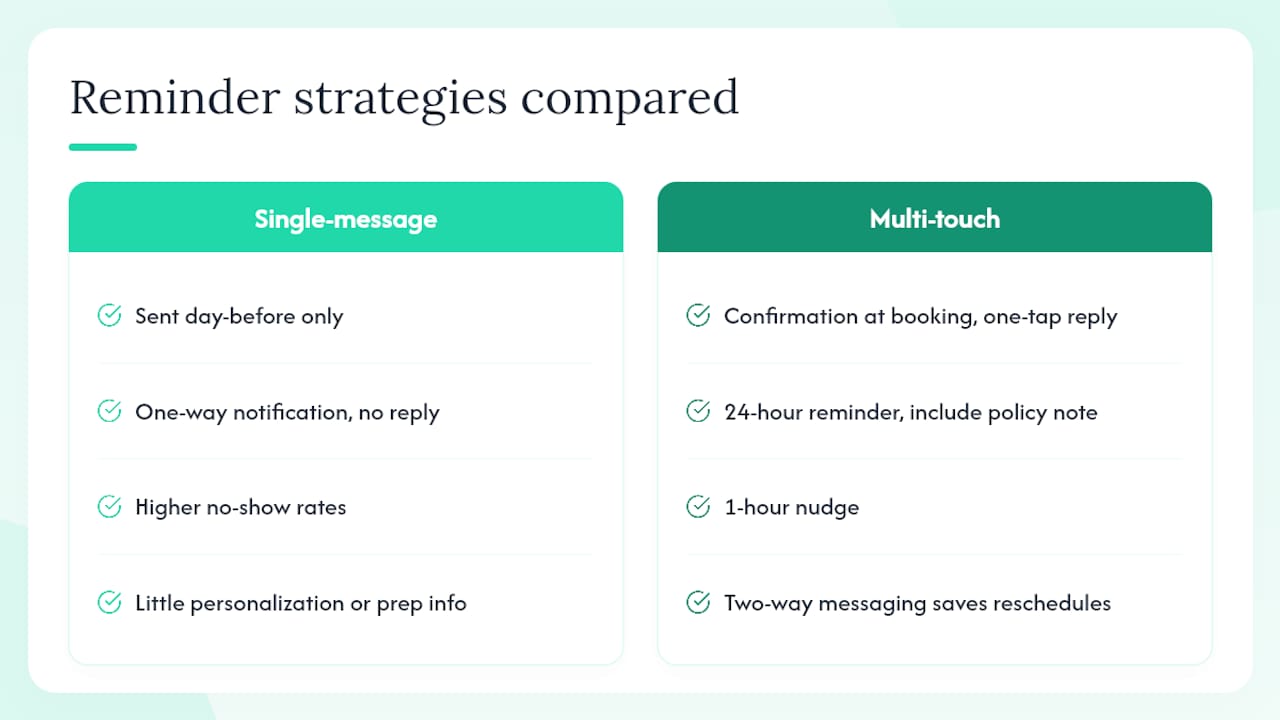
- Choose your channels and cadence. Decide whether you will send SMS, email, or both, and set your timing: confirmation on booking, a 24-hour reminder, and a 1-hour nudge. This three-touch cadence consistently outperforms a single reminder sent the day before.
- Connect your calendar. Sync Google Calendar or Outlook so your reminder system reads live appointment data. This prevents reminders from firing for canceled slots or missing newly booked ones.
- Build your templates with merge fields. Write one SMS template and one email template for each reminder moment. Pull in the client's name, appointment time, location or video link, and a reschedule URL. Keep SMS under 160 characters.
- Enable two-way messaging and reschedule links. Turn on reply handling so a client who texts back "I need to reschedule" gets an immediate response with a booking link, not silence. This single step converts the most no-shows into saved appointments.
- Test before you go live. Send each template to your own phone and email. Confirm the calendar sync fires correctly after a test booking. Check that a reply triggers the right response. Only then flip the automation on for real clients.
Testing checklist before launch:
- Confirm reminder fires at the correct time relative to the appointment
- Verify merge fields populate with real data (not placeholder text)
- Test a reply and confirm the reschedule link works
- Check that a canceled appointment stops the reminder sequence
Pro Tip: Set a different default cadence for different appointment types. A 90-minute strategy consult warrants a 48-hour reminder plus a 2-hour nudge. A 20-minute drop-in only needs a same-day text. Most platforms let you assign cadence templates by appointment category.
Compliance and privacy: what U.S. businesses need to know
Two federal frameworks govern most reminder messaging in the United States: HIPAA for healthcare-adjacent businesses and the TCPA for SMS. Getting either one wrong carries real financial risk.
HIPAA basics for appointment reminders:
HIPAA applies when your practice handles protected health information (PHI), which includes a patient's name linked to a diagnosis, treatment type, or provider. A reminder that says "Your appointment with Dr. Smith's cardiology practice is tomorrow" contains PHI. Use HIPAA-compliant messaging or send a secure portal link instead of including clinical details in the message body. Healthcare-focused guidance recommends that patient reminders include a confirmation or reschedule link and be personalized to increase response without exposing unnecessary detail.
TCPA essentials for SMS:
- Obtain written or digital consent before sending any marketing or reminder SMS
- Include opt-out language ("Reply STOP to opt out") in every message
- Keep records of consent, including the date, method, and phone number
- Do not send SMS to numbers on the National Do Not Call Registry without prior express consent
Operational compliance checklist:
- Collect SMS consent at booking (a checkbox on your intake form works)
- Store consent records with a timestamp
- Keep message content minimal when PHI is involved; use a secure portal link for details
- Provide a clear opt-out path in every SMS
- Maintain delivery and reply logs for at least four years
TCPA violations can reach $500 per message for negligent violations and up to $1,500 per message for willful ones. For a business sending hundreds of reminders per week, that exposure adds up fast. Realclient's security and compliance features are built to support these requirements, including bank-grade encryption for any sensitive links sent through the platform.
How do you measure whether your reminders are working?
Sending reminders is step one. Knowing whether they are actually reducing no-shows requires tracking a small set of metrics consistently.
| Metric | Definition | Example baseline | Target |
|---|---|---|---|
| Delivery rate | Percentage of reminders successfully delivered | -- | -- |
| Confirmation rate | Percentage of clients who confirm via reply or link | -- | -- |
| Reschedule rate | Percentage of appointments rescheduled before the slot | -- | -- |
| No-show rate | Percentage of booked appointments where the client does not appear | -- | -- |
| Revenue recovered | Estimated value of rescheduled vs. lost appointments | Varies | Track monthly |
Key metrics to watch:
- Delivery rate catches technical issues (bad numbers, carrier filtering) before they become no-show problems
- Confirmation rate tells you whether clients are engaging with your messages at all
- Reschedule rate is the leading indicator of whether your two-way reply flow is working
- No-show rate is the outcome metric everything else feeds
Simple experiments to run after four weeks of baseline data:
- Cadence A/B: send the 24-hour reminder to half your clients and a 48-hour reminder to the other half; compare confirmation rates
- Message length: test a 90-character SMS against a 155-character version with prep notes included
- Two-way vs. one-way: compare confirmation rates for messages with a reply option versus a link-only version
- Reschedule link placement: test the link in the first sentence versus the last
Wait at least four weeks before drawing conclusions. Appointment volumes at small practices are low enough that a single busy week can skew a two-week sample. For deeper follow-up workflows that go beyond reminders, Realclient's guide on automated follow-ups that win clients back covers re-engagement sequences worth layering in once your reminder baseline is stable.
What does the evidence say about making reminders more effective?
The research on reminder effectiveness points consistently in one direction: multi-touch cadences with low-friction confirmations outperform any single-message approach. Sending a confirmation at booking, a 24-hour reminder, and a 1-hour nudge produces materially higher show rates than a single reminder sent the day before, especially when the confirmation requires only one tap or one keystroke reply.
Two-way messaging is the most underused lever in this space. Most small businesses send one-way notifications and accept no-shows as inevitable. Providers who treat replies as a customer service channel, not just a notification pipe, convert a significant share of potential no-shows into rescheduled appointments. That reschedule preserves the revenue and the client relationship.
Personalization compounds over time. Dynamic tags like
[First Name],[Service Type], and[Prep Notes]do more than make a message feel warm. They reduce the "is this for me?" hesitation that causes clients to ignore generic reminders. A client who sees their name, their exact appointment time, and a note about what to bring is far more likely to confirm than one who receives a generic "you have an appointment soon" text.
Prep notes deserve more attention than most guides give them. Including directions, a document to review, or a short checklist in the reminder reduces last-minute cancellations driven by client anxiety or confusion. When clients feel prepared, they show up.
Pro Tip: Experienced providers add a one-line policy note to the 24-hour reminder ("A 24-hour cancellation notice helps us serve everyone on our schedule") rather than waiting until after a no-show to enforce it. Clients who see the policy before the appointment cancel properly instead of simply not appearing.
Why integrated portals beat point solutions for small teams
The conventional advice is to pick the best tool for each job: a dedicated reminder service for SMS, a calendar app for scheduling, a separate platform for contracts. That approach works fine for a 20-person operations team. For a solo consultant, a two-person studio, or a small agency, it creates a different problem: you spend more time managing tools than serving clients.
An integrated client portal changes the math. When your scheduling, reminders, file sharing, contracts, and payments all live in one place, you stop copying data between systems and start seeing the full client picture in one view. A reminder that fires from a live calendar, links to a branded portal where the client can review their contract and pay their deposit, and logs the reply in the same thread as your project notes — that is a fundamentally different experience than a standalone SMS tool.
The trade-off is real: a dedicated reminder service might cost less per message at very low volumes. But the administrative simplicity and consolidated client history of an integrated platform almost always wins for businesses managing more than a handful of active clients at a time.
Realclient brings scheduling, reminders, and client workflows together
Fewer no-shows and a cleaner client experience are two outcomes you can reach this week, not next quarter. Realclient gives you automated SMS and email reminders, two-way messaging, calendar sync, e-signatures, and payment processing inside one branded portal. You are not stitching together three tools or paying per message at scale.

The platform's bank-grade security supports HIPAA-adjacent workflows and protects any sensitive links you send through reminders. Over $48 million has been invoiced through Realclient portals, which reflects the kind of professional client workflow this platform is built for.
Start with a free trial at realclient.io. During your trial, set up two reminder templates, test the two-way reply flow, and check your confirmation rate after one week. That single experiment will show you exactly how much revenue you have been leaving on the table.
Useful sources and further reading
The sources below cover compliance requirements, template libraries, and Realclient's own platform guides for readers who want to go deeper.
Compliance and legal guidance:
- Tips for Sending Appointment Reminders to Patients
- 15+ Appointment Reminder Templates for Text, Email & Call
- RealClients — Client Portals for Freelancers & Small Businesses
- Automated Follow Ups That Actually Win Clients Back
- How to Ask a Client for Payment Professionally
Templates and copy:
- 15+ Appointment Reminder Templates for Text, Email & Call — tested templates across SMS, email, and phone for service businesses
Realclient workflows and strategy:
- Automated Follow Ups That Actually Win Clients Back — re-engagement sequences and follow-up cadences beyond the initial reminder
- How to Ask a Client for Payment Professionally — payment language for reminders that reference no-show fees or card-on-file policies
- RealClients Pricing and Trial — plan details and free trial access; Realclient has supported over $48 million in invoiced revenue through its portals
This article provides general information about appointment reminder practices and compliance considerations. It is not legal or professional advice. Confirm current HIPAA and TCPA requirements with a qualified attorney or your relevant regulatory authority before deploying reminder systems in regulated industries.