
Electronic signatures carry the same legal weight as ink signatures for the vast majority of contracts you'll sign this year, thanks to the ESIGN Act and its state-level partner, UETA. A handful of documents still demand wet ink: certain wills, some court filings, and select notarized or recorded paperwork. The rest of this guide shows you how to know which is which, and how to make your e-signatures bulletproof if anyone ever challenges them.
TL;DR:
- Digital signatures offer the highest level of proof and tamper-evidence, making them suitable for regulated industries and high-value contracts.
- Most routine legal documents like NDAs, contracts, and leases can be reliably signed electronically with a platform that creates an audit trail.
- Certain documents such as wills, some court filings, and county-recorded deeds still require wet signatures or must follow specific local rules.
- Always verify whether the county recorder or court accepts e-signatures before signing, as acceptance varies by jurisdiction and document type.
- Using integrated portals with automatic logging of identity verification, timestamps, and storage enhances the enforceability and defense of electronic signatures.
Table of Contents
- E Signature vs. Wet Signature: The Three Terms People Mix Up
- Is an E-Signature Legally Valid? The ESIGN and UETA Baseline
- How Do Audit Trails Compare to Ink for Proving a Signature Is Real?
- When Should You Actually Use Each Signature Method?
- How to Make an E-Signature Hold Up if Someone Challenges It
- Why Integrated Portals Beat Loose PDFs and Email Threads
- Sources
E Signature vs. Wet Signature: The Three Terms People Mix Up
Before you can decide which method fits your situation, you need to separate three terms that get used interchangeably but mean very different things.
A wet signature is exactly what it sounds like: a person physically signing with a pen, on paper, usually leaving actual ink. It can happen live in front of a witness, or the signer can mail back a signed page days later. Either way, no electronics are involved.
An electronic signature, as defined by the ESIGN Act, is any "electronic sound, symbol, or process" attached to a record that shows someone intended to sign it. That's a broad umbrella. A typed name at the bottom of an email, a scanned image of your signature dropped into a PDF, and a click-to-sign button in a platform like DocuSign or RealClient all qualify.
A digital signature is a specific, cryptographic type of electronic signature. It relies on Public Key Infrastructure (PKI) and a certificate from a trusted certificate authority to bind a signer's identity to the document and detect any tampering after the fact, according to Entrust's breakdown of the two. In plain terms:
- Wet signature: pen, paper, ink
- Electronic signature: any digital mark or click that shows intent
- Digital signature: an electronic signature backed by cryptographic proof of identity and integrity
Every digital signature is an electronic signature. Not every electronic signature is a digital signature. That distinction matters more than most people realize once a contract gets disputed.
Is an E-Signature Legally Valid? The ESIGN and UETA Baseline
Here's the short version: under federal law, a contract can't be thrown out just because it was signed electronically. The ESIGN Act says a signature, contract, or record cannot be denied legal effect solely because it exists in electronic form. Nearly every state backs this up with its own version of the Uniform Electronic Transactions Act (UETA), which requires that both parties agree to transact electronically, as outlined in 15 U.S.C. Chapter 96.
That's the baseline. It doesn't mean e-signatures work everywhere, every time. Statutory exceptions still exist, and they cluster around a few predictable categories:
- Wills and certain testamentary trusts
- Some court orders and specific court filings
- Notices of foreclosure, eviction, or utility shutoff in some states
- Documents that must be recorded with a county recorder, where local acceptance of e-signatures varies
Pro Tip: Don't assume your county recorder accepts e-signed deeds just because your state allows them in general. Recorder offices set their own intake rules, and checking recorder-level acceptance before you sign can save you a rejected filing and a second trip to the notary.
Before you print anything, run through a quick check: ask the requesting party or agency directly whether e-signatures are acceptable, look up that agency's or recorder's own posted guidance, and confirm whether a notary or Remote Online Notarization (RON) will be accepted downstream. A surprising number of "we need a wet signature" requests turn out to be organizational habit rather than actual law.
How Do Audit Trails Compare to Ink for Proving a Signature Is Real?
If a signature ever gets challenged, the question isn't "did they sign it?" It's "can you prove it?" This is where electronic methods often outperform paper, and where the gap between an electronic signature and a digital signature really shows up.
A solid audit trail should capture the signer's timestamp, IP address, email verification steps, and any identity checks completed before signing. That log becomes your evidence if a signer later claims they never agreed to the terms.
A pasted image of someone's signature dropped into a Word document is technically an electronic signature, but it's thin proof. It doesn't certify who placed it there or whether the document changed afterward, a weakness USA Notary's comparison of the two methods points out directly. A cryptographic digital signature closes that gap: it seals the document contents at the moment of signing and flags any later edits, which is why GlobalSign recommends reserving digital signatures for regulated industries, high-value contracts, and anything where non-repudiation matters.
- Ink signature: strong for handwriting forensics, weak for proving when it was signed
- Simple e-signature: fast, but only as trustworthy as its audit trail
- Digital signature: tamper-evident, identity-bound, best for regulated or high-stakes deals
Notarization, in-person or via RON, adds another evidentiary layer on top of either method by having a licensed notary verify identity at the moment of signing.
When Should You Actually Use Each Signature Method?
Most of your day-to-day paperwork doesn't need a debate. Here's where each method genuinely fits.
- NDAs and freelance contracts. A standard e-signature with a clean audit trail is more than sufficient, and it closes deals in minutes instead of days.
- Employment offers and onboarding paperwork. E-signatures move faster and integrate directly with employee onboarding software, cutting the back-and-forth of printing and scanning.
- Leases and everyday service agreements. Electronic signing is standard practice now and rarely challenged.
- Mortgages and recorded deeds. Check your county recorder's rules first. Many accept e-signatures, but some still require wet ink or a specific RON provider.
- Wills and testamentary documents. Most states still require a physical, witnessed signature. Don't gamble on this one.
- Certain court filings. Some jurisdictions mandate original signatures for specific motions or affidavits. Confirm with the court clerk before filing electronically.
The pattern is simple: routine business moves fast on e-signatures, and anything touching probate courts, some recorders, or statutory notices deserves a second look before you skip the pen.
How to Make an E-Signature Hold Up if Someone Challenges It
Treat every signature request like it might end up in a dispute, because occasionally it will. Run this checklist first:
- Confirm the other party or agency actually accepts e-signatures before you send anything
- Choose a signing platform that logs timestamps, IP addresses, and identity verification automatically
- Lock the finished document so it can't be edited after signing
- Skip the pasted scan for anything high-stakes. A platform-generated PDF with an embedded certificate holds up far better than an image dropped into a file, a gap that DocuSign's own comparison of signature types confirms.
For contracts involving large sums or regulated industries, enrolling in a PKI-backed digital signature service is worth the added setup and certificate management. For anything requiring notarization, decide upfront between an in-person notary and RON, since RON is legal in most states now but county recording acceptance still varies.
Pro Tip: If you're building repeatable client contracts, set your e-signature workflow up once with audit-trail settings turned on by default, rather than reconfiguring identity checks every time a new document goes out.
Why Integrated Portals Beat Loose PDFs and Email Threads
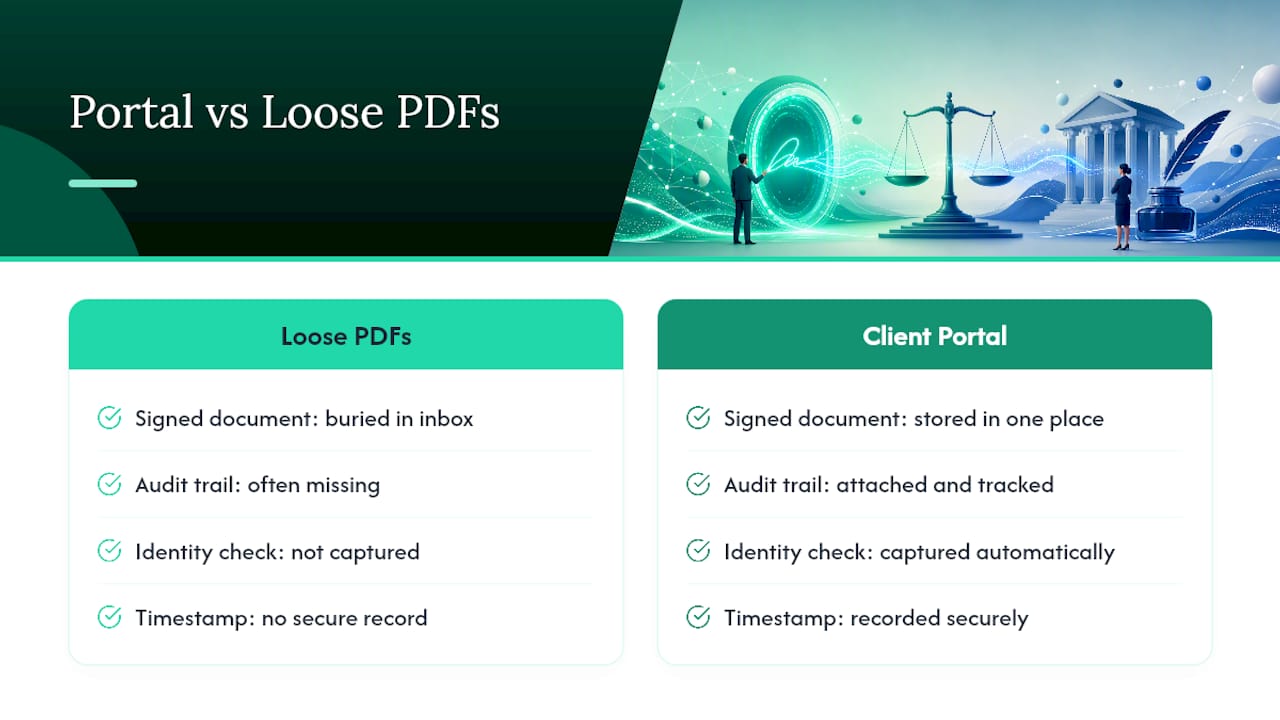
The biggest risk with e-signatures isn't the law. It's sloppy process: a signed PDF buried in someone's inbox with no audit trail attached to it.
An integrated client portal solves that by keeping the signed document, the timestamp, the identity check, and the payment record in one place instead of scattered across email threads. That's the model behind RealClients' approach to client workflows, where signing and invoicing happen inside the same secure record instead of six disconnected tools. When you're choosing a platform, prioritize one that captures identity, time, and storage automatically. That's the difference between a signature you can defend and one you're just hoping nobody questions.
— Real
This article is general information, not a substitute for advice from a qualified lawyer. Consult a qualified legal professional about your own circumstances before acting on anything here.
Sources
- Digital signature vs electronic signature - Entrust
- Electronic signatures vs digital signatures - GlobalSign
- Govinfo
- 15 USC Chapter 96 (ESIGN) - Cornell Law