
An NDA signed online holds up in court when both parties consent to sign electronically and the platform captures a tamper-evident record of that signature. That's the whole verdict. You don't need wet ink, a notary, or a lawyer standing over anyone's shoulder.
Two laws make this possible: the ESIGN Act at the federal level and UETA at the state level. Together they give an electronic signature the same legal weight as a handwritten one, provided the signer intended to sign, consented to do business electronically, and the platform kept a retrievable record. What courts actually ask for is an audit trail: timestamps, IP address, authentication method, and a sealed copy of the final document.
- Verdict: online NDAs are enforceable when consent, intent, and record retention are all documented.
- Governing law: ESIGN Act (federal) and UETA (state), working together.
- Proof you need: timestamp, signer IP, authentication method, and a tamper-evident PDF.
Pro Tip: Always export and save the audit certificate alongside the signed PDF the moment a document is complete. It's the single piece of evidence you can't reconstruct later if a signing platform account lapses.
Key Takeaways
An NDA signed online is legally enforceable under the ESIGN Act and state UETA laws when the signer's intent, consent, and identity are documented in a retrievable audit trail.
| Point | Details |
|---|---|
| Legal validity confirmed | ESIGN Act and UETA give electronic signatures the same legal weight as ink when consent and records are captured. |
| Audit trail is the real evidence | Timestamps, IP address, authentication method, and a sealed PDF matter more than the signature itself. |
| Match NDA type to the deal | Use unilateral when one side discloses, mutual when both sides exchange confidential information. |
| Draft clauses narrowly | A specific confidential information definition and a reasonable term hold up better than vague, sweeping language. |
| Manage signing inside one portal | RealClients pairs built-in e-signatures, templates, and secure storage with payment collection in a single branded workspace. |
Table of Contents
- When Do You Actually Need an NDA?
- Mutual or Unilateral: Which NDA Fits Your Situation?
- What Clauses Make an NDA Enforceable?
- Are Electronic NDAs Legally Binding?
- How Do You Create, Send, and Sign an NDA Online?
- What Should You Check Before Sending an NDA?
- What Should You Look for in an E-Signature Tool?
- How Much Does It Cost to Sign an NDA Online?
- What Should Your NDA Template Include?
- What Belongs in a Defensible Audit Trail?
- How Do RealClients Portals Handle NDA Signing?
- What Do Practitioners Get Wrong About Online NDA Signing?
- Ready to Manage NDAs and Client Work in One Place?
- Frequently Asked Questions
- Sources
When Do You Actually Need an NDA?
Not every conversation needs a signature first. NDAs make sense whenever you're about to hand someone material that would hurt you if it leaked: a product roadmap, a client list, unreleased pricing, or proprietary process documentation.
Typical moments to reach for one:
- Pre-sales calls where you're demoing an unreleased feature or sharing a roadmap.
- Investor pitches involving financials, cap tables, or trade secrets.
- Vendor or contractor onboarding before they access client files or credentials.
- Product demos for prospects evaluating a paid pilot.
- Granting temporary event or system access to an outside partner.
Skip the NDA when the information is already public, when you're discussing generic pricing tiers listed on your own website, or when the relationship is too early to justify the friction. A freelance designer doesn't need an NDA to discuss a $500 logo project. A consultant handing over a confidential audit methodology absolutely does. Match the paperwork to the actual risk, not to habit.
Mutual or Unilateral: Which NDA Fits Your Situation?
A unilateral NDA protects one party's information because only one side is disclosing anything confidential. A mutual NDA protects both sides because information flows in both directions.
The decision rule is simple: if only you're sharing sensitive material, unilateral is enough. If both parties are exposing something the other could misuse, go mutual.
- A freelance developer sharing proprietary client source code with a subcontractor: unilateral.
- Two companies exploring a joint product integration and swapping technical specs: mutual.
- A consultant reviewing a client's internal financials before proposing a strategy: unilateral, protecting the client.
- A startup negotiating a licensing deal where both sides reveal trade secrets: mutual.
Choosing the wrong type doesn't void the agreement, but it can leave one party's information legally unprotected. When in doubt, mutual NDAs offer broader coverage at almost no added drafting cost.
What Clauses Make an NDA Enforceable?
A signature means nothing if the document underneath it is vague. Courts scrutinize the actual language far more than the method of signing, so get these clauses right before anyone signs anything.
Definition of confidential information. Spell out exactly what counts: technical specs, client lists, financial data, source code. Vague language like "any information shared" tends to get narrowed or thrown out by judges who find it overbroad.
Exclusions. Standard carve-outs cover information that's already public, independently developed, or lawfully obtained from a third party. Leaving these out makes the whole agreement look punitive rather than protective.
Permitted use. State what the receiving party is allowed to do with the information, such as "solely to evaluate a potential business relationship." This closes the door on someone using your idea for an unrelated project.
Term and survival. Set a defined duration, often a reasonable multi-year term, with a separate survival clause for trade secrets that need indefinite protection. Courts routinely strike down "confidential forever" language as unreasonable.
Return or destruction. Require the receiving party to delete or return materials once the relationship ends, with a certification requirement for higher-stakes deals.
Remedies and injunctive relief. Confirm that a breach causes irreparable harm and that you can seek a court injunction, not just damages after the fact.
Choice of law and venue. Name the state whose law governs the agreement and where disputes get filed. Skipping this invites a jurisdictional fight before the actual dispute even gets addressed.
- Definition: "Confidential Information means all technical, business, and financial data disclosed by Discloser to Recipient in connection with [purpose]."
- Permitted use: "Recipient may use Confidential Information solely to evaluate and pursue the Purpose described above."
- Term: "This Agreement remains in effect for three years from the Effective Date, except that trade secrets remain protected for as long as they qualify as trade secrets under applicable law."
Pro Tip: Write your confidential information definition narrow enough to be specific but broad enough to cover future disclosures related to the same project. A definition that only lists items from Meeting One won't protect what gets shared in Meeting Three.
Pro Tip: Cap your term at a reasonable window (a reasonable multi-year term) for general business information. Courts in several states have refused to enforce NDAs with indefinite or "perpetual" terms outside of true trade secrets.
Are Electronic NDAs Legally Binding?
Yes, and this isn't a gray area. The ESIGN Act, signed into federal law in 2000, gives electronic signatures and records the same legal standing as handwritten signatures and paper documents whenever the statutory conditions are met. The bill originated as S.761 in the 106th Congress, reflecting a deliberate legislative choice to put electronic commerce on equal legal footing with paper.
At the state level, the Uniform Law Commission's UETA framework fills in the details most states have adopted, covering how records must be kept and how consent gets documented. ESIGN sets the federal floor; UETA handles the state-level mechanics.
"An electronic signature may not be denied legal effect solely because it is in electronic form." That principle, embedded in both ESIGN and UETA, is why a signature typed into a browser carries the same weight as one written in ink, as long as the process behind it can prove four things.
Courts and regulators generally look for:
- Intent to sign. The signer took a deliberate action (clicking "Sign," typing their name in a signature field) rather than something accidental.
- Consent to do business electronically. The platform captured explicit agreement to skip paper, usually via a checkbox or disclosure screen.
- Signature attribution. The record ties the signature to a specific, identifiable person, not just an anonymous IP address.
- Record retention. A durable, retrievable copy exists that reflects the terms both parties agreed to.
Financial-sector compliance guidance reinforces the same point from a regulatory angle: recordkeeping and secure handling of electronic transactions matters as much for legal defensibility as the signature itself. A signature without a preserved record is a liability, not proof.
ESIGN Act, 2000: the federal standard. It's the baseline every state-level UETA statute builds on, and it's why "digital NDA signing" isn't a legal gamble when done correctly.
How Do You Create, Send, and Sign an NDA Online?
Here's the workflow that gets an NDA from blank template to signed, sealed, and stored, generally within minutes rather than days.
- Choose a template and define the parties. Confirm legal names, not just company names, and specify roles (discloser, recipient, or both for mutual agreements).
- Add signature fields and set signing order. For multi-party NDAs, decide whether signatures happen simultaneously or sequentially.
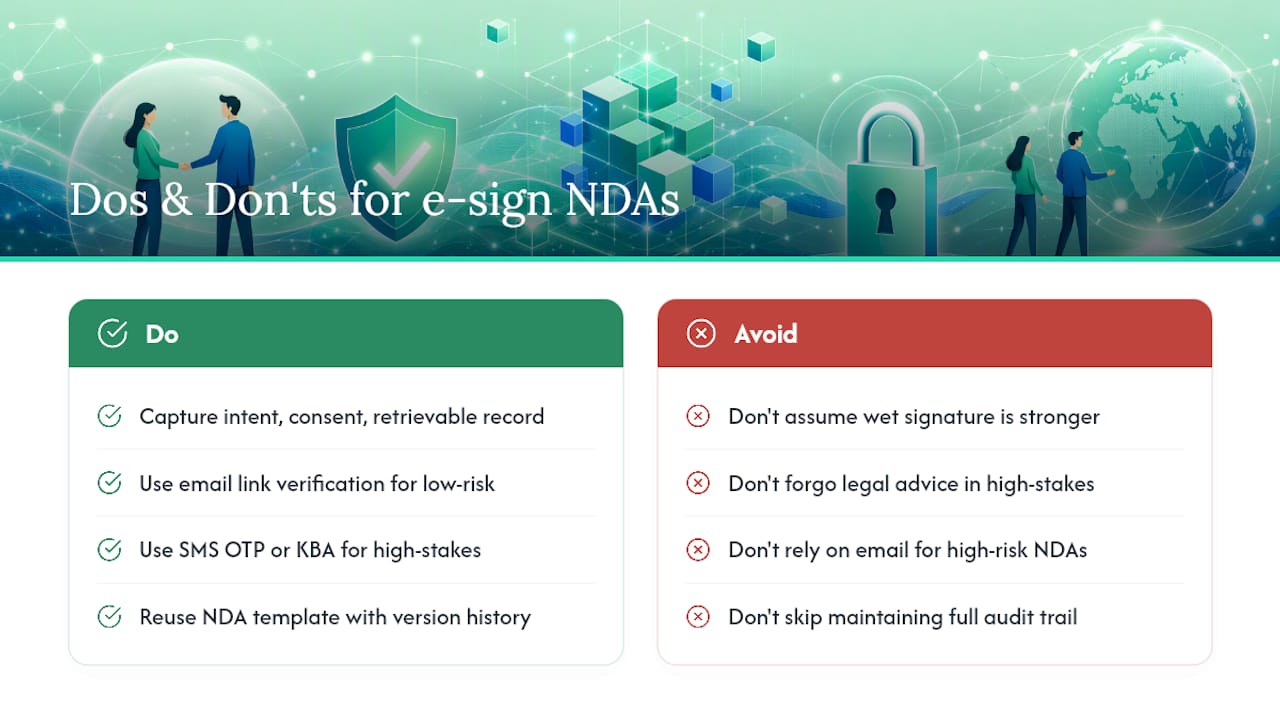
- Select an identity verification method. Email verification is fine for low-risk NDAs; OTP/SMS or knowledge-based authentication makes sense for higher-stakes deals involving trade secrets or large contracts.
- Capture explicit consent. A checkbox or "I agree to sign electronically" disclosure before the signature field, not buried in fine print, is what regulators expect to see.
- Run the signing session. Embedded, in-app signing tends to reduce drop-off compared to emailing a static PDF back and forth.
- Finalize with a sealed document. The platform should generate a tamper-evident PDF plus a certificate of completion showing timestamps and authentication details.
- Store and retain. Export both the signed document and the audit certificate to at least one secure, independent location.
This mirrors the standard e-signature workflow pattern: create, share, sign, store, each stage designed to remove a manual step without sacrificing evidence.
Pro Tip: Match your authentication level to the document's actual risk. Email link verification is enough for a routine vendor NDA. A trade-secret-heavy agreement with a new investor deserves SMS OTP or knowledge-based verification, since a stronger authentication trail is exactly what you'd want in front of a judge later.
A simple flow diagram, template selection on the left, signing session in the middle, sealed PDF and storage on the right works well as a visual anchor here if you're building this out for a team onboarding doc.
What Should You Check Before Sending an NDA?
A rushed NDA creates more problems than it solves. Run through this before you hit send:
- Confirm the signer's legal name and email match the actual decision maker, not an assistant's inbox.
- Double check party names against the entity's actual registered business name, not a DBA or nickname.
- Verify the confidential information definition matches what you're actually about to disclose.
- Confirm the term length is reasonable for the relationship (a reasonable multi-year term for most business NDAs).
- Place signature fields correctly, especially for multi-party documents with sequential signing.
- Make sure the platform requires explicit consent to sign electronically before the signature field activates.
- Set up automatic export of the audit trail once signing completes.
Common mistakes that come back to bite people: overbroad confidentiality definitions that cover "any and all information" (courts narrow these anyway, so write it right the first time), missing choice-of-law clauses that turn a simple dispute into a jurisdictional headache, and requiring the signer to create a full account just to sign a one-time NDA. That last one kills deal momentum for no legal benefit. Guest signing via a secure link works fine for most one-off NDAs and removes unnecessary friction.
If you catch one of these after sending, the fix is usually simple: void the original, correct the clause, and resend. Don't try to amend a signed NDA informally over email. That creates its own evidentiary mess.
What Should You Look for in an E-Signature Tool?
Not every e-signature tool is built for the same job. Before picking one, run it against these criteria:
- Audit-trail detail. Does it log timestamps, IP addresses, and authentication method automatically, or do you have to dig for it?
- Authentication options. Look for OTP/SMS, knowledge-based authentication, or SSO support for higher-risk transactions, since authentication should scale with document risk.
- Tamper-sealing. The final PDF should be cryptographically sealed, not just a flat export.
- Templates and bulk-send. If you're sending the same NDA to multiple contractors, template reuse saves real time.
- Storage and export. Can you pull the signed document and audit certificate together, on demand, without support tickets?
- Integrations. Does it connect to your payment processor or project management setup, or does it live on an island?
Freelancers and solo consultants generally prioritize speed and template reuse over deep API access. Small teams need shared template libraries and permission controls. Higher-risk transactions, investor NDAs, M&A discussions, deserve stronger authentication even if it adds a step to the signing session.
For freelancers and small businesses managing NDAs alongside contracts, invoices, and client files, an integrated portal like RealClients keeps signing embedded in the same workspace as everything else, instead of one more disconnected login to manage.
How Much Does It Cost to Sign an NDA Online?
Pricing generally falls into three shapes. Free tiers cover occasional, single-document signing, fine for a solo freelancer sending one NDA a month. Monthly subscriptions with per-user or volume-based pricing suit small teams sending contracts regularly, and this tier usually unlocks templates, bulk sending, and stronger authentication. Enterprise plans with API access exist for companies embedding signing directly into their own software, priced well above the small-business tiers.
A paid plan earns its cost once you're sending NDAs regularly, need multiple team members signing on behalf of the business, or require compliance-grade authentication for sensitive deals.
If you're a low-volume user, stick with a free tier, reuse one clean template rather than rebuilding from scratch each time, and use a public signing link where appropriate instead of paying for a feature you'll use twice a year.
What Should Your NDA Template Include?
A reusable template is the fastest way to stop rebuilding the wheel every time a new client shows up. At minimum, yours should include:
- Party names and roles (discloser, recipient, or mutual).
- A clear definition of confidential information.
- Permitted disclosures and use restrictions.
- Term length and survival clause for trade secrets.
- Standard exclusions (public knowledge, independently developed).
- Remedies section referencing injunctive relief.
- A signature block with fields for name, title, date, and company.
Sample snippets worth keeping on file: a definition clause ("Confidential Information means..."), a permitted-use clause tied to a specific stated purpose, and a term clause with a fixed multi-year window plus a trade-secret carve-out.
Save your master template somewhere with version history, so if you tweak the term length or add a jurisdiction clause, you're not hunting through old email attachments to find which version a given client actually signed. A dedicated contract management setup makes this far less painful than a folder of Word documents named "NDA_final_FINAL2."
What Belongs in a Defensible Audit Trail?
An audit trail is the evidence file that proves your NDA signing actually happened the way you say it did. At minimum, it should capture:
- Timestamp of every action: document sent, opened, signed.
- Signer's IP address and, ideally, device fingerprint.
- Authentication method used (email link, OTP, knowledge-based check).
- Email delivery and open logs.
- A certificate of completion summarizing the entire signing session.
Export the sealed PDF and the human-readable audit log together, every time, and store copies in at least two secure locations, your signing platform's archive plus a separate backup, whether that's your own cloud storage or a dedicated portal. Financial compliance guidance treats this kind of redundant recordkeeping as standard practice, not overkill.
A simple habit worth adopting: attach the audit certificate directly to the signed PDF before archiving, keep a running revision log for template changes, and never let the only copy of a signed NDA live inside a platform account you might someday cancel.
How Do RealClients Portals Handle NDA Signing?
RealClients was built around a simple observation: freelancers lose time and trust when contracts, files, and signatures live in five different tools. A branded client portal puts all of it in one place.
- Built-in e-signatures mean an NDA gets sent, signed, and sealed without leaving the portal.
- Reusable templates with version history keep your standard NDA consistent across every new client.
- Secure storage keeps signed documents and audit trails together, accessible whenever you need them.
- Payment and invoicing integration means the same portal that captured a signature can also process the deposit.
- Granular permissions control exactly what each client sees, keeping sensitive files compartmentalized.
Picture a freelance brand consultant onboarding a new client: the portal sends a welcome message, an NDA, and a project questionnaire together. The client signs the NDA, reviews the onboarding questionnaire, and pays a deposit, all inside one branded link, with zero email back and forth.
If that kind of setup sounds like what your onboarding process is missing, exploring a portal built for exactly this is worth ten minutes of your time.
What Do Practitioners Get Wrong About Online NDA Signing?
The biggest mistake independent professionals make isn't legal, it's operational. They treat every NDA like a custom legal document instead of a repeatable process. That inconsistency is what actually creates risk, not the fact that a signature happened on a screen instead of paper.
The fastest wins are boring ones: publish a single public signing link for your standard low-risk NDA so clients can sign without back-and-forth emails, lock in one template you don't rebuild from scratch, and make sure your consent checkbox is explicit rather than implied by a scroll-to-bottom action. None of this requires legal expertise. It requires discipline.
When onboarding a new client, a short checklist beats improvisation: confirm the legal name, send the standardized NDA template, verify the signature landed with a complete audit trail, then move to the next document. Skip a step and you're the one explaining a gap in evidence months later, not the client.
Ready to Manage NDAs and Client Work in One Place?
Juggling a separate e-signature app, a file-sharing tool, and an invoicing platform means three logins, three notification streams, and three places a signed NDA could get lost. RealClients puts the signature, the file, and the payment request inside one branded portal your client actually enjoys using.

Every plan includes built-in e-signatures with a full audit trail, reusable templates with version history, and Stripe or PayPal payment collection sitting right next to the signed document, not in a separate app. That means less time chasing a signature and more time on billable work. Freelancers using RealClients portals collectively invoiced $48 million last year through the same workspace that handles their contracts and NDAs.
Check the pricing page to see which plan fits your client volume, or start with the free tier and send your first NDA today.
Frequently Asked Questions
Can you sign an NDA online and have it hold up in court? Yes. Under the ESIGN Act and UETA, an electronically signed NDA carries the same legal weight as a paper one when the platform captures intent to sign, consent to electronic transactions, and a retrievable record.
What's the difference between signing NDA online versus using a wet signature? The signing method itself doesn't change enforceability. What matters is whether the process, electronic or paper, proves who signed, that they agreed to the terms, and that the record wasn't altered afterward.
Do you need a lawyer to collect e-signatures on an NDA? Not for a standard NDA using well-drafted clauses. A lawyer becomes worth the cost for high-stakes deals involving trade secrets, large sums, or multi-jurisdiction agreements.
How do you verify someone's identity during remote NDA signing? Email link verification suffices for low-risk NDAs. For higher-stakes agreements, use SMS one-time passcodes or knowledge-based authentication to strengthen the audit trail.
What happens if someone disputes an electronic NDA signature later? The audit trail settles most disputes. A complete record showing timestamp, IP address, authentication method, and consent language is generally sufficient evidence in court.
Can you reuse the same NDA template for multiple clients? Yes, and you should. A consistent template with version history reduces drafting errors and makes it easy to track which version a given client actually signed.
This article is general information, not a substitute for advice from a qualified lawyer. Consult a qualified legal professional about your own circumstances before acting on anything here.