
Use an integrated client-portal contract workflow to centralize agreements, automate reminders, and capture payment terms. The fastest way to test it: upload one active contract into your branded client portal and let AI extraction pull out the key terms immediately.
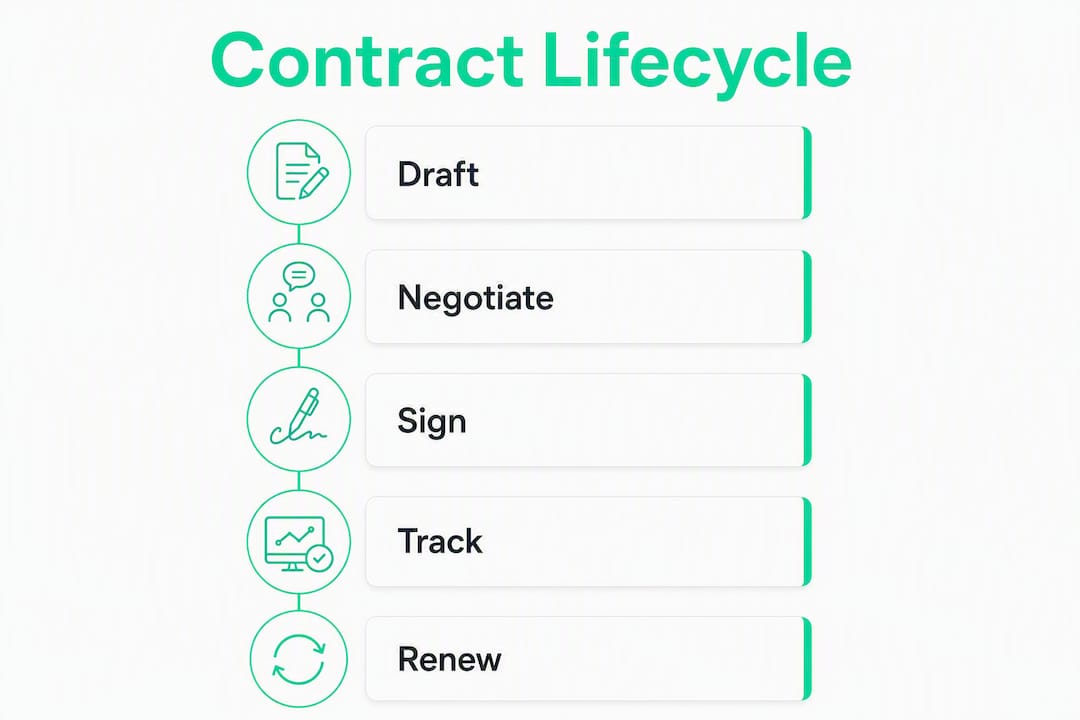
- Centralizing the agreement lifecycle (draft → sign → store → monitor → renew) in one workspace is what contract lifecycle management (CLM) actually means — not just cloud storage.
- AI-driven extraction and auto-tagging of rates, due dates, and renewal periods turns a static PDF into an active project asset on first upload.
- Over $48M was invoiced through Realclient portals last year, showing that portal-native contract workflows are already working at scale for independent professionals.
- SOC 2-aligned security and role-based permissions are the baseline to require before storing client contracts anywhere online.
Recommended next step: Upload one live contract to your Realclient portal today and confirm that extraction fires correctly. That single test tells you whether the workflow will hold for your whole client roster.
Table of Contents
- What online contract management actually means for small teams
- Core features your contract management workflow actually needs
- Why contract management saves freelancers time and protects cash flow
- How to choose the right solution — a decision checklist
- A practical 30-day setup plan for freelancers and agencies
- Security and U.S. compliance considerations for storing contracts online
- Realclient: portal-native contract management built for your workflow
- Key Takeaways
- The adoption lesson most small teams learn too late
- Try Realclient and test the full workflow in minutes
What online contract management actually means for small teams
Contract lifecycle management (CLM) is the practice of centralizing the entire agreement lifecycle — drafting, negotiation, signature, post-signature monitoring, and renewals — inside a single workspace. For freelancers and small agencies, that means every SOW, NDA, and retainer agreement lives in one place, with metadata attached, rather than scattered across email threads and desktop folders.
The difference between CLM and basic file storage comes down to four things: structured metadata, automated reminders, template-driven creation, and integrated signing. A folder of PDFs is an archive. A CLM workspace is a live system that tells you when a client's notice period expires or when a payment milestone is due.
The lifecycle stages that matter most to small teams are straightforward: creating agreements from templates, getting them signed without friction, storing them with searchable metadata, and tracking renewal or termination dates. Most freelancers skip the last two, which is exactly where revenue leaks.
Core components to look for:
- Reusable templates and a clause library
- Portal-native e-signature (clients sign without leaving your workspace)
- AI extraction of key terms (rates, dates, obligations)
- Version control and edit history
- Searchable repository with structured metadata fields
- Renewal and notice-period reminders
Core features your contract management workflow actually needs
Not every feature in an enterprise CLM platform matters to a freelancer or five-person agency. Here is what genuinely moves the needle:
- Templates and clause library: Build once, reuse forever. A good template library cuts contract creation from 30 minutes to under five.
- AI key-term extraction: The system reads your uploaded PDF and pulls out rates, payment terms, due dates, and renewal obligations automatically. This is the feature that converts a static archive into an active workflow.
- Automated renewal and notice reminders: Missed renewal windows cost real money. Automated alerts fire before the deadline, giving you time to send a proactive proposal instead of scrambling.
- Portal-native e-signature: Clients sign inside your branded workspace. No third-party redirect, no confusion about where to click.
- Searchable repository and version history: Find any clause from any contract in seconds. Version history protects you when a client disputes what was agreed.
- Obligations and milestone tracking: Tie contract deliverables directly to project milestones so your delivery schedule and your contract terms stay in sync.
- Payment and invoice integration: Connect contract payment terms to Stripe or PayPal so invoices generate from the agreement, not from a separate spreadsheet.
- Role-based permissions and branded portals: Clients see only what they need to see. Your brand stays front and center throughout.
Prioritize in this order for fast wins: AI extraction, automated reminders, e-signatures, and searchable storage. Get those four working first before configuring anything else.
Pro Tip: When you upload a contract, immediately fill in the structured metadata fields — termination notice period, renewal date, payment schedule. Contracts tagged at ingestion become active reminders and delivery roadmaps; contracts uploaded without metadata stay inert PDFs.

Why contract management saves freelancers time and protects cash flow
The most direct benefit is time. Searching through email threads for a client's payment terms or notice period can eat 20–30 minutes per contract per incident. Multiply that across a full client roster and the admin cost is significant.
Cash flow protection is the second benefit, and it is often underestimated. Missed renewal windows mean either losing a client you wanted to keep or scrambling to renegotiate terms under pressure. Integrated obligation tracking and auto-tagging remove that bottleneck entirely by alerting you weeks before a deadline, not the day after.
The third benefit is cleaner client handoffs. When contract approvals, scope documents, and obligations live in the same system your delivery team uses, handoff friction drops sharply. Everyone knows what was agreed, what is due, and when.
- Faster payment cycles: payment terms extracted at upload feed directly into invoice generation.
- Proactive renewals: automated reminders turn expiring contracts into new proposal opportunities.
- Dispute prevention: version history and audit trails give you a clear record if a client questions scope.
- Reduced admin overhead: digital CLM replaces manual tracking spreadsheets and calendar reminders with automated workflows.
How to choose the right solution — a decision checklist
Core capability questions
- Does it extract payment terms and renewal dates from PDF contracts automatically?
- Can clients sign inside your branded portal without being redirected to a third-party tool?
- Does it connect to Stripe or PayPal for contract-to-payment workflows?
- Is pricing per-client or per-seat? (Per-seat pricing scales poorly for small teams with large client rosters.)
- What is the realistic time-to-value — hours or weeks?
Red flags to walk away from
- Enterprise onboarding that requires a dedicated implementation team.
- No export of structured metadata (you should own your contract data).
- Missing calendar or notification sync for renewal alerts.
- Per-seat pricing that doubles your cost when you add a second team member.
- No audit trail for signatures and edits.
Integration fit matters as much as features. Check whether the platform connects to your calendar, your accounting software, and your file storage before committing. A well-integrated contract-to-invoice flow is what turns contract management from an admin task into a revenue-protection system. Also review the client management stack options to understand where contract management fits relative to your other tools.
A practical 30-day setup plan for freelancers and agencies
You do not need weeks of implementation. A focused 30-day rollout is realistic for any small team.
- Days 1–5 (Discovery): Pick three contract types you use most — SOW, NDA, and a payment agreement. These become your first templates.
- Days 6–10 (Import and tag): Upload your five most active existing contracts. Fill in metadata fields (renewal date, notice period, payment terms) for each one immediately.
- Days 11–17 (Configure templates and signature flows): Build reusable templates from your three chosen contract types. Set up the e-signature workflow so clients can sign inside the portal.
- Days 18–22 (Connect payments and calendar): Link Stripe or PayPal. Connect your calendar so renewal reminders appear alongside project deadlines.
- Days 23–30 (Pilot with one or two clients): Run a live pilot. Send one contract through the full workflow: create, send, sign, trigger payment.
Go/no-go checklist before full rollout:
- AI extraction correctly identifies payment terms and renewal dates on a test upload.
- Reminder fires at least 14 days before a test renewal date.
- Client can sign inside the portal on both desktop and mobile.
- Payment link generates correctly from contract terms.
Typical cost shape for small teams: Most subscription tiers for portal-native contract management run on monthly or annual billing, with costs scaling by number of active clients or storage. Setup time is measured in hours, not weeks. Optional migration assistance is available on higher tiers if you have a large existing contract library.
Security and U.S. compliance considerations for storing contracts online
Storing client contracts online requires a baseline of security controls that any credible platform should meet without negotiation.
Must-have security features:
- SOC 2 verification or equivalent third-party audit.
- TLS encryption in transit and encrypted-at-rest storage.
- Role-based access controls so clients see only their own documents.
- Full audit trail for every signature, edit, and access event.
- Two-factor authentication for team members.
For U.S.-based freelancers and agencies, data residency is worth confirming: check whether contract data is stored on U.S.-based servers, especially if you work with clients in regulated industries like healthcare or finance. If your work touches HIPAA or financial data, consult a qualified attorney before choosing a platform. General contract storage for most freelance and agency work does not trigger sector-specific regulation, but it is worth a quick check.
Pro Tip: Use granular, client-scoped permissions so each client can only access their own portal. This limits exposure in the event of a credential issue and makes any future audit straightforward — you can pull a clean access log for a single client without sifting through everyone else's data. Realclient's security architecture is built around this model.
Realclient: portal-native contract management built for your workflow
Realclient is built specifically for freelancers, agencies, and small businesses that run client work through branded portals. Every contract management feature connects directly to the client workspace, so nothing requires a separate tool or a third-party redirect.
What Realclient gives you:
- Private branded portals where clients sign, pay, and track project updates in one place.
- Portal-native e-signature — clients never leave your workspace to sign.
- Contract upload with AI extraction of key terms, rates, and renewal dates.
- Automated renewal reminders synced to your calendar.
- Stripe and PayPal integration so payment follows directly from signed contract terms.
- Full version history and edit audit trail.
- Granular permissions and client-scoped access.
- Bank-grade security with encrypted storage and role-based controls.
Over $48M was invoiced through Realclient portals last year. That volume reflects real independent professionals using the platform for active client work, not just storing documents.
What to expect on trial: Upload one contract, confirm that AI extraction pulls the correct payment terms and renewal date, then invite one client to sign inside the portal. That three-step test covers the core workflow. From there, connecting payments and enabling reminders takes under an hour. See live portal examples to understand what your clients will experience.
Key Takeaways
Online contract management works when you centralize agreements, capture metadata at upload, and connect signing directly to payment — all inside a single client workspace.
| Point | Details |
|---|---|
| Centralize the full lifecycle | Move from draft to sign to renewal tracking inside one workspace, not scattered across email and folders. |
| Tag metadata at upload | Capture renewal dates, notice periods, and payment terms immediately — contracts without metadata stay inert. |
| Prioritize AI extraction and reminders | These two features deliver the fastest time-to-value and protect cash flow from missed renewals. |
| Pilot before full rollout | Test extraction accuracy, reminder timing, and payment flow with one or two clients before migrating your full roster. |
| Realclient as your portal-native option | Realclient combines e-signature, AI extraction, payments, and branded portals in one platform, with over $48M invoiced through its portals last year. |
The adoption lesson most small teams learn too late
The biggest mistake we see freelancers and agencies make is treating contract management as a filing problem. They upload documents, feel organized, and stop there. The contracts sit in a folder and the system delivers exactly the same value as a well-named Google Drive: none, when a renewal deadline passes unnoticed.
The teams that get real value from CLM do one thing differently at setup: they tag every contract with structured metadata the moment it lands in the system. Renewal date, notice period, payment schedule. That 90-second step is what turns a document into a live alert. We have watched clients go from "I had no idea that contract was auto-renewing" to catching renewals three weeks out and converting them into new proposals. The difference was not the platform. It was the habit.
Measure your success in the first 30 days by one metric: time spent searching for contract information. If that number drops to near zero, the system is working.
Try Realclient and test the full workflow in minutes
Realclient gives freelancers and small agencies a contract-to-payment workflow inside a branded client portal, without stitching together separate tools for signing, storage, and invoicing. The concrete advantage over standalone contract apps: your client never leaves your portal, your brand stays visible at every step, and payment connects directly to the signed agreement.

Start a free trial, upload one contract, and confirm that AI extraction pulls your key terms correctly. Then invite one client to sign inside the portal. That three-step test takes under 30 minutes and tells you everything you need to know about fit. When you are ready to scale, review the pricing tiers to find the plan that matches your client volume. Full security details, including encryption standards and access controls, are available on the Realclient security page.