
The most effective approach to project milestone tracking is to centralize checkpoints in a client portal, assign a named owner to each one, and tie every milestone to a deliverable or decision so clients always know where things stand.
Start here:
- Define 3–6 milestones per project (not tasks, not deliverables — zero-duration checkpoints like "Design approved" or "Contract signed")
- Set an owner and a target date for each milestone before the project kicks off
- Publish milestones to your client portal so clients see live progress without emailing you for updates
Realclient supports all three steps natively: shared milestone timelines, e-signatures, and payment triggers live inside the same branded portal your client already logs into.
Pro Tip: Keep your milestone list short enough to fit on one screen. If a client has to scroll to see the full list, you have too many milestones.
Table of Contents
- Why milestone tracking keeps clients happy and projects on time
- How do you define effective project milestones?
- Step-by-step: how to run the milestone tracking process
- Setting up milestone tracking inside a client portal
- Milestone templates for web design, marketing, and onboarding
- What should you measure to know if milestone tracking is working?
- Common milestone-tracking mistakes and how to fix them fast
- What does milestone tracking cost in the US market?
- Key Takeaways
- Why the "just send a status email" approach costs you more than you think
- Realclient makes milestone tracking straightforward for freelancers
- Sources and further reading
Why milestone tracking keeps clients happy and projects on time
Clients do not want a spreadsheet of 47 tasks; rather, they appreciate tools that enable real-time client communication to keep milestone updates timely and transparent. They want to know: "Are we on track?" Milestones answer that question without exposing your internal workflow. When clients can see a shared timeline in their portal, status-check emails drop sharply. Approvals happen faster because the request is right there, not buried in a thread.

Milestone reporting also helps you spot bottlenecks early, before they become client conversations you dread. A missed milestone is a signal, not a crisis, when you catch it a week out rather than the day before a deadline.
The morale benefit is real too. Milestones motivate teams by turning a long project into a series of achievable checkpoints. Celebrating a completed milestone, even briefly, keeps energy up on multi-month engagements.
Key benefits for freelancers and small businesses:
- Fewer "just checking in" emails from clients
- Faster payment cycles when invoices trigger automatically on milestone completion
- Clearer scope boundaries that reduce scope creep disputes
- Shared accountability between you, your client, and any subcontractors
How do you define effective project milestones?
A milestone is a zero-duration checkpoint that marks a significant moment in your project timeline. It is not a task (which takes time to complete) and not a deliverable (which is a thing you hand over). It is the moment you confirm something meaningful has happened.
Use these four criteria for every milestone you set:
- Specific — "Homepage wireframes approved by client" beats "Design phase done"
- Measurable — there is a clear yes/no answer to whether it is complete
- Owner-assigned — one person is accountable, even if a team contributed
- Tied to a deliverable or decision — sequence milestones by dependency so nothing blocks unnecessarily
Each milestone entry should include: a short title, the owner's name, a target date, acceptance criteria (what "done" looks like), and links to the relevant files or tasks.
Pro Tip: Write acceptance criteria as a one-sentence test: "This milestone is complete when the client has signed the design-approval form in the portal." That sentence eliminates most completion disputes.
Quick examples for common freelance projects:
- Web design: Discovery call complete → Wireframes approved → Design signoff → Development complete → Site live
- Marketing campaign: Brief approved → Assets delivered → Campaign go-live → 30-day performance review
- Client onboarding: Contract signed → Portal activated → Kickoff call held → First deliverable reviewed
Step-by-step: how to run the milestone tracking process
Follow this sequence for every project, regardless of size:
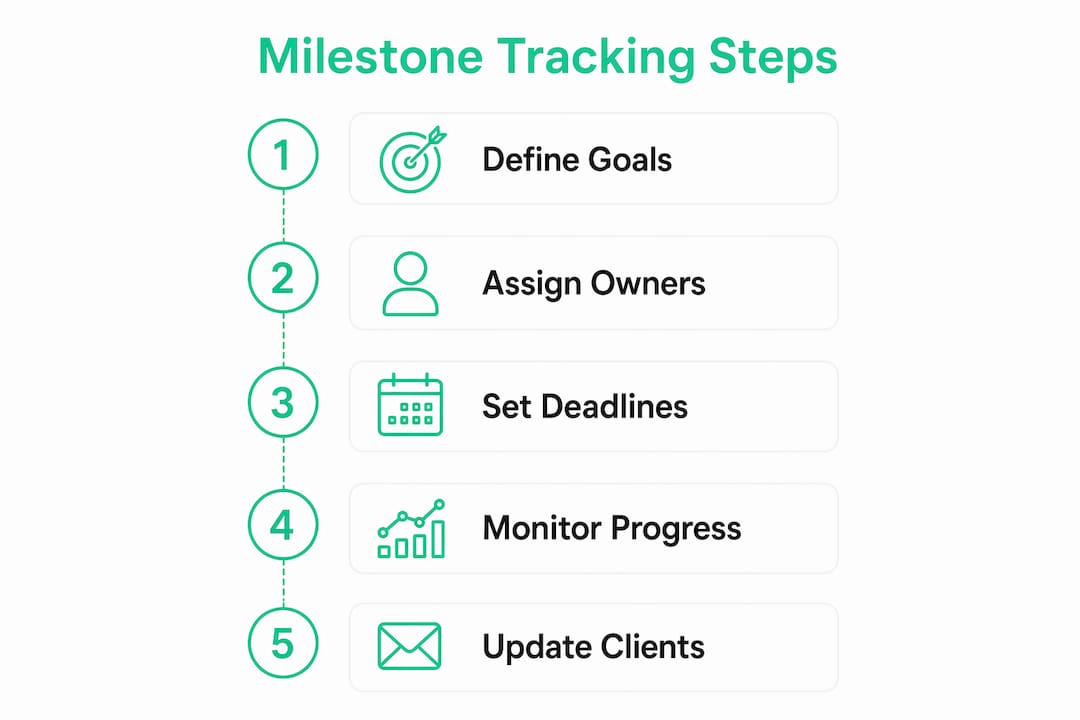
- Plan — list all milestones before work starts; sequence them by dependency
- Map to tasks — link the underlying tasks that feed each milestone
- Assign owners — one owner per milestone; clients own approval milestones
- Publish — push the milestone timeline to your client portal so it is visible from day one
- Update status — mark milestones complete as they happen; never batch updates
- Review — hold a brief weekly internal check and a biweekly client summary
| Role | Responsibility |
|---|---|
| Freelancer / PM | Creates milestones, updates status, escalates slippage |
| Client | Reviews and approves client-facing milestones, signs off |
| Subcontractor | Completes assigned tasks that feed into milestones |
| Stakeholder | Views milestone timeline; receives completion notices |
Milestone completions should trigger downstream actions automatically: send an invoice, request an e-signature, or kick off the next project phase. That automation removes the manual follow-up that eats hours every week.
Pro Tip: Embed acceptance criteria directly in the milestone description inside your portal. When a client clicks "approve," they are confirming those criteria are met. No ambiguity, no back-and-forth.
Setting up milestone tracking inside a client portal
A client portal turns your milestone plan from a private spreadsheet into a shared source of truth. Here is what to configure:
Implementation checklist:
- Create the project and add all milestones with owners and dates
- Link relevant files and contracts to each milestone
- Enable payment triggers on key milestones (e.g., "Design approved" triggers the second invoice)
- Set automated reminders 3 days before each milestone date
- Configure client notifications for milestone completions
Permission matrix:
| View / Action | Client | Internal team | Subcontractor |
|---|---|---|---|
| See milestone timeline | Yes | Yes | Yes (scoped) |
| Mark milestone complete | No | Yes | Yes (own tasks) |
| View linked files | Yes | Yes | Scoped |
| Sign contracts / approvals | Yes | No | No |
| See internal task details | No | Yes | Scoped |
Centralizing milestones in one platform eliminates the version-control problem that comes with emailed spreadsheets. Clients reference the portal; you update the portal. Everyone sees the same status.
Store acceptance evidence (signed forms, approved screenshots, test results) directly in the milestone record. If a dispute arises later, the evidence is already there.
Milestone templates for web design, marketing, and onboarding
Use these as starting points. Paste them into your portal or proposal and adjust dates to fit your project.
Web design project
| Milestone | Owner | Typical timeline | Acceptance criteria |
|---|---|---|---|
| Discovery complete | Freelancer | Week 1 | Brief signed, assets received |
| Wireframes approved | Client | Week 2–3 | Client signs approval in portal |
| Design signoff | Client | Week 4–5 | Final design approved in writing |
| Development complete | Freelancer | Week 8 | All pages live on staging |
| Site launched | Freelancer | — | DNS live, client confirms |
Marketing campaign
- Brief approved (Day 1–3)
- Creative assets delivered (Week 2)
- Campaign go-live (Week 3)
- Mid-campaign check (Week 5)
- Final performance report delivered (Week 8)
Client onboarding
- Contract signed (Day 1)
- Client portal activated (Day 2)
- Kickoff call held (Day 3–5)
- First deliverable reviewed (Week 2)
- Onboarding complete (Week 3–4)
Simple milestone trackers that list owner, due date, and status give clients the visibility they want without exposing your internal task board. Gantt-style visuals work well for longer projects where sequencing matters.
What should you measure to know if milestone tracking is working?
Five KPIs cover most freelance and small-business projects:
- % milestones complete on time — your primary health indicator
- Milestone slip rate — how often target dates move, and by how much
- Time-to-approval — how long clients take to approve a milestone after you mark it ready
- Client response time — average hours between your notification and client action
- Milestones-to-delivery ratio — whether your milestone count matches project complexity
Report on a simple rhythm: weekly internal review (5 minutes, just status updates), biweekly client summary (milestone chart or progress bar, no task-level detail), and an immediate notice whenever a milestone completes.
Keeping clients informed with high-level milestone updates rather than task lists is one of the most consistent ways to reduce client anxiety and speed up approvals.
Common milestone-tracking mistakes and how to fix them fast
Too many milestones. If you have more than eight milestones on a three-month project, you have tasks masquerading as milestones. Consolidate. Keep only the moments that genuinely signal a phase change or a client decision.
Vague completion criteria. Only 23% of organizations consistently agree on whether a milestone is complete. Write one-sentence acceptance criteria for every milestone before the project starts.
No named owner. A milestone owned by "the team" is owned by no one. Assign one person, even on solo projects where that person is always you.
Oversharing task-level updates with clients. Clients need the milestone view, not your internal to-do list. Keep task details internal and surface only milestone status in the client portal.
Red flags to watch for:
- A client has not logged into the portal in over a week
- The same milestone date has moved twice
- Approval milestones are sitting "ready for review" for more than three days
When a milestone slips, re-baseline immediately: update the date, communicate what changed, name the new owner accountable, and give the client a one-sentence remediation plan.
What does milestone tracking cost in the US market?
Client portal tools in the US follow a predictable pricing shape:
- Free tier: Basic project visibility, limited clients, no payment integration or e-sign
- Basic monthly ($15–$40/month): Milestone sharing, file access, client notifications, limited storage
- Premium/team tier ($50–$150/month): Payment processing, e-signatures, custom domains, advanced permissions, analytics
Features worth paying for as a freelancer: client-facing milestone visibility, integrated payments, and e-sign. Advanced project management features like resource leveling or portfolio dashboards are rarely worth the cost for solo operators or teams under five people.
Comparing client portal options shows that the tools with the highest ROI for freelancers are the ones that reduce payment lag and eliminate approval email chains, not the ones with the most features.
Pro Tip: Before upgrading to a premium tier, ask one question: "Will this feature get me paid faster or reduce client emails?" If the answer is no, stay on the lower tier.
Key Takeaways
Effective project milestone tracking requires clear checkpoints, named owners, and a client portal that makes progress visible without exposing internal task details.
| Point | Details |
|---|---|
| Keep milestones short and specific | Limit projects to 3–8 milestones; each must have a one-sentence acceptance criterion. |
| Assign one owner per milestone | Shared ownership means no ownership; name one accountable person before work starts. |
| Publish to a client portal | Clients who see live milestone status send fewer emails and approve faster. |
| Automate downstream actions | Trigger invoices and e-sign requests on milestone completion to accelerate payment. |
| Realclient centralizes it all | Realclient's branded portals combine milestone timelines, e-sign, and payments in one place. |
Why the "just send a status email" approach costs you more than you think
Most freelancers start with good intentions: a shared Google Sheet, a weekly email update, maybe a Notion page. The problem is not the tool. It is that none of those options give the client a live, single place to act. They read the email, mean to reply, and forget. The invoice sits unpaid because it arrived in the same inbox as forty other things.
The real value of milestone-driven portals is not organization. It is speed. When a client can see that "Design signoff" is ready for their approval and click to sign right there, the approval happens the same day instead of the same week. Realclient processed over $48 million invoiced through client portals last year, which reflects exactly this pattern: faster approvals lead directly to faster payments.
Tailor the process to your project. A two-week logo project needs three milestones. A six-month website build needs six or seven. The complexity of the tracking should match the complexity of the work, not the other way around.
Realclient makes milestone tracking straightforward for freelancers
Scattered tools cost you time and client confidence. Realclient gives you a branded client portal where milestone timelines, file sharing, e-signatures, and payment processing live in one place, protected by bank-grade security.

What you get with Realclient:
- Shared milestone timeline your client can view anytime, without emailing you
- Granular permissions so clients see what they need and subcontractors see only their scope
- Integrated e-sign and payments that trigger automatically when milestones complete
- Branded portal with your logo and domain, not a generic tool URL
- Bank-grade security for every file, contract, and payment
With over $48 million invoiced through Realclient portals last year, the pattern is consistent: freelancers who centralize milestone tracking in a client portal get paid faster and spend less time on follow-up. See how it works for your projects at realclient.io/showcase or check current pricing to find the right plan.
Sources and further reading
- Project Milestones: Definition, Examples & Tracking — Asana — used for milestone definition, zero-duration concept, and stakeholder reporting guidance
- How to Achieve Project Milestones — Atlassian — used for SMART criteria, sequencing, and Gantt visualization
- Manage Project Milestones — Mural — used for morale benefits, completion consensus data, and adaptive planning
- Project Milestones: Definition, Examples, and Tracking Tips — Tempo — used for centralization rationale and tracker format guidance
- What Is a Milestone in Project Management? — Wrike — background on milestone definitions and project life cycle phases
- Best Client Portal Software Alternatives — Realclient Blog — used for client portal feature and pricing comparisons
For implementation details, consult the template docs and tool guides linked above. Each includes ready-to-use milestone formats you can adapt to your own client portal setup.