
The most effective approach to client feedback collection combines multiple channels, funnels everything into one repository, and prioritizes by impact versus effort. Piecing together email surveys, in-app prompts, and support tickets without a system just creates noise. Here's how to start:
- Pick 2 to 3 channels and set a goal. A post-project email survey, an in-app microsurvey, and support ticket tagging cover most needs.
- Centralize everything. Route feedback into a single VoC repository or board, tagged by topic, so nothing gets lost in someone's inbox.
- Set a triage rhythm. Review weekly, then fold validated patterns into a monthly roadmap conversation.
Key Takeaways
Client feedback collection works best when multiple channels feed one centralized repository that gets triaged weekly and prioritized by impact and effort.
| Point | Details |
|---|---|
| Use 2 to 3 channels | Combine an email survey, an in-app prompt, and support ticket tagging instead of overloading clients. |
| Centralize every input | Route feedback into one VoC repository or board, tagged by topic and urgency. |
| Prioritize with a framework | Score by impact times effort, frequency times revenue, and severity to decide what ships first. |
| Always close the loop | Acknowledge, investigate, decide, implement, and notify the client who raised the issue. |
| Protect response quality | Cap survey frequency, personalize invites, and keep opt-outs visible to preserve trust. |
Table of Contents
- Why Does Client Feedback Collection Matter So Much?
- What Are the Best Client Feedback Collection Methods?
- Which Tools and Templates Help You Collect Feedback?
- How Do You Organize and Prioritize Client Feedback?
- How Do You Turn Feedback Into Real Changes?
- What Do Ready-to-Use Feedback Templates Look Like?
- How Should You Roll Out a Feedback Program?
- What Mistakes Should You Avoid When Collecting Feedback?
- How Does a Client Portal Simplify Feedback Collection?
- What's the One Priority Most Teams Get Wrong?
- Where Can You Learn More About Feedback Methods?
- Frequently Asked Questions
- Sources
Why Does Client Feedback Collection Matter So Much?
Feedback is the fastest signal you have for whether your product or service actually fits what clients need. Pendo defines customer feedback as both solicited input (surveys, interviews) and unsolicited signals (support tickets, reviews), and both types tie directly to retention and churn.
Teams that track NPS, CSAT, and CES consistently catch problems earlier and retain clients longer. When feedback collection becomes systematic instead of occasional, you should expect:
- Faster bug and friction discovery, often before it shows up in churn numbers
- Clearer prioritization because you're comparing real client input, not internal guesses
- Stronger retention, since clients who feel heard tend to stick around
Pro Tip: Track one retention metric alongside your feedback volume for 90 days. If feedback rises but retention doesn't move, you're collecting opinions, not acting on them.
What Are the Best Client Feedback Collection Methods?
Every method has a job. The mistake most teams make is using one tool for everything, whether it fits or not.
Active methods ask clients directly:
- Email surveys (NPS, CSAT): Best for post-project or quarterly check-ins. Pro: easy to send at scale. Con: response rates drop fast if you send too often. Tip: limit surveys to a reasonable frequency per client relationship.
- In-app microsurveys: Best for catching reactions in the moment, right after a feature or milestone. Pro: high relevance, low friction. Con: limited to users already inside the product. Tip: trigger by behavior, not by calendar date.
- Scheduled interviews: Best for understanding the "why" behind a pattern you've already spotted. Pro: rich, nuanced detail. Con: time intensive, doesn't scale. Tip: recruit from your most engaged and most disengaged clients, not just the easy ones.
- Focus groups: Best for testing concepts before you build them. Pro: surfaces group dynamics and disagreement. Con: expensive to run well and prone to groupthink. Tip: keep groups small to encourage participation and reduce groupthink.
- Usability tests: Best for validating a specific workflow or interface change. Pro: reveals friction you'd never catch by asking. Con: small sample sizes limit generalization. Tip: a small number of testers usually surface most major issues.
Passive methods capture signals without asking:
- Support tickets: A goldmine of unfiltered frustration. Tag tickets by theme weekly.
- Analytics event data: Shows where clients drop off, even when they never complain.
- Session replay: Reveals confusion in real time, like repeated clicks on a dead element.
- Reviews and social listening: Captures what clients say when they think no one from your team is watching.
Miro's method breakdown makes the same point: match the method to the research question. Interviews and usability tests answer "why." NPS and CSAT answer "how much" and "how often."
Which Tools and Templates Help You Collect Feedback?
You don't need five separate platforms. You need one tool per job, connected to a shared intake point.
- Lightweight survey builders handle NPS and CSAT without enterprise overhead. Tools built for small teams, like Pulzy, skip the configuration burden that larger suites demand.
- VoC and feedback boards centralize requests from every source. Canny's approach to de-duplicating and ranking requests is a solid template to copy even if you build your own board.
- Analytics and session tools cover the passive side, surfacing friction clients never mention outright.
- Collaborative capture tools like Miro work well for workshops and design research where feedback needs visual context.
- Annotated feedback tools, such as Reviso for pinned comments, let clients mark up live pages directly, useful for agencies reviewing design work.
- Client portals double as a feedback channel when messaging and file review already live in one place, which we'll cover shortly.
For template starting points, our free client questionnaire templates and web design questionnaire guide give you copy-ready structures instead of a blank page.
How Do You Organize and Prioritize Client Feedback?
Raw feedback is only useful once it's structured. Follow this sequence:
- Set up central intake. One VoC repository or board, with required metadata: customer name, product area, urgency, and source channel.
- Tag and analyze. Apply consistent tags, run basic sentiment checks, and track frequency, which segments are affected, and how loud the signal is.
- Score and prioritize. Use an impact times effort matrix for quick wins, frequency times revenue for business-critical fixes, and a severity score for anything touching client trust.
- Run the cadence. Triage weekly. Validate patterns before committing engineering time. Roll validated items into the monthly roadmap review.
Automation earns its keep for volume tagging, like auto-flagging tickets containing the word "billing." But sentiment nuance and prioritization calls still need a human. Tools like Simply Feedback pair AI-assisted analysis with manual review, which is the right balance for most teams: let automation sort the pile, let people make the calls that affect the roadmap.
Pro Tip: Score severity separately from frequency. A rare bug that breaks payments outranks a common complaint about button color, even though the common complaint has ten times the volume.
How Do You Turn Feedback Into Real Changes?
Collecting feedback without closing the loop trains clients to stop giving it. The workflow:
- Acknowledge the feedback within a day or two, even if the fix is months out.
- Investigate to confirm it's a pattern, not a one-off complaint.
- Decide whether it becomes a roadmap item, a quick fix, or a documented "not now."
- Implement the change through your normal sprint process.
- Notify the client who raised it, plus anyone else affected.
A typical path looks like: support ticket → weekly triage → design spike → sprint ticket → release note → direct client update. Once shipped, check the metric that prompted the change in the first place. If a CSAT score doesn't move after you fix the thing clients complained about, you either missed the real problem or the fix didn't address it fully.
What Do Ready-to-Use Feedback Templates Look Like?
Copy these directly:
- NPS template: "On a scale of 0 to 10, how likely are you to recommend us to a colleague?" Follow with: "What's the main reason for your score?" Segment respondents into promoters (9 to 10), passives (7 to 8), and detractors (0 to 6).
- CSAT post-support template: "How satisfied were you with the support you received today?" Use a 1 to 5 scale, sent immediately after ticket resolution.
- Interview guide: Open with rapport building, move into two or three exploratory prompts about recent experience, close with a consent statement for recording and future contact.
- Email invite: Subject line: "Two minutes to help us improve your experience." Body: brief context, direct link, one-sentence CTA like "Tell us how it's going."
How Should You Roll Out a Feedback Program?
Don't try to launch everything at once. A phased rollout protects your team's time and your clients' patience.
- Days 1 to 30: Set up your intake repository, pick your first two channels, and draft your templates.
- Days 31 to 60: Pilot with a narrow client segment, ten to twenty accounts, to validate the workflow before scaling.
- Days 61 to 90: Expand to your full client base and formalize the triage cadence.
Budget for three cost buckets: subscription tiers for your survey or board tool, incentives if you're running paid panels, and staff hours for weekly triage and monthly analysis. The pilot phase catches workflow gaps before they multiply across your whole client list.
What Mistakes Should You Avoid When Collecting Feedback?
Getting client feedback right is as much about restraint as it is about method.
Do:
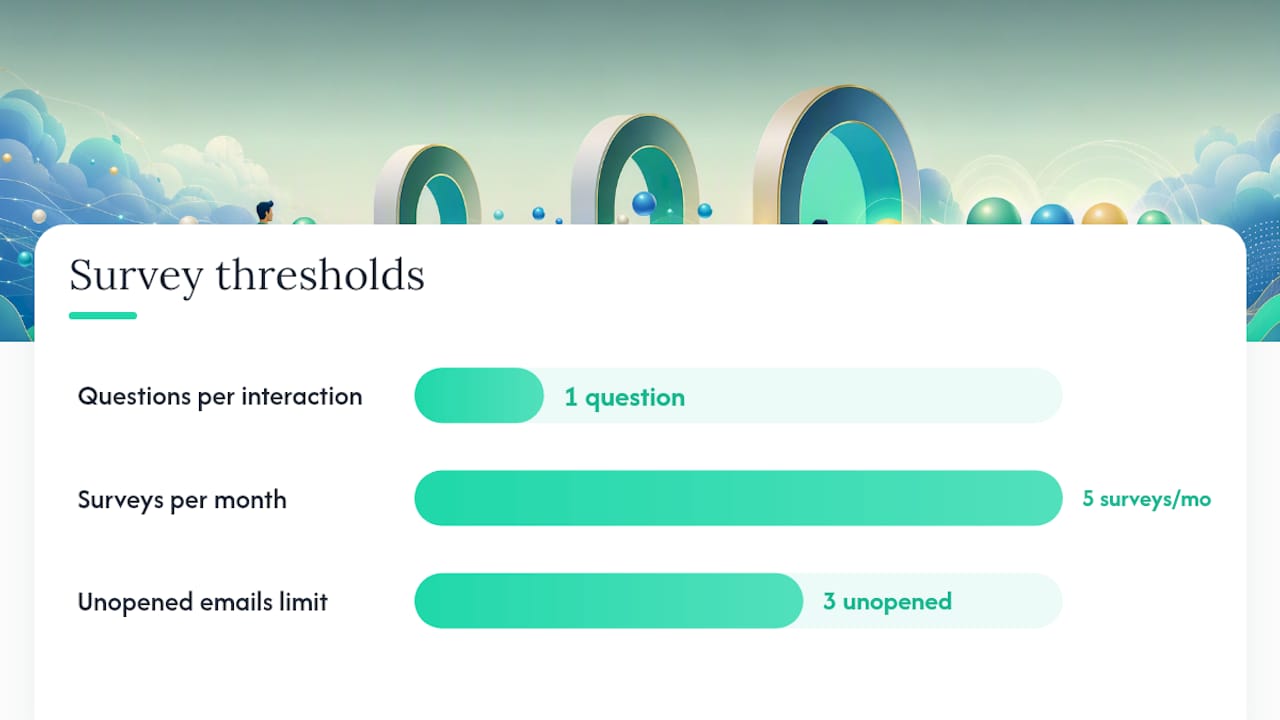
- Ask one clear question per interaction
- Time requests around natural milestones, like project completion
- Personalize invites with the client's name and specific context
Don't:
- Send five surveys in one month and wonder why response rates crash
- Combine NPS and product feature requests into a single instrument
- Let negative feedback sit unanswered. Silence reads as indifference
On privacy: keep opt-outs visible on every survey and store any personal client data securely, following the security standards your feedback and portal tools publish. NRLA's guide makes a similar point: the tool you choose should match your team's capacity, not the other way around.
Pro Tip: If a client hasn't opened three consecutive survey emails, stop sending and switch to a lighter-touch channel like an in-app prompt instead.
How Does a Client Portal Simplify Feedback Collection?
Agencies juggling scattered emails and file threads often lose feedback entirely. Consider a design studio using a client portal: every comment, file version, and approval lives in one workspace instead of three inboxes.
- Messages, files, and sign-offs stay attached to the same project thread
- Milestone-based invoicing makes it natural to request feedback at each payment point
- Signed approvals double as documented client satisfaction checkpoints
Realclient's portal showcase shows this exact structure in practice for freelancers and small agencies.
What's the One Priority Most Teams Get Wrong?
Most teams over-invest in collection and under-invest in closing the loop. A dozen new surveys won't fix a program where feedback disappears into a spreadsheet nobody revisits. Start with one repository, one weekly triage habit, and one commitment to tell clients what changed because of what they said.
Where Can You Learn More About Feedback Methods?
- Miro's method breakdown for collection technique comparisons
- Pendo's glossary for feedback and metric definitions
- Realclient's client portal software guide for centralized workflows
Frequently Asked Questions
What is the best method for client feedback collection? There's no single best method. Email surveys and in-app microsurveys work well for quantitative trends like NPS and CSAT, while interviews and usability tests answer the "why" behind those numbers.
How often should you survey clients? Quarterly for full NPS or CSAT surveys, and behavior-triggered for in-app microsurveys. Sending more than one survey a month tends to tank response rates.
What's the difference between NPS, CSAT, and CES? NPS measures loyalty through likelihood to recommend, CSAT measures satisfaction with a specific interaction, and CES (Customer Effort Score) measures how much work a client had to do to get something resolved.
How do you get honest feedback from clients? Ask one clear question at a time, personalize the request, and make it obvious that negative feedback is welcome, not just praise.
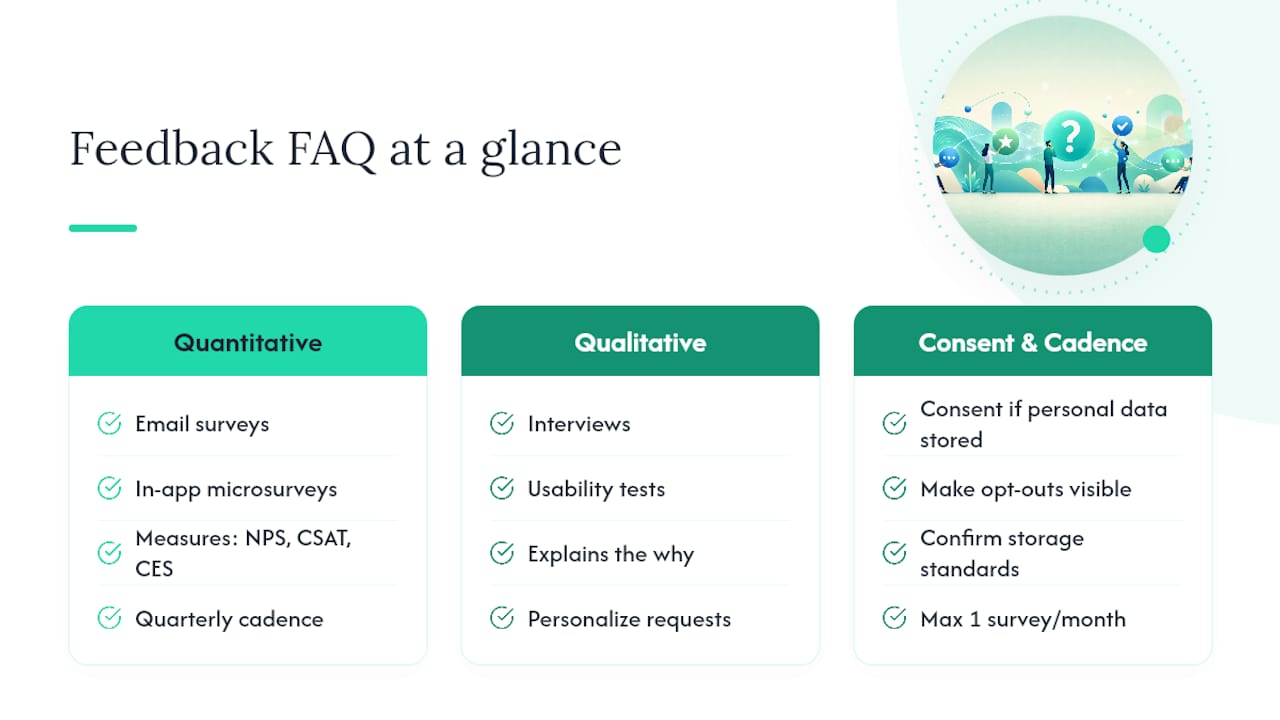
Do you need special consent to collect client feedback? Yes, particularly if you're storing personal data alongside responses. Make opt-outs visible and confirm your storage practices meet standards like the ones outlined on Realclient's security page.
Sources
- Collecting Customer Feedback: Methods and Best Practices
- What is Customer Feedback? How to Collect ...
- Collect Customer Feedback From Every Source | Canny
- Why Customer Feedback Is Valuable—and 5 Tools for ...