
If you store, process, or transmit cardholder data, PCI DSS applies to you. Your validation path depends on your acquirer, your payment brand, and how your systems handle cards, so your first move is mapping how card data actually flows through your business and calling your acquirer to confirm which Self-Assessment Questionnaire fits.
TL;DR:
- Using hosted checkout solutions significantly reduces scope by keeping card data off your servers, making compliance easier and less costly.
- Small merchants should confirm their validation requirements directly with their acquirer, as transaction volume and payment methods influence the necessary PCI steps.
- Regularly updating and reviewing security policies, staff training, and access controls are essential to maintain ongoing PCI compliance.
- Implementing tokenization or PCI-listed P2PE solutions can minimize the scope of PCI audits, but vendor validation must be verified carefully.
- Ignoring PCI validation can lead to substantial fines, increased fees, and suspension of card processing, often resulting from overlooked paperwork deadlines.
Table of Contents
- What Is PCI Compliance for Payments, and Who Has to Follow It?
- The 12 PCI DSS Requirements, Explained for Small Teams
- Which SAQ Type Fits Your Payment Setup?
- Cutting Your PCI Scope Through Tokenization and Hosted Payments
- What Happens If You Skip PCI Validation?
- How to Prepare for and Maintain PCI Compliance Year-Round
- How Realclient's Approach to Payments Affects Your PCI Scope
- How to Run Vulnerability Scans and Penetration Tests
- How to Handle Cardholder Data Safely During a Transaction
- Employee Training and Security Policies That Actually Stick
- Setting Up Multi-Factor Authentication for PCI Compliance
- Planning Your Response Before a Payment Data Breach Happens
- Prioritized Next Steps and Who Should Own Them
- Simplify Payments and Shrink Your PCI Footprint With Realclient
- Where to Verify These Standards Directly
- Sources
What Is PCI Compliance for Payments, and Who Has to Follow It?
PCI DSS (Payment Card Industry Data Security Standard) is the baseline security standard for anyone who touches cardholder data, and it's managed by the PCI Security Standards Council. If you swipe, key in, or pass along a customer's card number, you're in scope, whether you are a solo consultant billing through a payment link or an agency running its own checkout page.
The council also publishes a family of related standards worth knowing by name: P2PE (Point-to-Point Encryption), Secure Software, and Secure SLC (Software Lifecycle). Each applies to a different slice of the payment chain. P2PE covers validated hardware and encryption at the point of sale. Secure Software and Secure SLC apply to vendors building payment applications. You'll rarely need to master all three, but knowing they exist helps when a vendor name-drops one to sound compliant without actually being audited against it.
At the center of everything is the cardholder data environment, or CDE: the people, processes, and systems that store, process, or transmit card data, plus anything connected to them. Scope isn't just "the server with card numbers on it." A support laptop that can remote into your payment terminal, a spreadsheet where someone pasted a card number to troubleshoot a failed charge, a Wi-Fi network that touches your point-of-sale system. All of that can pull otherwise unrelated systems into your CDE, which is exactly why scope reduction (covered later) matters so much for small teams with limited IT staff.
Here's the part most first-time readers get wrong: PCI SSC writes the standard, but it doesn't decide who has to validate or how. That call belongs to your acquiring bank and the card brands (Visa, Mastercard, American Express, Discover), and it depends heavily on transaction volume and how you accept payments. This is why confirming your validation requirement directly with your acquirer beats guessing from a generic checklist.
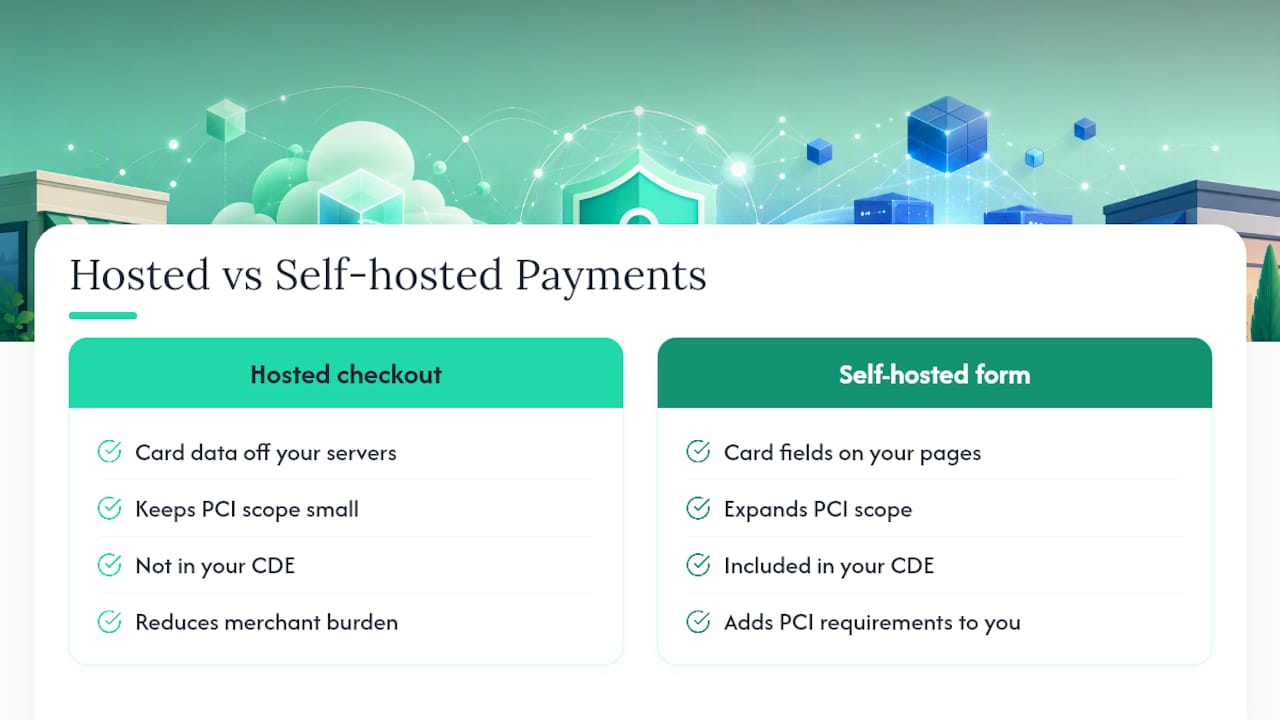
The setup that determines almost everything else is whether you use a hosted checkout (a third party's payment page or embedded iframe handles the card entry) or a self-hosted form where card fields sit on pages you control. Hosted checkout keeps card data off your servers entirely, which is the single biggest lever a small merchant has for shrinking scope. Self-hosted forms, by contrast, pull your own infrastructure directly into the CDE, along with all the requirements that come with it.
The 12 PCI DSS Requirements, Explained for Small Teams
PCI DSS v4.0.1 organizes everything into 12 principal requirements, each with its own testing procedures. You don't need to memorize the technical language. You need to know what each one asks of a business your size.
- Install and maintain network security controls. Firewalls and network segmentation separate payment systems from everything else on your network.
- Apply secure configurations. Change default passwords on routers, point-of-sale terminals, and admin accounts before anything else.
- Protect stored account data. If you must store card data at all, it needs strong encryption or tokenization, not a plaintext database field.
- Protect cardholder data with strong cryptography during transmission. TLS 1.2 or higher on every page and API call that touches card data, no exceptions.
- Protect all systems from malware. Antivirus or equivalent endpoint protection on any device that touches the CDE.
- Develop and maintain secure systems and software. Patch known vulnerabilities on a schedule, not whenever someone remembers.
- Restrict access to system components and cardholder data. Least-privilege access, meaning your part-time bookkeeper doesn't need admin rights to the payment gateway.
- Identify users and authenticate access. Unique logins for every person and system, no shared passwords.
- Restrict physical access to cardholder data. Locked server rooms or, for most SMBs, simply controlling who can touch the POS terminal.
- Log and monitor all access to system components and cardholder data. You need a record of who touched what, and when, going back far enough to investigate an incident.
- Test security of systems and networks regularly. Vulnerability scans and penetration tests, detailed further below.
- Support information security with organizational policies and programs. A written policy, actual training, and someone accountable for both.
Pro Tip: The requirement that trips up the most small merchants isn't encryption or firewalls. It's requirement 12, the written policy. Assessors consistently find businesses with decent technical controls but no documented security policy, no assigned owner, and no proof employees were ever trained on it.
Requirements 6 (patching) and 11 (scanning) are the other frequent failure points, mostly because they require ongoing effort rather than a one-time setup. A firewall configured correctly in January does you no good if nobody patches the point-of-sale software in June.
Which SAQ Type Fits Your Payment Setup?
Not every merchant fills out the same paperwork. The Self-Assessment Questionnaire (SAQ) you use depends entirely on how card data moves through your business, and picking the wrong one wastes time on controls you don't need or, worse, leaves you short of what your acquirer actually requires.
- SAQ A fits merchants who fully outsource payment processing to a PCI DSS–validated third party and never store card data electronically. E-commerce sellers using a hosted checkout page typically land here, and it's the shortest questionnaire by far.
- SAQ A-EP applies when your website influences the payment process (an iframe or hosted field embedded in your own page) even though the card data itself never touches your server. More controls apply here than SAQ A, since your site's security still affects payment security.
- SAQ B covers merchants using standalone, dial-out payment terminals with no internet connection to other systems, common in some brick-and-mortar setups.
- SAQ C applies to merchants whose payment application connects to the internet but is otherwise isolated from other systems, typical of some retail point-of-sale configurations.
- SAQ D is the long form, required for merchants who store cardholder data directly, run custom payment applications, or don't fit any narrower category. This is also the baseline for most service providers.
Larger transaction volumes, or an acquirer that decides your risk profile warrants it, can push you past self-assessment entirely into a Report on Compliance led by a Qualified Security Assessor (QSA). If your business runs an internet-facing payment application, you'll also need quarterly external scans from an Approved Scanning Vendor (ASV), regardless of which SAQ applies.
Whatever your path, you'll need to gather evidence before you submit anything: ASV scan reports, configuration screenshots, and, if a vendor's services factor into your compliance, that vendor's own Attestation of Compliance (AOC). The decision tree is simple even if the paperwork isn't: hosted or tokenized checkout keeps you in the shorter SAQs, while storing or directly handling raw card numbers pushes you toward the longer ones.
Cutting Your PCI Scope Through Tokenization and Hosted Payments
Scope reduction is the highest-leverage move available to a small business, and it's also the one most owners discover too late, usually after a QSA or acquirer flags a system nobody realized was in scope.
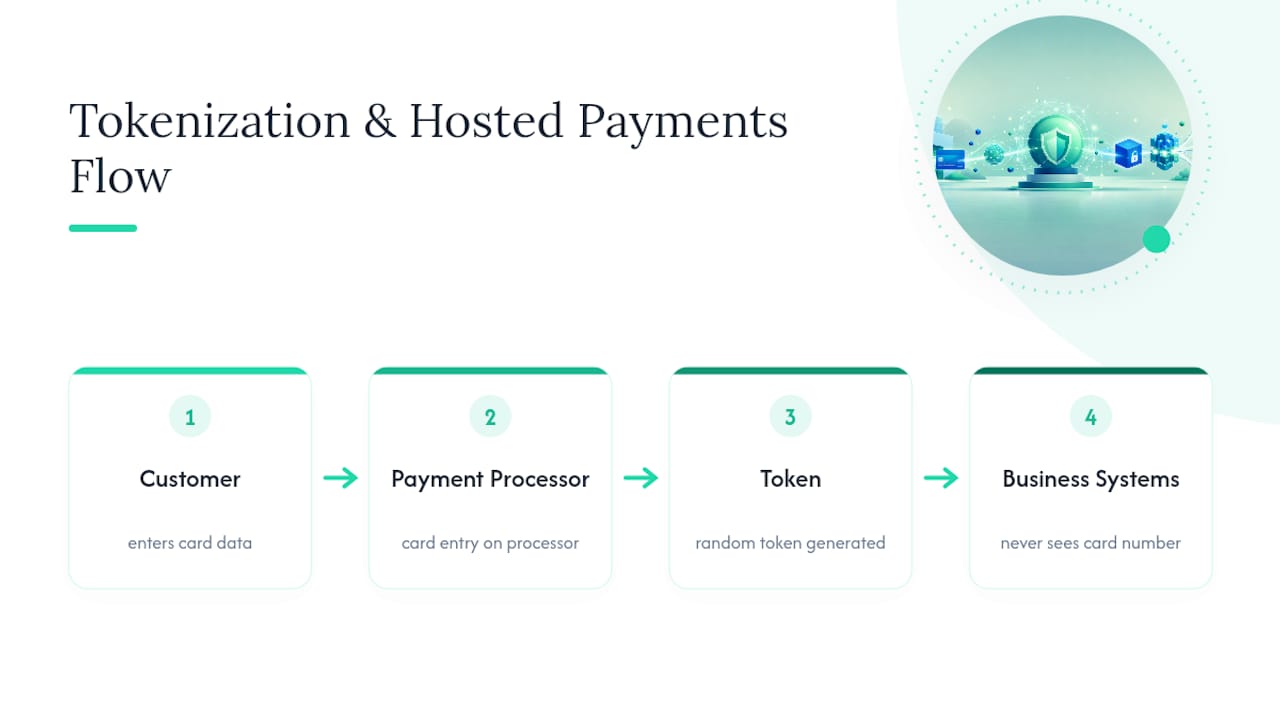
Tokenization replaces the actual card number with a randomly generated token everywhere except at the payment processor. Your systems store and pass around the token; the real card number never touches your servers. Hosted payment fields, whether a redirect checkout or an embedded iframe, work similarly by keeping card entry on the processor's infrastructure even when it visually sits inside your page. Both techniques mean an assessor is auditing far less of your environment, because far less of your environment ever sees a card number.
PCI-listed P2PE solutions add encryption at the physical point of interaction, typically on a validated card reader or terminal. This matters most for businesses taking in-person payments. A PCI-listed P2PE solution can meaningfully shrink which requirements apply to your CDE, but it doesn't erase your PCI obligations entirely. You still need to confirm the vendor's validation and handle everything outside the encrypted channel correctly.
That last point is where vendor due diligence comes in, and it's worth treating as a procurement step, not an afterthought. A vendor claiming "PCI compliant" in their marketing copy means little without proof. Even when a provider states it's compliant, request the actual AOC and any ASV scan reports covering the specific services you rely on. A vendor's AOC alone doesn't automatically make you compliant. It shows their piece is validated, not that your combined setup is.
Pro Tip: Before signing with any payment or portal vendor, ask three questions directly: Can you send me your current AOC? Do you have ASV scan reports for the services I'll use? Is your payment application validated, or does it just integrate with a validated processor? If a sales rep can't answer clearly, that's your answer.
Before choosing a route, weigh whether you even need to accept cards for every transaction. Comparing ACH transfers against card payments is worth doing early, since routing more volume through ACH sidesteps card scope entirely for those transactions.
What Happens If You Skip PCI Validation?
Skipping validation doesn't make PCI DSS stop applying. It just means you find out the hard way, usually through your monthly statement or, worse, after a breach.
Acquiring banks commonly charge a monthly non-compliance fee to merchants who don't submit required validation paperwork on time. According to Stripe's breakdown of these fees, they often start modest, in the range of $25 to $50 a month, but escalate the longer the account stays unresolved, sometimes reaching thousands of dollars if the issue drags on. That's real money for a freelancer or small agency operating on thin margins, and it's entirely avoidable paperwork.
The costs get worse if a breach happens on top of a lapsed compliance status. Card brands can levy penalties directly, and a breach investigation typically requires forensic analysis, card reissuance costs, and potential legal exposure, expenses that dwarf the monthly fee that triggered the scrutiny in the first place.
The most common triggers for these fees are mundane, not dramatic: a missed SAQ deadline, a skipped quarterly ASV scan, or an AOC that quietly expired without anyone noticing. None of these require a hacker. They require someone forgetting to renew paperwork on an annual cycle nobody assigned to a specific person.
Beyond direct fees, acquirers can suspend your ability to process cards at all, which for many small businesses means an immediate halt to revenue. Rebuilding trust with customers after a publicized breach takes considerably longer than the technical fix does.
How to Prepare for and Maintain PCI Compliance Year-Round
Treat compliance as a cycle, not a one-time project. Here's a sequence that works for most small teams without a dedicated security staff.
- Map your CDE first. List every system, application, and third party that touches card data, even briefly. Include that spreadsheet someone uses for refunds and the laptop your part-time contractor logs in from.
- Confirm your validation path with your acquirer. Ask directly which SAQ applies to your setup, since payment brands and acquiring banks make this determination, not the PCI SSC itself.
- Complete the SAQ or, if required, work with a QSA. Answer every applicable question honestly. A skipped or fudged answer creates liability later, not less work now.
- Run required ASV scans and fix what they find. Quarterly external scans apply to internet-facing payment systems. Treat critical findings as deadlines, not suggestions.
- Collect and store your evidence in one place. Your AOC, SAQ submission copies, vendor AOCs, ASV reports, and written policies should live somewhere any team member can find them during an audit or acquirer request.
- Assign an owner and set a recurring reminder. PCI validation is annual. Put it on a calendar tied to a specific person's name, not a vague "someone will handle it."
Pro Tip: The single most effective habit is treating your AOC's expiration date like a lease renewal. Set the reminder 60 days out, not 60 days after. Assessors and acquirers rarely give grace periods for a validation that quietly lapsed.
Reducing scope before you start this cycle makes every later step lighter. A merchant on SAQ A because they use hosted checkout answers a fraction of the questions a self-hosted SAQ D merchant does, and that difference compounds every single year you revalidate.
How Realclient's Approach to Payments Affects Your PCI Scope
An integrated portal that routes payments through hosted fields changes your compliance math directly. When card entry happens inside a hosted payment component rather than on your own server, card numbers never land in your systems, which is exactly the condition that qualifies most merchants for the shorter SAQ A path instead of the longer forms built for direct storage.
Realclient's portal combines invoicing, e-signatures, and payment processing through Stripe and PayPal in one place, so freelancers and small agencies aren't stitching together separate tools with separate vendors to vet. That matters for compliance specifically because every additional vendor is another AOC to chase down and another integration point that could expand your CDE. Consolidating into one portal means one vendor's security posture to verify instead of four.
Before adopting any portal for payments, request the same evidence you'd ask any processor for: an AOC, ASV scan documentation where applicable, and clear detail on how card data is encrypted in transit. Realclient's security overview outlines its approach to these controls, and it's worth reading against the vendor questions covered earlier in this guide.
How to Run Vulnerability Scans and Penetration Tests
Requirement 11 asks for two distinct things, and conflating them is a common mistake. A vulnerability scan is automated, runs on a schedule, and checks systems against a known list of weaknesses, missing patches, open ports, weak configurations. A penetration test is manual, performed by a skilled tester actively trying to exploit your systems the way an attacker would, and it happens far less often.
If your payment application is internet-facing, you need quarterly external scans performed by an Approved Scanning Vendor (ASV), a company specifically certified by the PCI SSC to run these scans. Internal scans, covering systems not exposed to the public internet, can often be run by your own staff or an internal tool, though many small teams outsource this too for simplicity.
Interpreting results matters as much as running the scan. A "passing" ASV scan means no critical or high-severity vulnerabilities were found at the time of the scan, not that your systems are permanently secure. Findings get graded by severity, and PCI DSS generally requires remediation of high and critical findings before you can claim a passing scan. Rescans confirm the fix actually worked; skipping that step is a common reason merchants think they're compliant when they aren't.
Penetration tests, required annually for most merchants with significant card-data exposure, go further by testing both the network layer and the application layer, including whether segmentation between your CDE and other systems actually holds up under active testing rather than just looking correct on paper.
How to Handle Cardholder Data Safely During a Transaction
The safest cardholder data is data your systems never see, which is why the guidance here starts with the same principle as scope reduction: route the transaction through a hosted field or tokenized flow whenever possible, and treat direct handling as the exception, not the default.
When card data must pass through your own systems, even briefly, encrypt it in transit using TLS 1.2 or higher on every page and API endpoint involved, with no exceptions for internal tools or "just testing" environments. Never let a card number land in a support ticket, a chat log, an email, or a spreadsheet. This sounds obvious, but it's one of the most common gaps the Small Merchant Guide flags, because it usually happens informally when a customer calls in with a payment problem and an employee tries to help by writing the number down.
If you must store card data, tokenization or strong encryption is non-negotiable, and the decryption keys need to live separately from the encrypted data itself. Truncation, showing only the last four digits, works for display and receipts but isn't a substitute for proper encryption anywhere data is actually stored.
Train staff specifically on what to do when a customer offers a card number over the phone or email. The safest answer is usually redirecting them to a secure payment link rather than accepting the number directly. A single documented process here prevents most of the accidental exposure that turns a compliant setup into a liability.
Employee Training and Security Policies That Actually Stick
A written policy nobody's read protects you on paper and nowhere else. Requirement 12 asks for both a documented information security policy and a real training program, and assessors can tell the difference between a policy that exists and one that's actually been taught.
Keep the policy specific to your business rather than a generic template. Cover who can access payment systems, how to report a suspected security incident, what to do if a customer offers a card number the wrong way, and how often passwords and access get reviewed. Vague language like "employees must follow security best practices" satisfies no one, including an assessor.
Training should happen at onboarding and at least annually after that, with a record of who completed it and when. Keep it short and specific to actual job functions. A bookkeeper handling refunds needs different training than someone who never touches the payment system at all.
Build in a habit of least privilege as part of the culture, not just the technical setup: new hires get access to exactly what their role requires, and departing employees lose access immediately, not "sometime this week." Review access quarterly, since role changes and forgotten accounts are how excess access quietly accumulates.
Document all of it. When an acquirer or QSA asks for proof of training, "we told everyone in a meeting once" isn't evidence. A signed acknowledgment and a dated training log are.
Setting Up Multi-Factor Authentication for PCI Compliance
Multi-factor authentication (MFA) requires a second proof of identity beyond a password, typically a code from an app or a hardware key, and PCI DSS requires it for all access into the cardholder data environment, plus any remote access into your network generally.
Start with the accounts that matter most: anyone with administrative access to payment systems, remote access tools, and cloud infrastructure hosting anything connected to the CDE. Password managers and single sign-on tools often support MFA natively, so enabling it frequently requires no new purchase, just a configuration change and a short rollout to your team.
Choose an authentication method your team will actually use consistently. App-based authenticators (Google Authenticator, Authy, or similar) tend to work better for small teams than SMS codes, which carry known interception risks. Hardware security keys offer the strongest protection for a handful of highly privileged accounts, like whoever administers your payment gateway directly.
Document which systems require MFA and confirm it during onboarding and offboarding, the same way you'd confirm any other access control. A departing employee's MFA-enabled account should be disabled immediately, not left active because nobody remembered the second factor was tied to their personal phone.
Test the setup periodically. MFA that's technically enabled but easily bypassed through a recovery flow or a forgotten backup code isn't meeting the intent of the requirement, even if it checks the box on paper.
Planning Your Response Before a Payment Data Breach Happens
An incident response plan written after a breach starts is a plan written too late. The businesses that recover fastest have already decided, in writing, who does what before anything goes wrong.
Start with a short, specific document naming who gets notified first (usually your acquirer and your payment processor), who investigates, and who communicates with affected customers. Include your acquirer's incident reporting requirements specifically, since missing their notification window can compound penalties on top of the breach itself.
Card brands and your acquirer will likely require a forensic investigation for anything involving actual cardholder data exposure, so know in advance whether your merchant agreement designates an approved forensic investigator or leaves that choice to you. Knowing this before an incident saves critical hours during one.
Practice the plan, at least once a year, even informally. Walk through a hypothetical scenario: a customer reports a suspicious charge, or a vendor notifies you their system was breached and your data may be affected. Does your team know who to call first? Do you know where your evidence (logs, access records, AOC, scan reports) actually lives?
Keep a factual, timestamped record of everything during an actual incident: when it was discovered, what containment steps were taken, and when each party was notified. This record matters both for the immediate response and for demonstrating due diligence afterward, to your acquirer, to card brands, and potentially to affected customers.
Prioritized Next Steps and Who Should Own Them
Reduce your scope before you do anything else. Every hour spent moving toward hosted payments or tokenization saves multiple hours of documentation and scanning work later, and it shrinks the list of things that can go wrong in the first place.
Document second, not first. It's tempting to jump straight into writing policies, but a policy written before you've reduced scope often describes systems you're about to eliminate anyway. Get your architecture right, then write down what you actually did.
Make vendor evidence, AOCs and ASV reports specifically, part of your procurement checklist for any payment or portal tool, the same way you'd check references before hiring. A sales pitch is not evidence.
Finally, name one person who owns annual revalidation. Not "the team," not "whoever's around in Q1." A specific name, tied to a specific calendar reminder, six months before your AOC expires. Compliance programs don't fail from lack of knowledge nearly as often as they fail from lack of ownership.
— Real
Simplify Payments and Shrink Your PCI Footprint With Realclient
Realclient gives freelancers and small agencies a direct path to less PCI exposure, not just less administrative hassle. Because payment processing runs through Stripe and PayPal inside a hosted portal rather than through custom-built checkout code, card numbers never land on your own servers, which is precisely the setup that keeps most solo professionals and small teams eligible for the shortest SAQ track instead of a longer, more demanding one.

That's on top of the operational win: invoicing, e-signatures, and payment collection live in one branded client workspace instead of four disconnected tools, each with its own vendor to vet and its own AOC to chase down come renewal time. Realclient's studios and freelancers invoiced a substantial amount through their portals last year, using the same hosted payment approach described throughout this guide. If you're evaluating whether to consolidate your payment stack, start by reviewing Realclient's pricing plans and comparing them against the vendor questions covered earlier, particularly around AOC and encryption documentation, before you sign anything new.
Where to Verify These Standards Directly
Read the source documents rather than relying on secondhand summaries. The PCI Security Standards Council's standards page hosts the full PCI DSS requirements, SAQ forms, and AOC templates. The Small Merchant Guide to Safe Payments covers scope reduction in plain language, and Stripe's explainer on non-compliance fees breaks down what acquirers typically charge.
Sources
- Payment Card Security Standards — PCI Security Standards Council
- PCI-DSS v4.0.1 — Payment Card Industry Data Security Standard (PDF)
- PCI Non-Compliance Fees: How They Work — Stripe