
The quickest, safest way for a freelancer or small-service business to secure client communication is a private, branded client portal that combines encrypted messaging, file sharing, e-signatures, and payments. Instead of juggling email threads, a shared Google Drive, and a separate invoicing tool, you give clients one link, protected by encryption and backed by an audit trail. Platforms like RealClients build this exact model, and the results show up in the numbers: providers on the platform invoiced over $48 million through portals last year.
Here's what that setup actually buys you:
- Encrypted exchange with a paper trail. Every file and message is protected in transit and at rest, and every action gets logged and timestamped.
- One workflow instead of five. Contracts, files, approvals, and payments live in a single place your client already trusts.
- Faster payments, happier clients. Portals that tie milestone approval to invoicing cut the awkward gap between "done" and "paid."
Key Takeaways
Secure client communication works best when strong encryption and audit trails are paired with near-zero friction for the client, since a secure system nobody uses protects nothing.
| Point | Details |
|---|---|
| Use a branded portal | Consolidate messaging, files, e-signatures, and payments into one authenticated workspace instead of email. |
| Verify encryption standards | Confirm TLS 1.2+ protects data in transit and AES-256 protects it at rest. |
| Prioritize low-friction access | Passwordless magic links drive far higher client adoption than password-protected logins. |
| Keep audit logs | Detailed access logs give you evidence for disputes and satisfy the ABA's reasonable-efforts standard. |
| Choose RealClients for integration | RealClients combines branded portals, encryption, e-signatures, and payments in one system that invoiced over $48 million last year. |
Table of Contents
- What Does Secure Client Communication Mean for a Small Business?
- What Security Features Actually Matter in a Client Portal?
- How Do You Choose the Right Portal for Your Business?
- How Do You Set Up a Portal Clients Will Actually Use?
- What Do Ethics Rules Require for Client Communication?
- What Happens if a Client Communication Gets Compromised?
- Which Regulations Apply Beyond Bar Association Guidance?
- The Real Tradeoff Nobody Talks About Enough
- Why RealClients Fits Everything on This Checklist
- Frequently Asked Questions
- Sources
What Does Secure Client Communication Mean for a Small Business?
For a freelancer, realtor, or small agency, secure client communication means one specific thing: messaging, file sharing, e-signatures, and payments that all happen inside a private, branded portal instead of scattered across email and consumer apps. It does not mean configuring a corporate VPN or picking apart a developer-facing encryption protocol. Those are enterprise IT problems, not yours.
Here's why the distinction matters for your day-to-day work:
- Email has no reliable chain of custody. Anyone can forward a thread, and there's no way to see who opened an attachment or when.
- A portal gives you a single, centralized home for every file, approval, and conversation tied to a client, with access you can revoke instantly.
- Regulatory guidance on document handling increasingly treats email as a compliance risk for anything involving identity documents or financial records, which is reason enough to move sensitive exchanges off it entirely.
Everything from here forward assumes that scope: portals, not enterprise networking.
What Security Features Actually Matter in a Client Portal?
Not every feature on a vendor's pricing page protects you equally. Some are non-negotiable. Others are nice touches. Here's how to tell the difference.
Start with encryption, since it's the foundation everything else sits on. You want TLS 1.2 or higher protecting data while it moves between your client's browser and the server, and AES-256 protecting it once it's sitting in storage. Transit encryption alone isn't enough. If a portal only encrypts data in motion, a breach of the storage layer exposes everything sitting at rest, unprotected.
Audit trails come next, and they matter more than most freelancers realize until they need one. A detailed access log that shows who viewed a contract, when they signed it, and who downloaded which file gives you real evidence in a dispute, not just a vague memory of "I sent that last Tuesday."
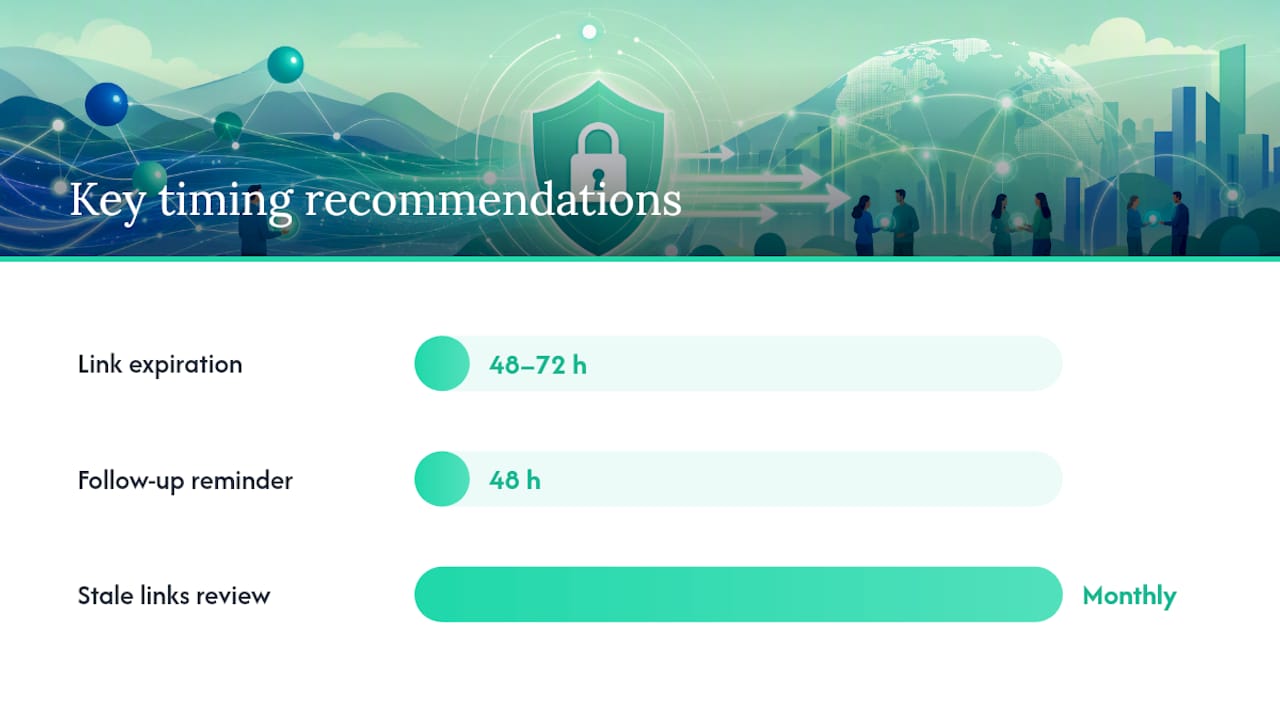
Granular, revocable permissions are the third pillar. You should be able to grant one client access to only their folder, set a file link to expire in 48 hours, and cut off access the moment a project ends, without touching anyone else's account.
Pro Tip: Don't force clients through a password setup just to view one contract. Passwordless magic links that expire after a single use or a set window remove the biggest adoption barrier: friction. Clients who have to "remember another password" often just ask you to email the file instead, undoing all your security work in one message.
A few more items worth checking before you commit to a portal:
- Preview-only viewing for sensitive documents, so files can be reviewed without a permanent download.
- Built-in virus scanning on uploads, since client-submitted files are a common malware vector.
- Version history, so you're never guessing which draft a client actually approved.
- Integrated e-signature and payment processing, which closes the loop that email plus a separate PDF signer plus a separate payment link leaves wide open.
That last point deserves emphasis. When approval, signature, and payment all happen in one authenticated session, you eliminate the handoff points where things get lost, delayed, or intercepted.
How Do You Choose the Right Portal for Your Business?
Picking a portal isn't about finding the flashiest feature list. It's about matching capability to how you actually work.
Run through this order of operations:
- List your non-negotiables first. If you're a realtor, that's probably e-signature and document versioning. If you're an agency, it's likely file collaboration and payment milestones.
- Test the client-facing side, not just your dashboard. Send yourself a test invite. If it takes more than two clicks to view a file, your least tech-savvy client will bounce.
- Map the pricing model to your actual client count. Per-client pricing punishes growth; per-seat pricing punishes solo operators who bring on occasional help. Know which shape fits your business before you sign up.
- Check where data lives and how long it's retained, especially if you handle documents with retention requirements.
Beyond that checklist, weigh usability signals that don't show up in a feature comparison:
- No-login document collection for one-off client uploads.
- Mobile-friendly previews, since a growing share of clients will open your link on a phone.
- A short setup path. If onboarding takes a week, most solo providers will abandon it by day three.
- Integration with the accounting or project-management tool you already use.
Before you commit, ask any provider three direct questions: what encryption standard protects data at rest, what their breach notification timeline looks like, and what their documented incident response process actually involves. A provider that can't answer clearly in one sentence hasn't thought it through.
How Do You Set Up a Portal Clients Will Actually Use?
A secure portal that clients ignore protects nothing. Adoption is the real test, and it starts before you send the first invite.
- Configure your branding first. Add your logo, connect a custom domain if your portal software supports it, and set default permissions so new client folders start locked down rather than wide open.
- Set your defaults for security, not convenience. Turn on encryption settings if they're configurable, set link expiration to a sensible window (48 to 72 hours for one-off shares), and confirm your provider runs regular backups.
- Demo the portal live on your kickoff call. Don't just email a link and hope. Walk the client through logging in, viewing a sample file, and completing one small action, like an e-signature on the engagement letter.
- Send the invite through a magic link, since removing password friction is the single biggest lever for getting non-technical clients to actually log in.
- Follow up 48 hours later if the client hasn't opened the portal, with a short, direct nudge rather than a generic reminder.
Pro Tip: Tune notifications early. If clients get an email alert for every tiny file update, they'll start ignoring the portal entirely. Reserve notifications for approvals, signatures, and payment requests, the moments that actually need their attention.
Set one hard operational rule from day one: sensitive documents never go through email, even as a "just this once" exception. When a client emails you a scanned ID or a signed W9, redirect them to a branded upload link instead. Do a monthly check on stale links and unused permissions so nothing lingers longer than it should.
What Do Ethics Rules Require for Client Communication?
If you're a lawyer, or you work alongside one, this isn't optional background reading. Model Rule 1.6 requires attorneys to make "reasonable efforts" to prevent unauthorized access to client information, and the ABA's Formal Opinion makes clear that "reasonable" isn't a fixed bar. It scales with how sensitive the information is and what the circumstances demand.
The Formal Opinion recommends that lawyers understand where client data resides, who can access it, and use commonly available protections including encryption, strong passwords, and device controls, applying more care as sensitivity increases.
Practically, that means a few things for anyone handling client-sensitive material, not just attorneys:
- Document why you chose a given communication method for a given matter, especially for anything highly sensitive.
- Keep audit logs and retain evidence that a client agreed to your chosen communication channel.
- Build a simple incident-response checklist before you need one, not after.
- For genuinely high-stakes matters, escalate beyond standard portal messaging to a method with stronger controls, and say so explicitly to the client.
What Happens if a Client Communication Gets Compromised?
A breach isn't a hypothetical you plan for once. It's a process you rehearse so you're not improvising during the worst week of your business.
The first hour matters most. The moment you suspect a compromised account, revoke access immediately: kill active sessions, rotate credentials, and disable any exposed links before doing anything else. Speed here limits how much data an intruder can actually pull before the door closes.
Next, figure out scope. Check your audit logs to see which files were accessed, downloaded, or shared, and when. This is exactly why audit trails matter more than a nice-to-have feature; without them, you're guessing at what happened instead of knowing.
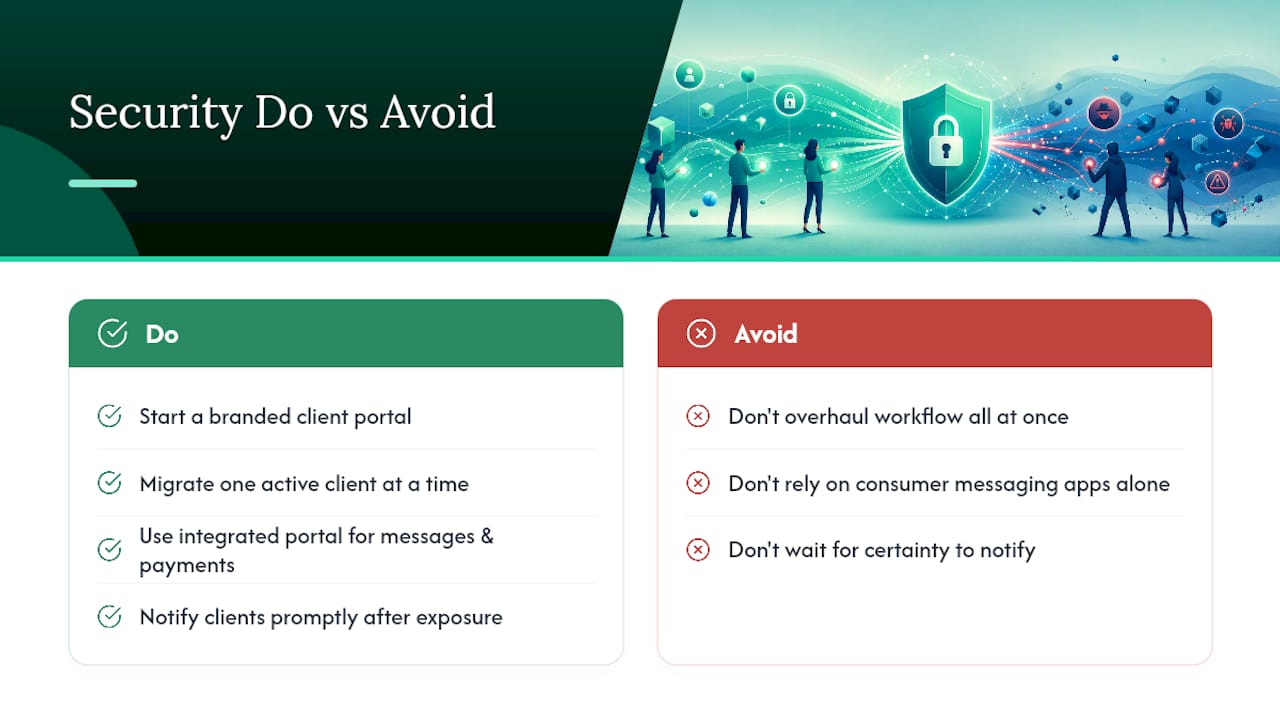
Notification comes third, and timing depends on what was exposed. If client financial data, identity documents, or legally protected information was involved, most state breach notification laws set specific windows, often 30 to 60 days, though some require "without unreasonable delay." Don't wait for certainty before you start drafting that notice. Tell affected clients what happened, what data was involved, and what you're doing about it.
Finally, document everything. What triggered the incident, when you discovered it, what you did, and when you notified affected parties. That record protects you legally and helps you close the actual gap that caused the problem, whether it was a phishing email, a reused password, or a misconfigured permission.
Build this checklist before an incident happens, not during one. A calm, rehearsed response looks completely different from a panicked one, and clients notice which kind they're getting.
Which Regulations Apply Beyond Bar Association Guidance?
Ethics opinions cover professional conduct, but they're not the only rules in play. Depending on who your clients are and where they're located, other regulations layer on top.
If you serve clients in the European Union, GDPR applies regardless of where your business is based, as long as you're processing EU residents' personal data. That means clients have a right to know what data you hold, a right to request deletion, and you need a lawful basis for processing their information in the first place. A portal with clear data retention settings and export capability makes this far easier to honor than a folder of scattered email attachments.
If you touch health information, even indirectly (think wellness coaches, certain consultants, or professionals working with healthcare clients), HIPAA may require a signed Business Associate Agreement with any tool that stores or transmits that data. Not every portal offers one, so check before you use a general-purpose tool for anything health-related.
Financial services and real estate professionals often face anti-money-laundering (AML) recordkeeping requirements, which is part of why sending identity documents over email creates real compliance exposure, not just a security inconvenience.
None of this requires becoming a compliance expert overnight. It requires picking a portal that gives you the controls (retention settings, access logs, deletion tools) to meet whichever rules actually apply to your client base, and knowing which ones those are before a client asks.
The Real Tradeoff Nobody Talks About Enough
Most security advice for small businesses treats encryption strength as the whole conversation. It isn't. The harder problem, and the one that actually determines whether your client communication stays secure, is adoption. Bank-grade protection that clients route around because it's inconvenient protects nothing. That's not a minor caveat; it's the core design problem.
The conventional advice tells freelancers to "use strong passwords" and "enable two-factor everywhere." That's fine advice for you. It's terrible advice for your 68-year-old real estate client who will simply ask you to text them the contract instead if your portal makes login painful. The friction point isn't your security posture. It's your client's patience.
What the evidence actually supports is a different priority order: pick controls that are strong by default and invisible to the client. Magic links instead of passwords. Encryption that's on regardless of what the client clicks. Audit trails that log everything without requiring a single extra step from anyone.
If you take one thing from this guide, take this: security that requires client cooperation to work is security that will eventually fail. Design for the path of least resistance, and make that path the secure one.
Why RealClients Fits Everything on This Checklist
Everything covered above, encryption at rest and in transit, audit logs, granular permissions, magic-link access, integrated e-signatures and payments, is exactly what RealClients was built around. It's not a bundle of separate tools stitched together. It's one branded workspace where your client logs in once and finds their files, contracts, and invoice in the same place.

The platform's security page lays out the specific controls behind that, and the adoption numbers back up the approach: providers using RealClients portals invoiced over $48 million last year, evidence that a secure, low-friction portal doesn't just protect client data, it gets used consistently enough to move real money through it. If you're tired of chasing signatures through email and tracking payments across three different apps, set up your branded portal and send your next client a single link instead of five.
Frequently Asked Questions
What is the easiest way to start secure client communication without overhauling my whole workflow?
Set up a branded client portal and migrate one active client at a time, starting with whoever handles the most sensitive files. You don't need to move every client on day one; a gradual rollout keeps adoption manageable.
Are encrypted messaging apps enough for secure client communication?
Consumer messaging apps can encrypt conversations, but most lack audit trails, granular permissions, and integrated contracts or payments, which are the features that actually protect you in a dispute or an audit.
Do I need a lawyer's level of security if I'm not an attorney?
No, but the same logic applies. If you handle financial records, identity documents, or health-adjacent information, match your controls to the sensitivity of what you're storing, not to a one-size-fits-all standard.
How quickly should I notify clients if their data is compromised?
Notify as soon as you understand the scope of exposure, and don't wait for full certainty. Many state laws expect notification "without unreasonable delay," so a documented incident-response checklist matters more than a perfect timeline.
Can I use one portal for both messaging and payments?
Yes, and that integration is precisely what closes the security gaps that separate tools create. When approval, signature, and payment happen in one authenticated session, there's no handoff point for something to leak or get lost.
This article is general information, not a substitute for advice from a qualified lawyer. Consult a qualified legal professional about your own circumstances before acting on anything here.
Sources
- Secure Document Sharing: A Practical Guide for Firms That Handle Sensitive Client Files
- The Complete Guide to Client Portal Software for Agencies