
Realclient is the best client portal for accountants who want to stop chasing clients and start getting paid faster. Three reasons stand out:
- Automated reminders replace manual follow-ups, so nothing slips through the cracks between tax seasons.
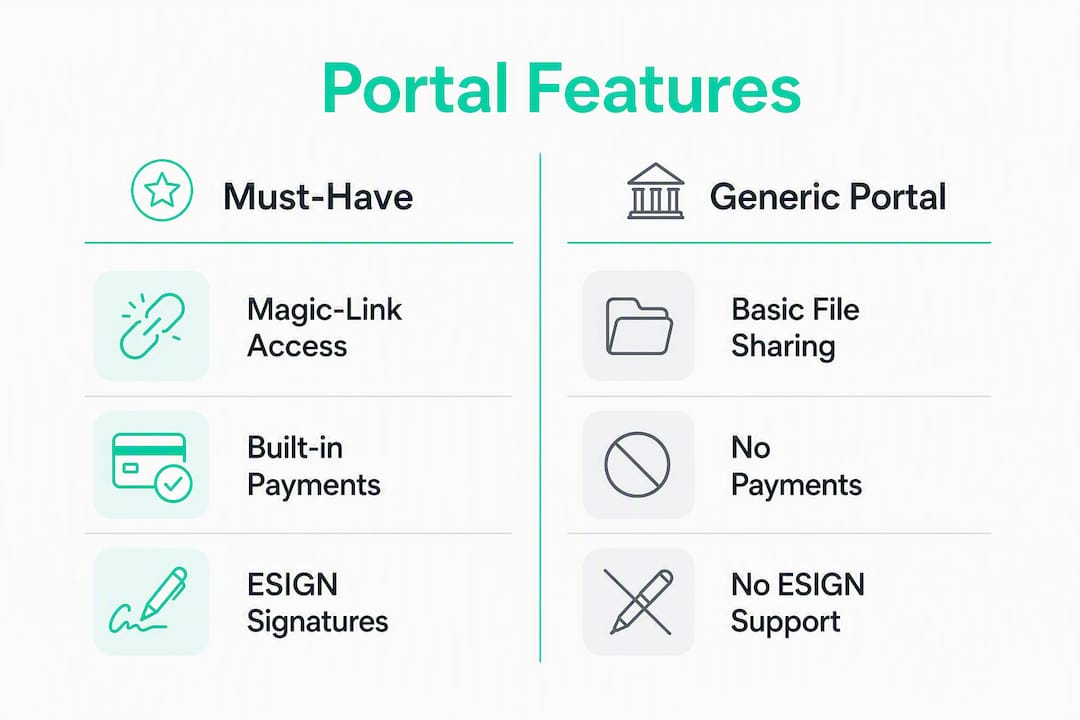
- Magic-link access means clients click one email link and land directly in their portal — no passwords, no support tickets, no friction.
- Built-in e-signatures and payments (Stripe and PayPal) close the loop from document request to invoice in one place.
Pro Tip: Start your free trial before you migrate a single client. Spin up one branded portal, send a magic-link invite to yourself, and experience the client side firsthand. That five-minute test will tell you more than any demo.
Table of Contents
- Why a client portal changes how accountants actually work
- Features accountants must check before choosing a portal
- How to choose an accountant portal: questions, red flags, and timeline
- Security and compliance checkpoints before you buy
- Integrations that turn your portal into a real time-saver
- Real-world impact: what the numbers show
- How to get started with Realclient in days, not weeks
- How Realclient handles data backup and business continuity
- How Realclient scales from solo freelancers to growing firms
- How do top accounting client portals compare?
- User experience for accountants and their clients
- What to expect from vendor support and onboarding
- Key Takeaways
- Why we recommend Realclient — and where to push back in a demo
- Try Realclient free and see the difference in your first week
- Sources and further reading
Why a client portal changes how accountants actually work
Accounting work stalls at the handoff. You send an email requesting documents, the client forgets, you send another, they reply with the wrong file, and suddenly a quarter of your day is gone before any real work begins. A dedicated portal stops that cycle by centralizing every request, file, message, and signature in one place your client can access any time.
Automating the request process — assigning tasks with clear checklists and automatic reminders — saves more time than basic file storage alone. Clients receive a nudge without you lifting a finger, and you see exactly what is outstanding at a glance.
- Fewer emails back and forth on document status
- Faster payment cycles when invoicing is built into the same workspace
- Cleaner onboarding when new clients get a branded welcome and a task checklist on day one
- Better client perception when they see a professional, white-labeled portal instead of a generic file-sharing link
Pro Tip: When you roll out your portal, send magic-link invites rather than asking clients to create accounts. Passwordless access removes the single biggest adoption barrier for occasional users.
Features accountants must check before choosing a portal
Not every portal is built for accounting workflows. Some are glorified file folders. Here is how to triage what you actually need.

Must-have features
| Feature | Why it matters |
|---|---|
| Secure file sharing | Protects sensitive tax documents in transit and at rest |
| Audit trail | Logs every access, upload, and signature for compliance |
| E-signatures (ESIGN-compliant) | Legally binding approvals without printing or scanning |
| Integrated payments | Stripe or PayPal built in so clients pay inside the portal |
| Client task lists | Assigns document requests with deadlines clients can check off |
| Granular permissions | Controls who sees what — critical for multi-client firms |
| Version history | Tracks document revisions so you always have the right file |
| Automated reminders | Replaces manual follow-ups for outstanding tasks |
Nice-to-have features
- Custom domain and white-label branding (your logo, colors, welcome video)
- Mobile app for clients and accountants
- Workflow templates for recurring engagements (tax prep, monthly close)
- Analytics showing portal activity and client engagement
- Appointment scheduling built into the portal
White-labeling deserves a closer look than most buyers give it. A branded portal increases client confidence and adoption in ways a generic link never will. Clients who see your firm's name and colors are more likely to complete tasks promptly.
How to choose an accountant portal: questions, red flags, and timeline
Start every vendor demo with product questions, then move to security and integrations. That order keeps you from getting distracted by a polished UI before you have confirmed the basics.
Questions to ask during a demo
- Can I use my own domain and branding from day one?
- How do automated reminders work, and can I customize the cadence?
- What does client migration look like — can I import existing contacts and files?
- Is there a mobile experience for clients, or only a browser portal?
- Where is the audit log, and what events does it capture?
Red flags to watch for
- Pricing that charges per client rather than per plan tier (costs balloon fast)
- No audit trail or vague answers about access logs
- Poor mobile UX — if the demo looks clunky on a phone, your clients will abandon it
- Unclear data ownership terms in the contract
Typical onboarding timeline: most firms go from signup to a live pilot in two to five days. Full rollout across all clients usually takes two to four weeks, depending on how much historical data you migrate and whether you build custom workflow templates first.
Security and compliance checkpoints before you buy
Tax and accounting data is among the most sensitive information a client shares. Verify these controls before signing any contract.
Checklist
- Encryption at rest and in transit (AES-256 and TLS 1.2 or higher)
- SOC 2 Type II report or equivalent third-party attestation
- Two-factor authentication or biometric login options
- ESIGN-compliant e-signatures for legally binding documents
- PCI DSS compliance if the portal processes card payments
- Granular access controls and role-based permissions
- Automated backups with documented recovery time objectives
Short glossary
| Term | What it means in practice |
|---|---|
| SOC 2 Type II | An independent audit confirming security controls were operating effectively over a period of time |
| ESIGN | The U.S. Electronic Signatures in Global and National Commerce Act — makes digital signatures legally binding |
| PCI DSS | Payment Card Industry Data Security Standard — required when handling card payment data |
| SSAE | The auditing standard used to produce SOC 2 reports |
Realclient publishes its security documentation directly, covering encryption standards and access controls. Backups and disaster recovery are covered in the next section.
Integrations that turn your portal into a real time-saver
Integrations are what convert a portal from a storage folder into a genuine workflow tool. The right connections eliminate manual data entry at every stage.
High-priority integrations for accountants
- QuickBooks / Xero — sync client data and invoice status without re-entering figures
- Stripe / PayPal — collect payments inside the portal the moment a deliverable is approved
- Calendar apps (Google Calendar, Outlook) — schedule appointments and deadlines without leaving the portal
- Zapier — connect to hundreds of other tools and trigger automations (e.g., create a task when a new client is added)
- E-sign providers — native or integrated signing so contracts close in the same workspace
Sample workflow: tax prep engagement
- Client receives a magic-link invite and lands in their branded portal.
- A task checklist requests W-2s, 1099s, and prior-year returns with a deadline and automated reminders.
- Client uploads files; you receive a notification and review inside the portal.
- You send the completed return for e-signature — client signs in one click.
- Invoice is generated and paid via Stripe before the client closes the tab.
Pro Tip: Use Zapier to trigger a "thank you" message and a request for a Google review the moment a payment clears. That one automation builds your reputation without any manual effort.
One-click sync between your portal and your accounting software reduces manual posting errors and keeps your books accurate without a second data-entry pass.
Real-world impact: what the numbers show
Realclient reports over $48 million invoiced through client portals in the past year. That figure reflects real firms using the platform to close engagements, collect payments, and move work forward — not a projection.
What that means for a small firm
- Faster invoice-to-payment cycles when clients pay inside the portal rather than waiting for a separate billing email
- Fewer outstanding invoices when payment is a single click at the moment of delivery
- Measurable reduction in time spent on follow-ups when reminders run automatically
During your demo, ask the vendor for case studies specific to your firm size. A solo accountant and a ten-person firm have different adoption challenges, and a good vendor will have evidence for both.
How to get started with Realclient in days, not weeks
You can have a branded portal live before your next client meeting. Here is the exact sequence.
- Sign up — the free plan is available with no credit card required to start.
- Brand your portal — add your logo, choose your colors, and set a custom domain.
- Import clients — upload a CSV or add clients manually; existing files can be migrated in bulk.
- Create a task template — build a reusable checklist for your most common engagement (tax prep, monthly bookkeeping, audit prep).
- Send magic-link invites — clients receive one email, click once, and land in their workspace.
The steps that slow rollout are almost always data migration and custom template building. If you have years of files in a shared drive, plan an extra week to organize them before importing. Starting with client questionnaire templates cuts that setup time significantly.
Pro Tip: Run a 30-day pilot with three to five clients before full rollout. Track two metrics: time spent on follow-ups and days from invoice to payment. Those two numbers will tell you exactly what the portal is worth to your firm.
Pricing tiers are based on the number of clients, storage, and team members. See the full breakdown on the pricing page.
How Realclient handles data backup and business continuity
Losing client tax documents is not a recoverable situation. Realclient stores data with automated backups so your files are protected against hardware failure, accidental deletion, or service interruption. Bank-grade security controls cover both the storage layer and the transmission layer, meaning documents are encrypted whether they are sitting in the portal or moving between your client's browser and the server.
For disaster recovery, the key question to ask any vendor is their recovery time objective (RTO) and recovery point objective (RPO). Ask Realclient's team directly during onboarding for the current figures, as these are updated with infrastructure changes.
How Realclient scales from solo freelancers to growing firms
A solo accountant and a ten-person firm need different things from the same platform. Realclient's tiered plans scale with you: the free plan covers the basics for a freelancer testing the waters, while paid tiers add team members, more client slots, advanced permissions, and analytics.
Custom domains and white-label branding are available on paid plans, which matters more as your firm grows and your brand becomes a differentiator. Granular permissions let you assign team members to specific client portals without exposing the full client list — a practical necessity once you have staff handling different accounts.
Workflow templates are the scalability feature most firms underuse. Build one template for tax prep, one for monthly close, and one for new client onboarding, and every new engagement starts with a consistent, professional experience regardless of which team member handles it.
How do top accounting client portals compare?
| Feature | Must-have | Realclient | Generic portal |
|---|---|---|---|
| Magic-link (passwordless) access | Yes | Yes | Varies |
| White-label / custom domain | Nice-to-have | Yes (paid plans) | Rarely included |
| Built-in e-signatures | Yes | Yes | Often add-on |
| Stripe / PayPal payments | Yes | Yes | Rarely built in |
| Automated reminders | Yes | Yes | Varies |
| Audit trail | Yes | Yes | Varies |
| Free plan available | Nice-to-have | Yes | Rarely |
| Accounting software integrations | Yes | Yes (via Zapier + native) | Varies |
Generic portals built for broad use cases rarely include built-in payments or ESIGN-compliant signatures out of the box. Accounting-specific needs — audit trails, granular permissions, version history — are often afterthoughts in general-purpose tools. For a deeper look at how custom client portal software stacks up against off-the-shelf options, the tradeoffs are worth understanding before you commit.
User experience for accountants and their clients
The best portal in the world fails if clients do not use it. Mobile-friendly design and a simple interface increase task completion rates, especially for occasional users who log in once a quarter to upload documents.
Realclient's portal is browser-based and mobile-responsive, so clients on a phone can upload a photo of a document without needing to install anything. Magic-link access removes the password reset problem entirely — the single most common reason clients abandon portals after their first visit.
On the accountant side, the dashboard shows outstanding tasks, pending signatures, and unpaid invoices in one view. You do not need to open three tabs to know where each client engagement stands.
What to expect from vendor support and onboarding
Support quality separates a smooth rollout from a frustrating one. Look for vendors who offer:
- Live onboarding help (not just a knowledge base)
- Video tutorials covering the most common workflows
- Responsive support via chat or email during business hours
- A migration checklist so you know exactly what to prepare before you import data
Realclient provides onboarding guidance and documentation to help you get your first portal live quickly. During your evaluation, ask specifically about migration support — how they handle bulk file imports and whether they assign a dedicated contact for the first 30 days.
Key Takeaways
Realclient is the strongest choice for accountants who need a branded portal with built-in payments, e-signatures, and automated reminders — all verified by over $48 million invoiced through the platform.
| Point | Details |
|---|---|
| Start with a free trial | Sign up for Realclient's free plan and run a pilot with three to five clients before full rollout. |
| Use the features checklist | Verify must-haves (audit trail, e-signatures, payments, permissions) during every vendor demo. |
| Measure time-to-value in 30 days | Track follow-up time and invoice-to-payment days to quantify what the portal saves you. |
| Verify security before signing | Ask for SOC 2 documentation, encryption standards, and a data breach notification policy. |
| Realclient fits firms of all sizes | Free plan for solo accountants; paid tiers scale with team members, clients, and storage needs. |
Why we recommend Realclient — and where to push back in a demo
Full transparency: Realclient publishes this article, and we compete in this category. We recommend our platform because it matches the checklist above — magic-link access, built-in payments, e-signatures, audit trails, and white-label branding are all included, not sold as add-ons.
Where you should probe during a demo: ask for a current SOC 2 summary, a migration checklist for your existing files, and a case study from a firm your size. We would rather you ask hard questions now than discover a gap after you have migrated 200 clients. The platform has genuine strengths for freelancers and small firms. It is not the right fit if you need deep ERP integrations or a fully custom-coded workflow engine — and we will tell you that directly.
Try Realclient free and see the difference in your first week
Chasing clients for documents and waiting on invoice payments are two problems a good portal solves in the first 30 days. Realclient gives you white-label branding, magic-link invites, automated reminders, built-in Stripe and PayPal payments, and ESIGN-compliant signatures — all in one workspace your clients will actually use.

The free plan gets you started with no credit card required. Paid plans scale with your client list and team. Visit the pricing page to compare tiers, or go straight to realclient.io to start your free trial today. If you want to see branded portals in action before you commit, the showcase has live examples. For security documentation, the security page covers encryption standards and access controls in full.
Sources and further reading
- Realclient — main product page: platform overview, free trial, and feature list
- Realclient — pricing: plan tiers, client limits, and storage options
- Realclient — security: encryption standards, access controls, and compliance documentation
- Realclient — showcase: white-label portal examples and branding options
- Custom client portal software guide: implementation advice for professional services firms
- Client questionnaire templates: free templates for onboarding and document collection inside portals
Industry references (neutral, non-vendor):