
Secure client messaging is any communication system that encrypts messages between you and your clients while keeping the entire exchange inside an authenticated portal instead of open email or text. It fits any professional who handles sensitive client data: accountants, lawyers, healthcare providers, real estate agents, and agencies juggling contracts and financials. Done right, it delivers three things at once.
- Privacy — messages stay encrypted and out of reach of anyone outside the client relationship
- Auditability — every message, read receipt, and file exchange leaves a timestamped record you can produce later
- Faster workflows — clients get answers, files, and signatures in one place instead of chasing five different tools
Key Takeaways
Secure client messaging works because encryption and portal-based authentication together close the gaps that email and text leave wide open, and no platform delivers real compliance without an exportable audit trail.
| Point | Details |
|---|---|
| Verify all three encryption layers | Confirm transit, at-rest, and end-to-end encryption instead of trusting a vendor's blanket "secure" label. |
| Authentication belongs in the portal | Use SSO or verified invitations, not email links, to eliminate the most common accidental exposure. |
| Compliance requires exports, not just encryption | Request a BAA and a sample audit log export before trusting a platform with PHI or equivalent data. |
| Train for the human failure points | Phishing simulations and secure-upload habits stop more incidents than stronger encryption alone. |
| RealClients consolidates the workflow | Messaging, e-signatures, and payments share one audit trail, a setup tied to $48 million invoiced through its portals last year. |
Table of Contents
- How Secure Client Messaging Works Behind the Scenes
- Features That Actually Reduce Risk and Save Time
- What HIPAA Compliance Actually Requires From Your Messaging Setup
- A Rollout Checklist for Small and Midsize Teams
- Daily Habits That Keep Messaging Secure Without Slowing You Down
- RealClients: Secure Messaging Built Into a Branded Client Portal
- How Different Secure Messaging Platforms Stack Up on Security
- Where Secure Messaging Systems Actually Break Down
- Training Your Team to Use Secure Messaging Correctly
- Connecting Secure Messaging to the Tools You Already Use
- Mobile Security: Where Convenience Meets Risk
- What This Guide Gets Right That Most Vendor Pages Don't
- Get Secure Messaging Without Adding Another Tool to Your Stack
- Frequently Asked Questions About Secure Client Messaging
- Sources
How Secure Client Messaging Works Behind the Scenes
Three layers of protection separate a genuinely secure system from a messaging app that just says "secure" on the label. Encryption in transit scrambles data as it travels between devices and servers, the baseline almost every platform offers. Encryption at rest protects stored messages and files sitting on a server, which matters if that server is ever breached. End-to-end encryption goes further: only the sender and recipient hold the keys, so even the platform provider can't read the content.
Portal-based authentication closes the second gap. Instead of a client clicking an email link that anyone with access to that inbox could open, they log into a dedicated portal, often through single sign-on or a verified invitation flow tied to their identity. That single change eliminates a huge share of the accidental exposure that happens when sensitive replies land in a shared or forwarded email thread.
The third piece is the audit trail: metadata logging that records who sent what, when it was read, and whether it was edited or deleted. According to the Secure messaging Wikipedia overview, protecting confidentiality, integrity, and availability together forms the actual definition of secure messaging, not encryption alone.
Even the transport layer keeps improving. RFC 9849's Encrypted Client Hello standard hides metadata like the destination domain during the TLS handshake, closing a leak that used to expose which service a client was connecting to even when the message itself was encrypted.
- Confirm encryption in transit and at rest, not just marketing language
- Verify authentication happens through the portal, not an email link
- Check that logging captures timestamps, read status, and edit history
Features That Actually Reduce Risk and Save Time
Vendor feature lists tend to blur together, but each item on a real checklist solves a specific problem you'd otherwise handle manually.
- Secure file sharing with malware scanning stops a client's infected attachment from becoming your problem, and format/size controls keep large contracts or scans from bouncing back undelivered
- Read receipts and delivery confirmations turn "I never got that" into a settled question, which matters when a signature deadline or payment due date is on the line
- Role-based access and client-only threads mean a paralegal sees only the cases assigned to them and a client never accidentally sees another client's thread
- Integrated e-signatures and payments cut the number of tools in your stack, since the contract, the signature, and the invoice all live in the same audit trail as the conversation that led to them
Enterprise-grade platforms serving regulated industries push this further. Financial-services messaging tools, for instance, pair end-to-end encryption with enterprise key management and audit-ready archiving, because a consumer-grade encrypted app with no export function doesn't satisfy a compliance review.
Pro Tip: Before you commit to a platform, ask for a sample audit log export. If it doesn't clearly show sender, timestamp, and read status in a format you could hand to an auditor, keep looking.
What HIPAA Compliance Actually Requires From Your Messaging Setup
"HIPAA compliant" gets thrown around loosely, but compliance is a set of verifiable controls, not a badge a vendor slaps on a pricing page. Here's what to check before you trust a platform with protected health information or comparably sensitive client data.
- Technical safeguards — confirm encryption at rest and in transit, request a signed Business Associate Agreement (BAA) if you're a covered entity, and ask how encryption keys are managed and rotated
- Recordkeeping — retention policies need to match your industry's requirements, and you should be able to export a full audit log on demand, not just view it on screen
- Operational policy — staff need written rules on what counts as protected information, how to respond to a suspected breach, and who signs off on access changes
- Mistake response — if protected health information (PHI) goes to the wrong recipient, the fix isn't just deleting the message. Document the incident in the audit log, notify affected clients per your policy, and retain an export of the removed message for legal review.
Platforms that build compliance into the architecture, rather than bolting it on, generally combine audit trails, read receipts, and role-based access controls as a single connected system, so a mistake is traceable within minutes instead of requiring a manual reconstruction of who saw what.
A Rollout Checklist for Small and Midsize Teams
Rolling out secure messaging doesn't require an IT department, but it does require sequence. Skip a step and you'll end up patching security gaps after clients are already using the system.
- Decide scope and policy first. Define what counts as sensitive or PHI-equivalent data for your practice, and decide which staff roles need access to which client threads.
- Configure authentication before you invite a single client. Set up SSO or a verified invitation flow so no one logs in through a guessable link.
- Turn on audit logging and test an export. Don't wait for a real incident to discover your export function is broken or incomplete.
- Train your staff and set service-level agreements. Everyone needs to know response time expectations and what never gets typed directly into a message thread.
- Pilot with a small client group first. Run a mock PHI-handling scenario, including a deliberate "wrong recipient" test, before rolling out to your full client list.
Pro Tip: Run your pilot with your most detail-oriented client, not your most forgiving one. They'll actually notice if a file upload fails or a read receipt doesn't fire, and you want that feedback before launch, not after.
Daily Habits That Keep Messaging Secure Without Slowing You Down
Security tools only work if the people using them don't burn out managing message volume. Clinical research on secure messaging in healthcare settings found it improves engagement and follow-up, but only when paired with triage protocols that prevent message fatigue. The same logic applies to any client-facing practice.
- Set an away message that tells clients when to expect a reply, and route anything urgent to a separate escalation channel
- Define response-time SLAs by message type, since a signature request and a casual check-in don't need the same turnaround
- Keep sensitive forms and templates as secure uploads inside the portal rather than pasted into the message body, where they're harder to redact or retract
- Schedule a quarterly review of who has access to which threads and whether your retention settings still match your policy
Small teams that skip the away message and SLA step tend to see the opposite of the intended benefit: clients start double-messaging out of anxiety, which floods the very system meant to reduce noise.
RealClients: Secure Messaging Built Into a Branded Client Portal
Every control covered above, portal authentication, encrypted storage, audit trails, read receipts, is exactly what RealClients builds into its client portal platform, rather than treating messaging as a separate app bolted onto everything else.
- Clients log into a private, branded portal, not an email thread, so authentication and access control happen at the portal level
- File sharing, e-signatures, and payments live in the same audit trail as the conversation, so there's one record instead of five scattered tools
- Retention and access settings apply consistently across messages, contracts, and invoices in a single client history
That consolidation shows up in real usage. Realclient's own platform data shows over $48 million invoiced through its portals last year, evidence that centralizing secure communication with payments and contracts doesn't just protect data, it moves work faster.
Pro Tip: If you're currently juggling a separate e-signature tool, a payment processor, and an email thread for the same client relationship, that's three audit trails to reconcile if something goes wrong. One portal means one trail.
Freelancers and small agencies lose more client trust to scattered files and missed messages than to any single security incident. Consolidation is the security feature nobody markets, but it's the one that actually prevents mistakes.
How Different Secure Messaging Platforms Stack Up on Security
Not every platform marketed as "secure" protects the same layers. Consumer messaging apps with end-to-end encryption protect message content well but rarely offer the audit exports, retention controls, or BAAs that regulated professionals need, since they were built for personal conversations, not compliance review.
Portal-based professional platforms sit a level higher. They add authenticated login, role-based access, and audit logging on top of encryption, which is why healthcare and legal-adjacent platforms lean on this model rather than a bare encrypted chat app. Support documentation for one widely used practice-management platform confirms this pattern directly: persistent audit trails, read receipts, and role-based access controls work together, not as separate add-ons.
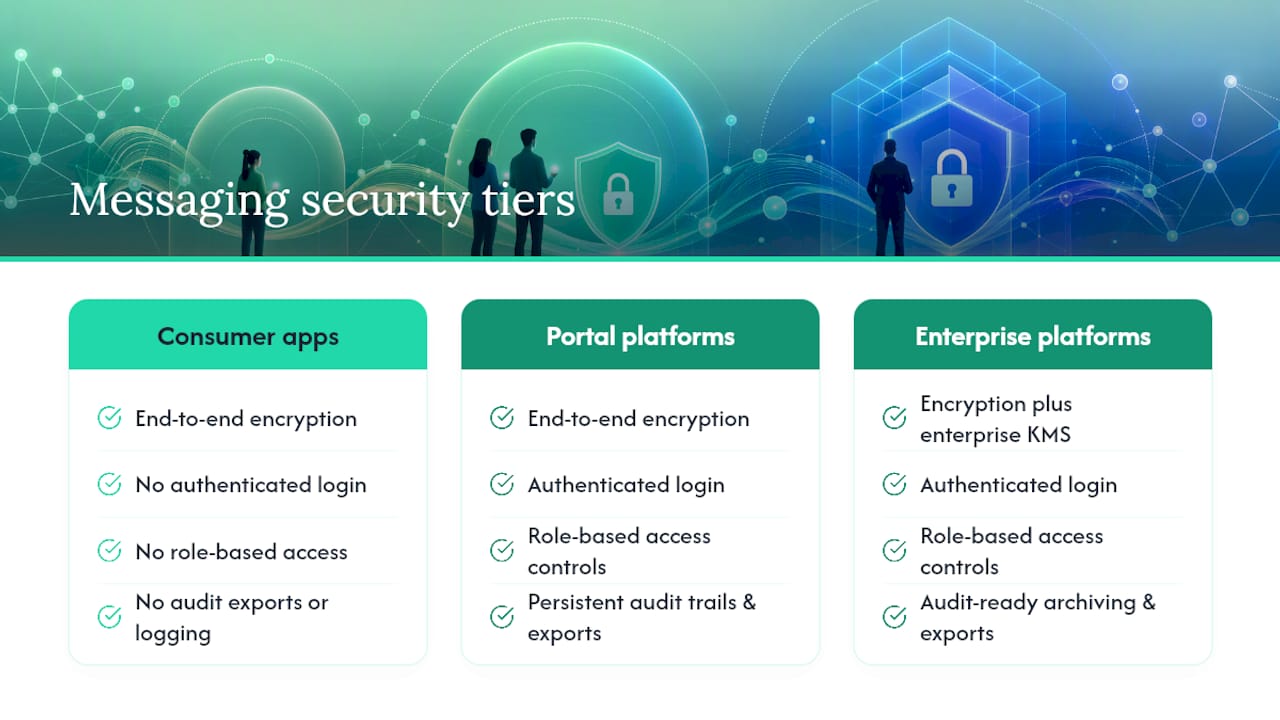
Enterprise and financial-services platforms go further still, adding enterprise key management and audit-ready archiving built for regulatory review rather than general client communication. Unblu's approach to financial-services messaging illustrates this tier: the differentiator isn't encryption strength, it's whether keys are managed at an organizational level and whether every message can be pulled into a compliance export on demand.
The practical takeaway: match the tier to your exposure. A freelance photographer emailing proofs doesn't need enterprise key management. A CPA handling tax documents or a clinician handling PHI does need audit-ready logging and a signed BAA, regardless of how strong the underlying encryption is.
Where Secure Messaging Systems Actually Break Down
Encryption rarely fails on its own. The weak points almost always sit at the edges of the system, where human behavior or configuration mistakes create an opening that strong cryptography can't close.
Phishing remains the most common entry point. A client receives a convincing fake login page, enters their portal credentials, and an attacker gains access without ever touching the encryption itself. Credential reuse compounds this: a client who uses the same password across five services hands an attacker a way in if any one of those services gets breached.
Misdirected messages cause damage that's entirely preventable but stubbornly common. Autocomplete in an email client, or a portal with poor recipient verification, can route a sensitive file to the wrong person in seconds. This is exactly why portal-based systems with verified client identities reduce risk compared to open email threads, where a single mistyped address has no safety net.
Metadata leakage is the quieter risk. Even when message content is encrypted, older transport protocols exposed details like which domain a device was connecting to. Newer standards close this gap: Encrypted Client Hello hides fields like the SNI during the TLS handshake, so an observer on the network can no longer see which service a client is reaching.
Stale access is the final common vector. Former employees or contractors who retain portal access long after their role ends represent a live vulnerability that has nothing to do with encryption strength and everything to do with access review discipline.
Training Your Team to Use Secure Messaging Correctly
The strongest encryption in the world doesn't stop someone from pasting a client's Social Security number into an unencrypted text message out of habit. Training is what closes that gap, and it works best when it's specific rather than generic.
Start with a clear definition of what counts as sensitive: financial account numbers, health details, legal case specifics, and anything a client would reasonably expect kept private. Staff need to know this isn't a judgment call made in the moment.
Run a phishing simulation at least once during onboarding. Most people who've never seen a fake portal login page will click it; most people who have seen one, even once, catch the next attempt. That single exposure changes behavior more than a policy document ever will.
Make secure uploads the default habit for anything containing personal data, rather than typing details directly into a message. This is a workflow change more than a technology change, and it needs repetition to stick.
Finally, build a short incident-response reflex into the team: anyone who sends something to the wrong recipient reports it immediately rather than trying to quietly fix it. Faster reporting means faster containment and a cleaner audit trail if the incident needs review later.
Connecting Secure Messaging to the Tools You Already Use
Secure messaging that lives in isolation from your other business tools creates its own risk: staff route around it because it's inconvenient, and convenience usually wins over policy. The fix is picking a platform where messaging connects naturally to the workflows you already run.
Calendar and scheduling integration means an appointment reminder or reschedule request doesn't require a separate email chain outside the secure system. Payment integration matters just as much. When invoicing and payment processing sit inside the same portal as the conversation, there's no need to email a client a link to a separate payment page, which is exactly the kind of side channel that creates exposure.
Document and e-signature workflows benefit the most from integration. A contract that gets discussed, revised, signed, and invoiced without ever leaving the portal has a single, continuous audit trail. Split that same process across four tools and you've created four separate places a breach or mistake could happen.
For teams already running accounting or CRM software, look for platforms that offer at least basic data export or API access, so client records don't become an island. A client portal built for professional services should reduce the number of logins your team needs each day, not add one more system to check.
Mobile Security: Where Convenience Meets Risk
Clients and staff increasingly read and reply to secure messages from their phones, and mobile introduces risks that don't exist on a locked-down office desktop. A lost or stolen phone with an active portal session is a real exposure point if the app doesn't enforce its own authentication layer independent of the phone's lock screen.

Look for platforms that support biometric or PIN-based app locks in addition to the phone's native security, session timeouts that log a user out after inactivity, and remote session revocation so a lost device can be cut off immediately. Public Wi-Fi is a secondary concern: modern TLS with Encrypted Client Hello reduces what an attacker on the same network can observe, but a platform that also supports certificate pinning adds another layer against interception attempts.
Push notifications deserve a second look too. A notification preview that displays a client's message content on a locked screen defeats the purpose of the encrypted app underneath it. The safest configuration shows that a message arrived without previewing what it says.
For file uploads and downloads on mobile, malware scanning matters as much as it does on desktop, since a compromised attachment doesn't care what device opened it. Teams issuing company devices should pair app-level protections with basic mobile device management, so a lost phone can be wiped remotely rather than just logged out.
What This Guide Gets Right That Most Vendor Pages Don't
Most vendor pages sell encryption strength as if it's the whole story. It isn't. The research on clinical secure messaging makes this explicit: platforms that improve follow-up and engagement do it because of triage protocols and away-message discipline, not because the cipher is stronger than a competitor's. Encryption is table stakes now. What separates a genuinely secure practice from a technically secure one is whether staff actually follow the access-review, training, and mistake-response steps that make the encryption matter.
The conventional advice oversells "HIPAA compliant" as a binary and undersells consolidation. A platform can check every compliance box and still leak client trust through five disconnected tools, each with its own login and its own audit gap. The businesses that get this right treat messaging, files, signatures, and payments as one continuous record, not five separate risks to manage.
If you're starting from scratch, prioritize the audit trail and portal authentication before you evaluate encryption marketing claims. Encryption you can't verify is a promise. An audit log you can export is proof.
Get Secure Messaging Without Adding Another Tool to Your Stack
If everything above sounds like a lot of separate boxes to check, encryption, authentication, audit logs, e-signatures, payments, that's because most businesses end up managing them as separate tools. Realclient built a client portal platform specifically so freelancers, agencies, and small firms don't have to stitch five systems together to get one secure client relationship. Messaging, file sharing with version history, e-signatures, and Stripe or PayPal payments all live inside a single branded portal with role-based access and a consolidated audit trail.

That means the audit-ready recordkeeping covered throughout this guide isn't a separate compliance project. It's built into the same portal your clients already use to review project updates and sign contracts. If you're ready to stop reconciling five tools for one client relationship, start a trial and set up your first branded portal at Realclient, or check plan details on the pricing page to see which tier fits your client volume.
Frequently Asked Questions About Secure Client Messaging
Is secure client messaging the same as encrypted email? No. Encrypted email protects a single message in transit, but it doesn't provide portal authentication, audit logging, or role-based access the way a dedicated secure messaging platform does.
Do freelancers and small businesses actually need HIPAA-level compliance? Only if you handle protected health information, but the same controls, audit trails, access review, and encryption, protect any sensitive client data, including financial and legal records.
What's the biggest mistake businesses make when adopting secure messaging? Skipping the policy step. Buying a compliant platform doesn't help if staff aren't trained on what counts as sensitive data or how to respond when a message goes to the wrong recipient.
Can clients use secure messaging without technical skill? Yes, most portal-based systems are designed for one-click login through an invitation link or SSO, which is simpler for clients than managing encrypted email tools themselves.
How do read receipts help with compliance? They create a timestamped record proving a client received and opened a message, which matters for disputes over missed deadlines or contract terms.
What should happen immediately if PHI is sent to the wrong client? Document the incident in the audit log, notify the affected client according to your policy, and retain an export of the removed message for legal review.
Does end-to-end encryption alone make a platform compliant? No. Compliance also requires signed BAAs where applicable, retention policies, exportable audit logs, and documented staff procedures.
Why does portal-based authentication matter more than a strong password? It removes the email link as an attack surface entirely, since access requires logging into an authenticated system rather than clicking a link that could be intercepted or forwarded.
Are consumer messaging apps secure enough for client communication? They protect message content well but usually lack the audit exports, retention controls, and role-based access that regulated professionals need for compliance review.
How often should access permissions be reviewed? A quarterly review catches former employees or contractors who still have portal access long after they should have been removed.
What's the role of malware scanning in file sharing? It stops an infected attachment from a client's device from compromising your systems or spreading to other client files stored in the same portal.
Does mobile use weaken secure messaging? It can, if the app lacks its own authentication layer, session timeouts, or remote wipe capability, since a lost phone becomes the weak point instead of the encryption itself.
How does integration with payments and e-signatures improve security? It consolidates what would otherwise be separate audit trails across multiple tools into one continuous, exportable record for each client relationship.
What training reduces phishing risk the most? A single simulated phishing attempt during onboarding changes behavior more than a written policy, since most people who've seen a fake login page once catch the next attempt.
Should away messages be used for sensitive client threads? Yes. Away messages paired with clear response-time expectations reduce message fatigue and prevent clients from escalating unnecessarily through insecure side channels.
What is Encrypted Client Hello and why does it matter for messaging apps? It's a TLS extension that hides metadata like the destination domain during the connection handshake, reducing what an observer on the network can learn even when content is encrypted.
Can secure messaging platforms integrate with accounting or CRM software? Many offer data export or API access so client records don't stay isolated, though the depth of integration varies significantly by platform.
What proof should a business ask a vendor for before trusting their compliance claims? Request a sample audit log export and a signed BAA if applicable, since marketing language alone doesn't confirm real technical controls.
How does RealClients handle secure messaging differently from a standalone chat app? It combines messaging with encrypted file storage, e-signatures, and payments in one branded portal, so the audit trail covers the entire client relationship, not just the conversation.
Sources
For deeper technical and compliance context, see the PMC review on secure messaging in health care on adoption and safety protocols, RFC 9849 on Encrypted Client Hello, the Wikipedia overview of secure messaging for foundational definitions, and RealClients' security page for platform-specific controls.
- PMC article on secure messaging in health care
- RFC 9849: Encrypted Client Hello (ECH)
- Secure messaging — Wikipedia