
An audit trail for clients is the timestamped record inside your portal of every message, file upload, version, approval, e-signature, and payment tied to a project. The core benefit is simple: it turns "I thought you approved that" into a dated fact both sides can see. For freelancers and small studios, that record is what prevents a stalled invoice from turning into a stalled relationship. Some client portal providers report substantial invoicing through portals built on this exact structure last year.
TL;DR:
- Implementing a timestamped audit trail inside your portal reduces disputes and speeds up invoicing by providing clear proof of approvals, file versions, and feedback.
- Essential features include per-file logging, version control with rollback, explicit approval actions, scoped client views, and automated approval-to-invoice links.
- Consistent folder structures, clear approval clauses in contracts, and regular testing ensure the audit trail is reliable and legally binding.
- Using a unified, branded portal like RealClients streamlines approvals, file management, and payments, avoiding disorganized scattered tools and saving time.
- Securing the audit trail with tamper-proof records, role-based access, and encryption ensures its integrity and compliance, especially for sensitive or high-stakes projects.
Table of Contents
- Why a Client Audit Trail Protects Your Revenue
- What Portal Features Actually Create the Record
- How to Set Up an Audit Trail in Your Portal
- Making Approvals Legally and Operationally Binding
- Templates You Can Copy Into Your Next Project
- How RealClients Handles This in Practice
- Keeping the Audit Trail Itself Secure
- Staying Compliant Without Overcomplicating Things
- Turning the Log Into a Report a Client Can Actually Read
- Setting Up Alerts Without Training Clients to Ignore Them
- Who Can See the Audit Trail, and How They Prove It's Them
- What the Templates Won't Tell You
- Set Up Your Client Audit Trail With RealClients
- Sources
Why a Client Audit Trail Protects Your Revenue
Most billing disputes don't start with bad work. They start with bad records. A client approves a homepage design in a Zoom call, forgets they said yes, and disputes the invoice three weeks later. A freelancer emails a final PDF, the client replies "looks great!" to the wrong thread, and neither party can prove what "great" referred to. These aren't edge cases. They're the default failure mode when approval lives in memory instead of in a system.
Scattered communication is the real culprit. When feedback lives across email, Slack, texts, and phone calls, nobody, including you, can reconstruct what actually happened. Timestamping messages, files, and approvals in a single canonical channel prevents scope creep and cuts down on disputes because there's one place to check, not five.
Version history solves a related problem: proving what was delivered and when. A reliable audit trail records every version, change, comment, and approval with a timestamp, which makes rollback and accountability possible instead of theoretical.
Pro Tip: If a client disputes an invoice, the first thing to check isn't your memory. It's the portal timestamp on their last approval. Let the record do the arguing.
Studios running one to five people also pay a hidden tax when tools are scattered: reconciling files, approvals, and invoices across separate apps eats hours that never show up on a timesheet. Centralizing approvals, file sharing, and invoicing in one system reduces that reconciliation work and tightens post-delivery billing accuracy.
What Portal Features Actually Create the Record
Not every "activity log" is useful. Some portals track clicks and page views, which tells you nothing about whether a deliverable was approved. A usable audit trail needs a specific set of features working together, not a generic activity feed.
- Per-file timeline logging. Every upload, view, comment, download, and approval should record the timestamp and the user who took the action, not just "a file was updated."
- Version control and rollback. When a client asks for "the version from last Tuesday," you need to produce it in seconds, not dig through your sent folder.
- Formal approval actions with a named approver. A client clicking a labeled "Approve" button and having that action recorded is worth more than ten enthusiastic emails.
- One feedback channel per deliverable. Comments and revision requests attached directly to the file in question, not scattered across three apps.
- Scoped client views and permission controls. Clients see their project, their files, their invoices, nothing else, and nothing they shouldn't.
- Automated approval-to-invoice linkage. The moment a deliverable is approved, that action should be able to trigger the next invoice automatically.
Formal approval workflows with timestamped confirmations reduce ambiguity far more effectively than a "sounds good" reply buried in an inbox. Enforced folder structure matters just as much as the approval button itself. Separating Internal, Client Uploads, and Deliverables folders, paired with automatic delivery to the portal, creates a searchable activity log instead of a guessing game about where the final files live.
Pro Tip: Name your deliverables folder the same way on every project. "Final Deliverables_v3" beats "stuff for client" every single time a dispute lands on your desk.
How to Set Up an Audit Trail in Your Portal
You don't need a new tool to start this. You need a consistent structure inside the one you already have. Here's the sequence that works whether you're on RealClients, a competitor, or something you cobbled together last year.
- Pick one canonical deliverables view per project and use it every time. If clients sometimes find files in email and sometimes in the portal, your audit trail already has a hole in it.
- Set folder structure once and reuse it. Internal, Client Uploads, and Deliverables should exist on project one and project fifty, using the same names each time.
- Turn on version history so every revision keeps its own timestamp and file link, not just the newest overwrite.
- Require an actual approval button, not a reply. "Approved" typed into an email thread is weaker evidence than a logged click tied to a named account.
- Name your approver explicitly. If three people from the client side can approve work, you don't have an audit trail, you have a rotating cast of maybes.
- Automate the notification that matters, and only that one. Configure alerts for "ready for review" and "approval required," not every minor file touch, since notification overload trains clients to ignore the portal entirely.
- Connect approval to invoice generation. The gap between "client said yes" and "invoice sent" should be minutes, not a manual task on your Friday to-do list.
- Run a dry test before your first paid deliverable on the new setup. Upload a dummy file, approve it yourself, confirm the invoice trigger fires correctly.
Set it up once and it runs on autopilot for every client after that.
Making Approvals Legally and Operationally Binding
A timestamp is only as strong as the agreement behind it. Your contract should name a specific person as the approver and state plainly that their portal approval is what triggers payment or phase closure. That single sentence eliminates the "well, my assistant said it looked fine" argument before it starts.
- Add a clause naming the approver by name and title, not just "the client."
- Define approval as the trigger for invoicing, not a vague follow up step.
- Set a response window, five business days is common, after which unapproved work is deemed accepted.
- Cap revision rounds per deliverable so feedback doesn't spiral past what you quoted.
- Walk every new client through the portal during kickoff, showing them exactly where approvals and files live.
Naming a single approver in the contract and requiring a written, dated approval sentence is what makes the record legally usable, not just internally convenient. Once a project wraps, archive the final package, deliverables, approvals, and invoices together, so you have a complete answer ready if a dispute surfaces months later.
Templates You Can Copy Into Your Next Project
Templates remove the friction of remembering to log things correctly every time. Copy these into your onboarding docs and adjust the wording to your voice.
Kickoff scope recap (send within 24 hours of the first call): "Confirming what we discussed today: [scope]. I'll upload drafts to your portal deliverables folder, and each version will be numbered so we can reference it clearly."
Delivery confirmation: "Version 3 of [deliverable] is now in your portal, ready for review. Please use the Approve button once it meets your expectations. Approval triggers the next invoice per our agreement."
Named-approver sign-off clause for your SOW: "[Client name] designates [approver name] as the sole authorized approver for deliverables under this agreement. Portal approval by this individual constitutes final acceptance and triggers invoicing."
Final-archive checklist: final deliverable file, approval timestamp and approver name, related invoice, and a one-paragraph handoff note. Bundling these four elements together gives you a defensible record if a dispute resurfaces later and a fast reference if the client returns for more work.
How RealClients Handles This in Practice
RealClients builds the elements above into one branded workspace instead of a stack of disconnected tools. Project updates, file version timelines, e-signatures, and Stripe or PayPal payments all live under client-scoped views, so each client sees only their own project history. That structure helps portals move substantial invoiced work by having approvals and payments sit in the same system instead of multiple inboxes. If you're weighing document version history specifically, how freelancers use version history to stop billing disputes covers the mechanics in more depth than a features list can.
Keeping the Audit Trail Itself Secure
An audit trail is only trustworthy if it can't be quietly edited after the fact. Records need to be tamper resistant, meaning approvals and timestamps are locked once logged, not editable by either party after the click happens. Encryption in transit and at rest protects files and messages as they move between your device, the portal, and the client's browser. Role-based access controls matter just as much: your team members should only see the projects assigned to them, and clients should never see another client's files by accident.
Regular backups protect against the worst-case scenario, a server failure wiping months of approval history right before a dispute. Look for portals that log administrative actions too, not just client actions, so if a team member deletes a file or edits a record, that action leaves its own trace. If you're vetting a platform's security posture before committing, what buyers should verify about SOC 2 compliance for client portals is a reasonable starting checklist for the questions to ask a vendor directly.
None of this needs to be visible to your clients day to day. It just needs to hold up the one time someone tries to argue the record was altered.
Staying Compliant Without Overcomplicating Things
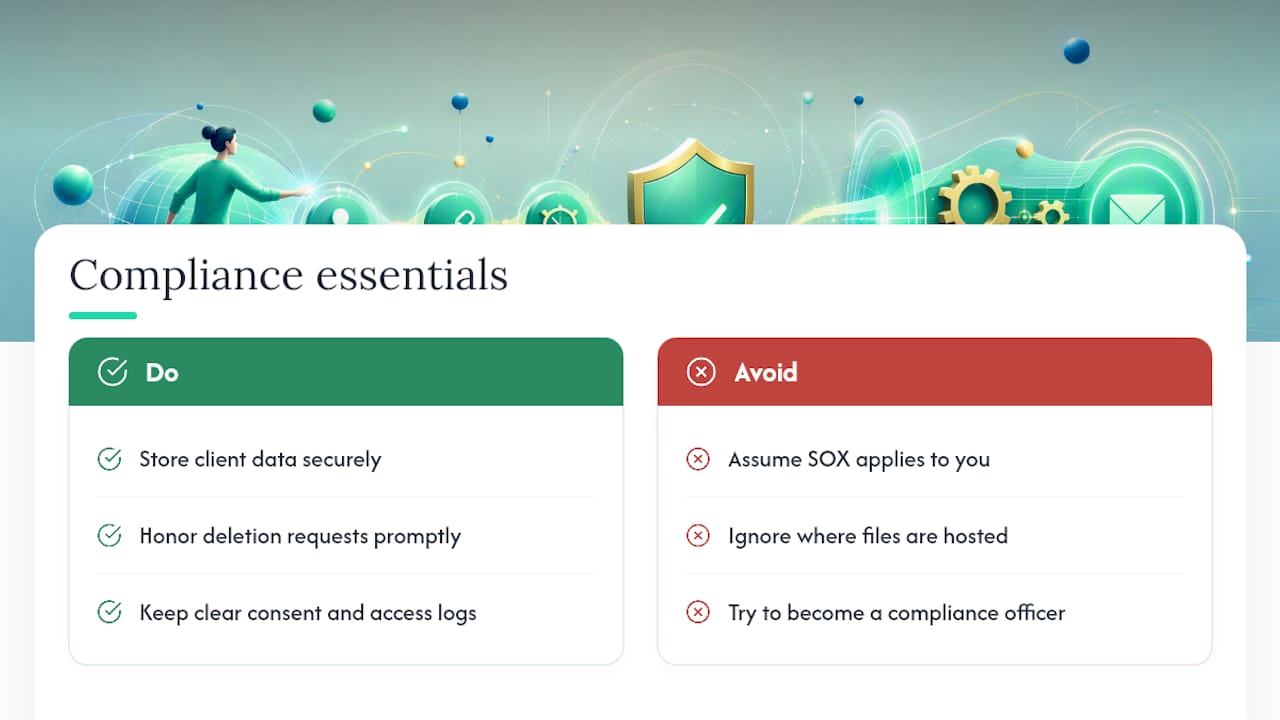
If you work with clients in the European Union, GDPR governs how you store and process their personal data, including names, contact details, and payment information tied to their portal activity. That means clients have a right to know what data you hold and, in many cases, a right to have it deleted on request. Your portal provider's data handling practices become your compliance posture by extension, so it's worth confirming where files are hosted and how deletion requests get fulfilled with detailed guidance in the Audit Preparation for Accounting Teams: Checklist & Timeline.
Sarbanes Oxley (SOX) applies to publicly traded companies and their financial reporting controls, not to independent freelancers or small agencies managing client deliverables. If you're a solo consultant or a five-person studio, SOX almost certainly doesn't apply to your work directly, though it can matter if you're a vendor to a publicly traded client who has their own compliance requirements to satisfy.
The practical takeaway for most readers of this article: you don't need to become a compliance officer. You need a portal that stores client data securely, lets you honor a deletion request if one comes in, and keeps a clear record of who consented to what. That's a far smaller task than it sounds, and it overlaps almost entirely with the same features that make your audit trail useful in the first place, secure storage, access controls, and clear logging.
Turning the Log Into a Report a Client Can Actually Read
A raw activity feed is not something you hand a client. It's a technical list of timestamps and file names that means nothing without context. Turning that feed into a usable report means filtering it down to what matters. A useful client-facing export typically includes the deliverable name, the approval date, the named approver, the invoice number it triggered, and a link to the final file version.
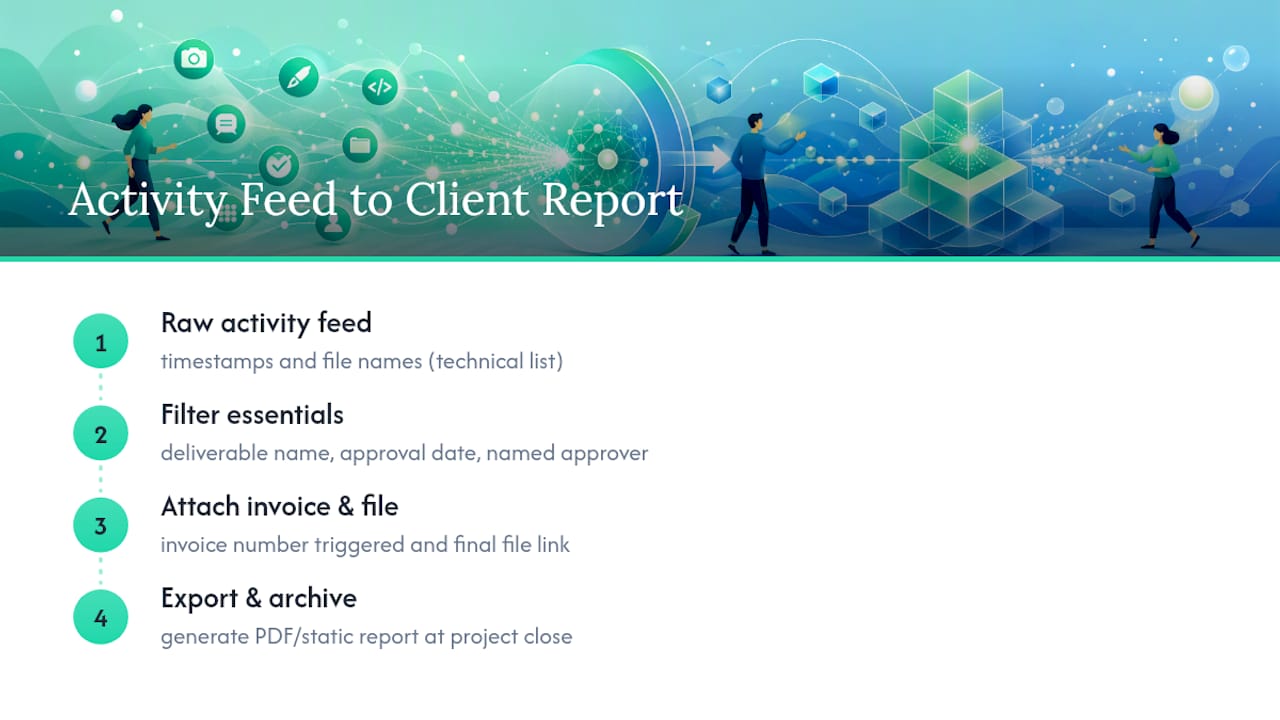
Most portal platforms let you generate this as a PDF or shareable link on demand, which matters most in two situations: a client requesting proof of project history for their own records, or a dispute where you need to show a clear timeline fast. Export the report, don't just point to the live portal, because a static document is easier for both sides to reference in an email or a legal conversation without either party needing portal access at that moment.
Build the habit of generating one of these reports at project close, even when nothing is in dispute. It becomes part of your final archive package, and it saves you from digging through months-old activity six weeks after the project wrapped, when a client suddenly asks "can you send me a summary of what we approved?"
Setting Up Alerts Without Training Clients to Ignore Them
Real-time notifications are what make an audit trail feel alive instead of archival. The mistake most freelancers make is over-notifying: an alert for every comment, every file view, every minor edit. Clients learn fast that most of these pings don't require action, and they start ignoring all of them, including the ones that matter.
The fix is narrower notification rules. Alert clients when a deliverable is ready for review, when their approval is required to move to the next phase, and when an invoice has been generated following their approval. That's close to the full list. Configuring notifications for meaningful events rather than every update keeps the portal feeling relevant instead of noisy.
On your side as the service provider, the calculus flips a little. You want to know immediately when a client uploads a file, leaves a comment, or clicks approve, because those are the moments that move your project and your invoice forward. Set your own alerts more aggressively than your clients', and check that your portal lets you split those settings rather than forcing one notification policy on both sides.
Who Can See the Audit Trail, and How They Prove It's Them
An audit trail is worthless if the wrong person can access it, or if you can't prove the right person did. Client-scoped permissions are the first layer: each client should see only their own project, their own files, and their own invoice history, never a peek into another client's workspace. This isn't just good manners. It's what makes the record legally credible, since a shared or leaky view undermines the claim that a specific approval came from a specific person.
Authentication is the second layer, and it's where a lot of small studios cut corners by sharing a single generic login across a client's team. That habit destroys the value of a named-approver clause, since you can no longer prove which individual clicked approve. Individual logins per client contact, ideally with two-factor authentication available, close that gap. If your named approver is the only person with credentials to that project, their approval click means something specific and defensible.
For higher-stakes work, contracts or real estate transactions, for instance, consider requiring the client to confirm their identity again at the point of e-signature, not just at initial login. Custom folder and permission structures inside your portal make this kind of scoped, per-client control realistic to maintain even as your client list grows past a handful of active projects.
What the Templates Won't Tell You
Over-logging trains clients to ignore their portal entirely, which defeats the purpose. The judgment call that actually matters is picking the two or three moments per project where a record is non-negotiable: the scope recap, the deliverable approval, and the sign-off that closes the phase. Everything else can stay lightweight.
Where most freelancers get this wrong is treating the audit trail as a defensive tool they'll need someday. Wrong framing. Its bigger job is speeding up your cash flow right now, because a client who can click one button to approve a deliverable pays faster than a client stuck sending a "looks good, I guess?" email into the void. Prioritize the approval-to-invoice link before you worry about anything else in this article. Get that one connection working cleanly, and half of the disputes you'd otherwise spend hours untangling never happen in the first place.
— Real
Set Up Your Client Audit Trail With RealClients
RealClients is the alternative to stitching together email, Google Drive, and a separate invoicing app for every client, one branded portal where approvals, file versions, and payments already talk to each other. Every feature described above, per-file timelines, named-approver sign-off, scoped client views, and automated approval-to-invoice triggers, comes built into the platform rather than requiring you to configure five different tools to work together.

Setting it up takes an afternoon, not a migration project. Check the pricing plans to find the tier that fits your current client count, then start a free trial on the main platform to build your first branded portal.
Pro Tip: During your trial, run one full test project end to end, upload a dummy deliverable, click approve yourself, and confirm the invoice trigger fires correctly before you invite your first real client in.
Sources
- The Complete Guide to Client Portal Software for Agencies
- Why Timestamped Messages & Files Can Save Your Freelance Career - Schemon
- Revision Management Software: Best Practices for Agencies | Revue