
Automated payment reminders are scheduled messages sent to clients before, on, and after an invoice due date, triggered automatically by your billing platform without any manual effort. The recommended approach: set up a tiered cadence (pre-due, on-due, and overdue steps), attach a direct payment link to every message, and configure your system to cancel pending reminders the moment payment posts. Here's how to get started in under an hour:
- Enable reminders in your billing tool. Platforms like Stripe support automatic reminders tied to invoice due dates and cancel pending messages the moment payment is confirmed.
- Add a direct payment link. Every reminder should include a hosted payment page link so clients can pay in one click, not three.
- Create one friendly pre-due template. A short, polite message sent 3–7 days before the due date sets the tone and catches clients before they forget.
Key Takeaways
Automated payment reminders work best when they combine a tiered cadence, a direct payment link, and auto-cancel behavior so clients who pay never receive a redundant overdue message.
| Point | Details |
|---|---|
| Start with high-value invoices | Pilot your cadence on your largest invoices first to catch tone or timing issues before they affect key clients. |
| Use a tiered cadence | Send reminders at D-7, D+0, D+7, D+14, D+30, and D+60 relative to the due date, adjusting for client history. |
| Auto-cancel on payment | Configure your platform to stop pending reminders the moment an invoice is marked paid, preventing awkward duplicate messages. |
| Track DSO and click-to-pay rate | These two metrics tell you whether your reminders are reaching clients and whether the payment link is working. |
| Realclient centralizes the workflow | Realclient combines invoicing, scheduled reminders, Stripe/PayPal payments, and auto-stop behavior inside one branded client portal. |
Table of Contents
- Why automated reminders help you get paid faster
- When should you send payment reminders?
- What to include in each reminder, plus copy-ready templates
- How to set up automated reminders in Stripe and Zoho
- Tone, personalization, and compliance rules to follow
- How to measure and improve your reminder performance
- Your implementation checklist
- How Realclient handles payment reminders inside your client portal
- How to handle disputed invoices or payment delays triggered by reminders
- What actually matters when you implement reminders
- Realclient makes payment reminders part of your client experience
- Sources
Why automated reminders help you get paid faster
Chasing unpaid invoices by hand is one of the most draining tasks in a small business. You draft an email, wait, draft another, feel awkward, and still don't know if the client even opened it. Automated billing reminders remove that friction entirely.
The direct benefits are real and measurable:
- Fewer manual follow-ups. Your team stops writing the same email for the tenth time this month.
- Shorter Days Sales Outstanding (DSO). Reminders keep invoices top of mind, which shortens the gap between invoice date and payment date.
- Preserved client relationships. A polite automated message feels less confrontational than a personal call about an overdue bill.
- Fewer errors. Automation removes the risk of forgetting to follow up or sending the wrong invoice number.
The scale of unpaid receivables is significant. Urban Institute research shows that a large share of past-due debt is owed to institutions that already have billing systems in place, suggesting that the problem isn't always willful non-payment. Often, clients simply forget. A well-timed reminder is enough to prompt action.
Healthcare billing offers a useful parallel. The American Hospital Association reported increases in delayed or missing payments in recent quarters, and University of Utah Health's billing team found that clearer, proactive billing communications reduce confusion and accelerate payments by making amounts and payment options obvious at first contact. The same principle applies to any freelancer or small business: clarity at the right moment gets invoices paid.
Stat to know: Proactive billing communications that clearly state the amount due, the due date, and a direct payment option consistently outperform reactive follow-ups in reducing time-to-payment across industries.
Pro Tip: Before rolling out reminders to your entire client list, pilot the cadence on your highest-value invoices first. You'll catch tone or timing issues on a small group before they affect your most important relationships.
When should you send payment reminders?
Timing is everything. Send too early and clients ignore you. Send too late and the invoice has already aged past the point where a polite nudge works. Here's a practical cadence that works for most small businesses and freelancers:
Baseline cadence (recommended starting point):
- 7 days before due date — Friendly courtesy reminder. Confirm the invoice details, include the payment link, and keep the tone warm.
- On the due date — Brief, neutral reminder. State the amount and due date clearly. No guilt, no pressure.
- 7 days overdue — Polite follow-up. Acknowledge that things get busy and offer a direct line for questions.
- 14 days overdue — Firmer tone. Reference the original due date, note the outstanding balance, and ask for a response.
- 30 days overdue — Escalation step. Mention next steps (late fees, account hold, or referral to collections) if applicable.
- 60 days overdue — Final demand or handoff to collections. This step should trigger a human review before sending.
Conservative cadence (for long-term service relationships):
- 5 days before due date — Courtesy notice
- On due date — Neutral reminder
- 14 days overdue — Polite follow-up
- 30 days overdue — Firm escalation
Firm cadence (for repeat late payers or high-value invoices):
- 7 days before due date — Courtesy reminder
- 3 days before due date — Second pre-due alert
- On due date — Neutral reminder
- 5 days overdue — Firm follow-up
- 14 days overdue — Escalation with late fee notice
- 30 days overdue — Final demand
Segmentation rules: Shorten the cadence for clients with a history of late payments or for invoices above $5,000. Lengthen the gap between steps for long-term clients with a clean payment record. Invoices on active payment plans should be excluded from the standard overdue sequence entirely.
What to include in each reminder, plus copy-ready templates
Every payment reminder, regardless of channel, needs six core elements:
- Invoice number and amount due — clients often have multiple open invoices
- Due date (or days overdue, for late reminders)
- Direct payment link — a hosted page where they can pay immediately
- Clear call to action — one button or link, not three options
- Contact for questions — an email or phone number for disputes
- Payment options — credit card, ACH, PayPal, or whatever you accept
Subject lines matter more than most people realize. A subject like "Invoice #1042 due Friday — pay in one click" outperforms "Reminder" every time. Include the invoice number and a time reference in every subject line.
Email template — friendly (pre-due):
Subject: Invoice #[NUMBER] due [DATE] — quick link to pay
Hi [CLIENT NAME],
Just a heads-up that Invoice #[NUMBER] for $[AMOUNT] is due on [DATE]. You can pay directly here: [PAYMENT LINK].
Let me know if you have any questions about the invoice. Happy to help.
Thanks, [YOUR NAME]
SMS template — on due date:
Hi [CLIENT NAME], Invoice #[NUMBER] for $[AMOUNT] is due today. Pay here: [SHORT LINK]. Reply with questions.
In-portal notification — 7 days overdue:
Invoice #[NUMBER] is 7 days past due. Balance: $[AMOUNT]. Please review and pay at your earliest convenience: [PAYMENT LINK]. Contact us at [EMAIL] with any questions.
Keep SMS under 160 characters where possible. In-portal notifications should mirror the email tone but can be shorter since the client is already logged in and authenticated.
Pro Tip: For professional guidance on phrasing payment requests without damaging client relationships, the Realclient guide on asking for payment professionally covers tone, timing, and exact language that keeps things cordial.
How to set up automated reminders in Stripe and Zoho
Setting up reminders in Stripe
Stripe's invoicing settings let you configure automatic email reminders before, on, or after an invoice's due date, with links to a Stripe-hosted customer portal or your own payment page. Here's the setup path:
- Go to Settings > Billing > Automatic collection in your Stripe Dashboard.
- Enable Send reminders and choose your trigger points (before due, on due, after due).
- Set the number of days for each trigger (e.g., 7 days before, 0 days on due date, 7 and 14 days after).
- Link each reminder to your hosted invoice page or a custom payment URL.
- Enable Auto-cancel so pending reminders stop the moment Stripe records a payment or confirms one is processing.
- Test using a sandbox invoice before going live.
Stripe's auto-cancel behavior is critical. Without it, a client who pays on day 8 will still receive the day-14 overdue message, which damages trust and creates confusion.
Setting up reminders in Zoho Invoice (or similar tools)
Most invoicing platforms follow a similar pattern:
- Open Settings > Reminders (or Payment Reminders in your billing module).
- Map the reminder trigger to the invoice due date field.
- Set your cadence steps (before/on/after due date, in days).
- Enable email and, if available, SMS channels.
- Insert invoice tokens:
{{invoice_number}},{{amount_due}},{{due_date}},{{payment_link}}. - Enable auto-stop when invoice status changes to "Paid."
- Run a test with three real invoices (one pre-due, one on-due, one overdue) before full rollout.
One important behavior note: if a client is on an active payment plan, exclude that invoice from the standard overdue sequence. Sending a "30 days overdue" message to someone making agreed installments destroys trust fast.
Tone, personalization, and compliance rules to follow
Getting the mechanics right is half the job. The other half is making sure your reminders don't create legal or relationship problems.
Tone and personalization:
- Always use the client's name and reference the specific invoice number. Generic "Dear Customer" messages feel impersonal and get ignored.
- Avoid threatening language in early reminders. Phrases like "legal action will be taken" belong only in a final demand, if at all.
- Match tone to the relationship. A freelancer with a 3-year client should write differently than a business chasing a new client's first invoice.
Privacy and security checklist:
- Use secure, hosted payment pages only. Never include full card numbers, bank account details, or sensitive financial data in an email or SMS.
- Respect Do Not Contact preferences. If a client has opted out of marketing emails, check whether your reminder system uses the same suppression list.
- For SMS reminders, comply with the Telephone Consumer Protection Act (TCPA). You need prior express written consent before sending automated texts for billing purposes.
- Review your platform's security practices before enabling SMS or multi-channel sends.
Red flags that require human review before sending the next automated message:
- Client has formally disputed the invoice
- You've received a chargeback notification
- Emails are bouncing repeatedly (possible contact change)
- Client has sent a legal threat or mentioned an attorney
- Invoice is tied to a contract dispute or scope disagreement
Pro Tip: For any invoice over $2,500 that's more than 21 days overdue, pick up the phone before sending the next automated message. A 5-minute call resolves more than three more emails.
How to measure and improve your reminder performance
You can't improve what you don't measure. These are the metrics that matter:
Days Sales Outstanding (DSO): The average number of days between invoice date and payment date. Lower is better. Track it monthly and compare before and after enabling reminders.
Invoice-to-pay time: Similar to DSO but measured per invoice. Useful for spotting which client segments pay fastest.
Reminder open rate: The percentage of reminder emails opened. A low open rate signals a subject line or sender name problem, not a payment problem.
Click-to-pay rate: Of clients who opened the reminder, how many clicked the payment link? Low click-to-pay usually means the payment link is buried or the CTA is unclear.
Collection rate: The percentage of invoiced dollars collected within 90 days. This is your headline number.
A/B test ideas to run:
- Subject line: "Invoice #1042 due Friday" vs. "Quick reminder: $450 due [DATE]"
- Send time: Tuesday 9 AM vs. Thursday 2 PM
- Channel: email only vs. email + SMS
- Cadence spacing: 7/14/30 days overdue vs. 5/10/21 days overdue
Measure the lift in click-to-pay rate or DSO, then roll out the winning variant to your full list. One test at a time keeps results clean.
Your implementation checklist
Copy this into your billing tool's runbook or settings notes before you go live:
- Enable reminders in your billing platform's settings.
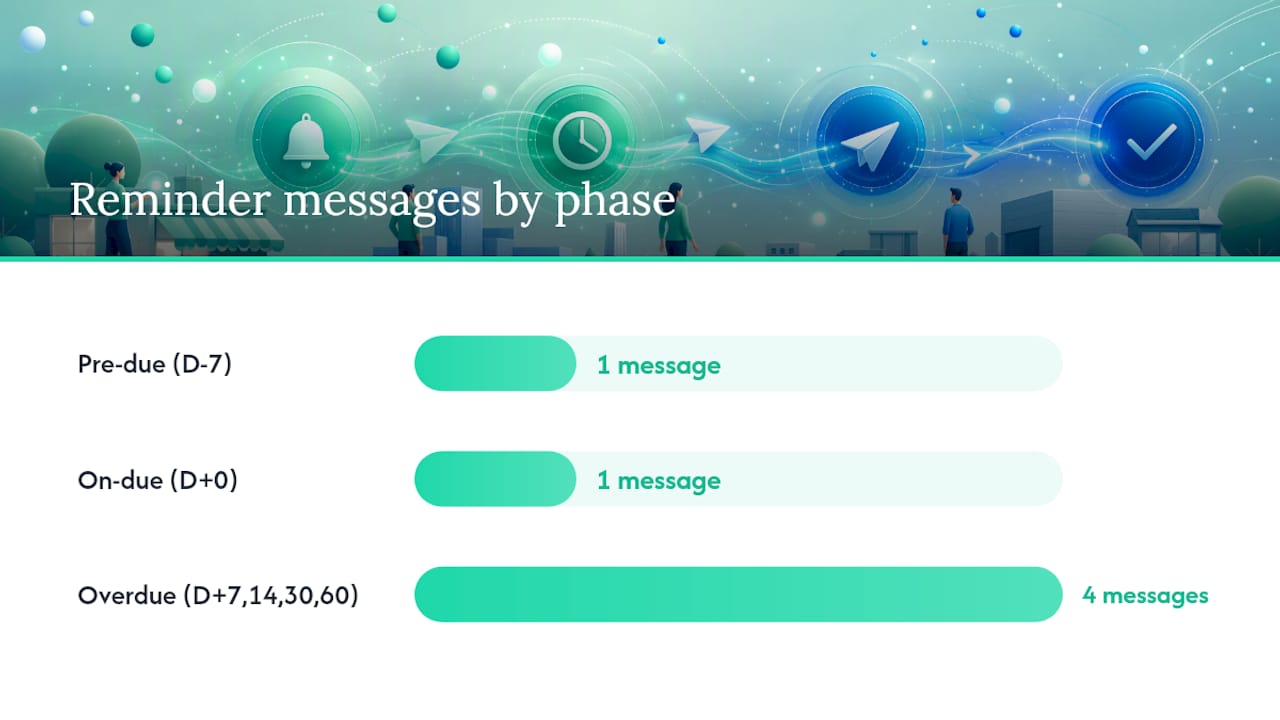
- Set your cadence: pre-due (7 days), on-due (0 days), overdue (7, 14, 30, 60 days).
- Add invoice tokens to every template:
{{client_name}},{{invoice_number}},{{amount_due}},{{due_date}},{{payment_link}}. - Include a direct payment link in every message, not just the first one.
- Enable auto-cancel on payment so reminders stop the moment the invoice is marked paid.
- Exclude payment plan invoices from the overdue sequence.
- Test with three invoices (pre-due, on-due, overdue) before full rollout.
- Set segmentation rules: firm cadence for invoices over $5,000 or clients with two or more late payments in the past year.
- Enable reporting and record your baseline DSO before launch.
- Define escalation triggers: notify your account manager or principal when an invoice hits 30 days overdue; escalate to final demand at 60 days only after human review.
Cadence rule snippet (copy into your runbook): Pre-due: D-7. On-due: D+0. Overdue: D+7, D+14, D+30, D+60. Auto-stop: on payment confirmed.
Escalation rule: Any invoice over $2,500 at D+21 triggers a manual call before the next automated step.
How Realclient handles payment reminders inside your client portal
Realclient is built for exactly this workflow. Inside a branded client portal, you get invoicing, automated reminders, and payment processing without stitching together three separate tools.
What Realclient includes for payment reminders:
- Built-in invoicing with scheduled reminder sequences
- Stripe and PayPal integration for direct, hosted payment links inside the portal
- Auto-stop behavior: reminders cancel automatically when a client pays
- Branded portal experience so clients see your logo, not a generic billing page
- Secure, bank-grade infrastructure for all payment communications
Trust signal: Realclient has facilitated over $48 million invoiced through client portals, making it one of the most actively used branded portal platforms for freelancers and small businesses.
For freelancers and agencies managing multiple clients, having reminders, contracts, file sharing, and payments in one place removes the coordination overhead that slows everything down. Clients pay faster when the payment link is inside a portal they already trust and use daily.
How to handle disputed invoices or payment delays triggered by reminders
Sometimes a reminder triggers a response you weren't expecting: a client replies saying the invoice is wrong, the work wasn't completed, or they're waiting on internal approval. This is actually useful information. Here's how to handle it cleanly.

When a client disputes an invoice:
Pause the automated sequence immediately. Most platforms let you manually suppress reminders for a specific invoice. Do this before the next scheduled message goes out. Then respond to the dispute directly, in writing, within 24 hours. Acknowledge the concern, reference the contract or scope document, and propose a resolution timeline.
If the dispute is about scope or deliverables, pull up your contract. Realclient's contract management tools let you reference signed agreements directly inside the portal, which makes resolving scope disputes faster and cleaner.
When a client says they need more time:
Offer a short extension or a payment plan, then update the invoice due date in your billing system. This resets the reminder cadence automatically in most platforms. Document the agreed terms in writing before adjusting anything.
When reminders go unanswered entirely:
After 30 days of silence, shift from automated to personal. A direct call or a personal email from the account owner carries more weight than a sixth automated message. If the invoice is large enough, consider a formal demand letter before referring to a collections agency.
The goal throughout is to resolve the issue without burning the relationship. Most payment delays are logistical, not adversarial. Treat them that way until the evidence says otherwise.
What actually matters when you implement reminders
Most guides focus on the mechanics: which platform, which cadence, which template. Those things matter. But the bigger mistake most small businesses make is treating automation as a set-and-forget system.
The real value of automated payment reminders isn't that they replace human judgment. It's that they handle the routine cases so your attention is free for the ones that need it. A client who pays within 7 days of the pre-due reminder never needs a phone call. A client who's 30 days overdue and hasn't opened a single message almost certainly does.
As your invoice volume grows, so should your reminder sophistication. Start with a single email cadence. Add SMS when you have consent and volume to justify it. Build segmentation rules once you have 6 months of payment history to work with. The multi-channel reminder strategy that works for a 50-client agency is overkill for a freelancer with 8 active clients. Match the complexity to the scale.
Realclient makes payment reminders part of your client experience
Freelancers and agencies using Realclient don't need a separate invoicing tool, a separate reminder scheduler, and a separate payment processor. The platform brings all of it into one branded portal your clients already use for project updates, file downloads, and contract signing.

When a client receives a payment reminder inside a portal that carries your brand, it feels like a professional touchpoint, not a collections notice. That distinction changes how clients respond. Realclient's Stripe and PayPal integrations mean clients can pay in one click from inside the portal, and the reminder sequence stops automatically the moment payment is confirmed.
Over $48 million has been invoiced through Realclient portals, and the freelancers and agencies driving that volume aren't using five tools to do it. They're using one. See how Realclient works or review pricing to find the plan that fits your client volume.
Sources
- Stripe — Invoicing automatic collection
- AHA — Report: delayed or missing payments increased in hospitals (Q1 report)
- Urban Institute — Most adults with past-due medical debt owe hospitals
- University of Utah Health — Explanation of Benefits and billing clarity
This article is general information, not a substitute for advice from a qualified financial advisor. Consult a qualified financial professional about your own circumstances before acting on anything here.