
The best payment processing for freelancers combines three things: an invoicing system that accepts cards for convenience, ACH for larger domestic invoices, and one low-fee international rail for cross-border clients. Send a payment link the moment work wraps, require a deposit up front, and you'll trade weeks of chasing invoices for days. The tradeoff is simple: cards cost more but remove friction, ACH saves money but takes longer, and the right mix depends on your clients.
TL;DR:
- Freelancers should combine integrated card payments, ACH transfers, and low-fee international rails for maximum efficiency and cost savings based on client needs.
- Using embedded payment links on invoices significantly reduces payment delays by simplifying the client checkout process.
- For invoices over $2,000, ACH transfers generally become more cost-effective than card payments due to lower processing fees.
- International clients are best paid through local currency accounts like Wise to avoid hidden foreign exchange markup costs.
- Implementing a system with deposits, shorter payment terms, auto-reminders, and a unified portal accelerates cash flow and reduces chasing late payments.
Table of Contents
- Which payment methods should freelancers actually use?
- How do card payments and embedded invoicing work?
- When should freelancers use ACH instead of cards?
- How do you get paid by international clients without losing money to FX fees?
- Should you use payment links or a full marketplace with escrow?
- What do fees and payout speed actually look like on real invoices?
- How do you set up a payment system that actually gets you paid faster?
- What security and tax practices should every freelancer follow?
- How do you handle payment disputes and chargebacks?
- What compliance rules apply to freelancers accepting payments?
- Why the "just use whatever the client offers" approach fails freelancers
- Consolidate contracts, invoices, and payments in one place
- Where these figures and recommendations come from
- Sources
Which payment methods should freelancers actually use?
You don't need every payment option available. You need two or three that cover how your clients actually pay, without forcing you to juggle five different dashboards at tax time.
Here's the shortlist that covers almost every freelance situation:
- Integrated invoicing with card payments — best for one-off projects, new clients, and anyone who wants to get paid within a day or two.
- ACH/bank transfers — best for retainers, large invoices ($1,000+), and clients with established accounts payable processes.
- Payment links and hosted pages — best for quick, one-click collection when you don't want to build a full invoice.
- Marketplaces and escrow — best for first-time clients or milestone-based projects where you want built-in dispute protection.
- Low-fee FX rails — best for international clients paying in a foreign currency, where card networks would otherwise eat your margin.
Most freelancers do fine with a few complementary payment methods of these running in parallel. A common setup: one invoicing tool that handles both cards and ACH, plus a Wise-style account for anyone paying from outside the US. PayPal's guidance for freelancers recommends starting with embedded payment links on every invoice, since that single change removes the "how do I actually pay you" question that stalls a huge share of first payments.
Set up one invoice template today with a Pay Now button attached. That alone solves more payment delays than switching processors ever will.
How do card payments and embedded invoicing work?
A client opens your invoice, clicks Pay Now, enters a card number, and the money starts moving. No app download, no account setup, no excuse. Stripe's own documentation on freelancer payments points to this frictionless checkout as the biggest reason card acceptance converts faster than sending a bank routing number and hoping.
The cost of that convenience is predictable: a percentage fee (typically in the 2.9% range) plus a flat fee per transaction, deducted before the money lands in your account. Standard payouts usually take one to two business days; instant payout options exist but usually carry their own fee.
- Card fees make sense on invoices under $1,000, where speed matters more than the few dollars lost.
- On invoices above $2,000 to $3,000, that percentage starts eating real money. That's when it's worth asking the client to use ACH instead.
- Embedded invoicing also feeds your bookkeeping automatically, which matters more than it sounds like once tax season hits.
Pro Tip: Offer both card and ACH on the same invoice. Let the client pick. Most will default to whichever feels easiest, and you'll capture the fast payers without forcing everyone into the higher-fee option.
When should freelancers use ACH instead of cards?
ACH transfers move money directly between bank accounts, and they typically cost freelancers far less than card processing, sometimes under $1 per transaction regardless of invoice size. The catch is settlement time: expect one to three business days, sometimes longer if a bank flags the transfer for review.
That tradeoff makes ACH the obvious choice for specific situations:
- Retainer clients you invoice every month, where the relationship is established and speed matters less than saving on fees.
- Invoices over $2,000, where a 3% card fee would cost more than the delay is worth.
- Corporate clients whose accounts payable department already prefers bank transfers.
Put your routing and account number in a clearly labeled section of the invoice, not buried in a footer, and reconciliation gets far easier when the payment lands. The real drawback isn't the transfer itself. It's that corporate AP cycles often run 30 to 45 days regardless of payment method, so ACH savings can come paired with a longer wait. If a client insists on wire transfer instead of ACH, expect them (or you) to eat a $15 to $30 bank fee on top. Our ACH versus card payments breakdown walks through exactly where that line sits for different invoice sizes.
How do you get paid by international clients without losing money to FX fees?
Currency conversion is where freelancers quietly lose the most money, often without realizing it. A card payment from a client in Europe or Asia can carry a hidden FX markup layered on top of the standard processing fee, sometimes adding several percentage points nobody itemizes for you.
The fix that most experienced freelancers land on: hold a multi-currency account (Wise is the common example) so clients can pay into a local account number in their own currency, and you convert only when the exchange rate favors you. BizToolkit's freelancer payment roundup recommends pairing this kind of receive-local setup with card acceptance as a backup, so clients who insist on paying by card still can, just at a higher cost you've already priced in.
Quick math that matters: on a $3,000 invoice, a 3 to 4% combined card and FX markup can quietly cost you $90 to $120, compared to a flat low-dollar fee through a dedicated international rail.
Practical steps to keep more of what you invoice:
- Invoice in the client's local currency when your rates allow it, and convert on your schedule, not theirs.
- Reserve card payments for smaller international invoices where the fee is a rounding error.
- Ask new international clients upfront which payment methods they can access. Some countries have far fewer card options than you'd assume.
Should you use payment links or a full marketplace with escrow?
A payment link is the fastest thing you can send: one URL, one click, done. Hosted payment pages work the same way. Both remove the multi-step dance of "let me send you an invoice, then wait for you to open it in another app." Zoho's breakdown of freelancer payment options frames this simplicity as the main reason links convert better than traditional emailed invoices.
Escrow and marketplace-style rails work differently. The client's money sits held by a third party until you deliver, then releases. That's slower and usually carries a higher fee, but it solves a real problem: getting paid by someone you've never worked with before, where you have no track record to lean on.
Here's how to decide between them:
- Use a payment link for repeat clients or anyone you already trust to pay on delivery.
- Use escrow for new relationships, high-dollar projects, or milestone-based work where partial delivery needs partial payment.
- Combine either with a signed contract before work starts. A payment link without a contract behind it protects nobody if a dispute happens later.
What do fees and payout speed actually look like on real invoices?
Numbers make this concrete. Here's what a freelancer actually keeps, after fees, on three common invoice sizes using typical published rates for card processing versus ACH.
The pattern holds across every guide in this space: card fees scale with the invoice, ACH fees don't. FreshBooks' 2026 payment methods comparison reaches the same conclusion, recommending freelancers default to ACH once an invoice clears roughly $1,000 to $1,500, unless the client specifically needs the speed of a card.
Payout timing tells the other half of the story. Card payments typically settle in one to two business days through standard payout, faster through instant payout at an extra cost. ACH usually takes one to three business days once initiated, but the client has to initiate it, which is where delays creep in. Wires settle same day or next day but come with the highest flat fee of the three.
The decision guideline is straightforward: below roughly $1,000, the percentage fee on a card is small enough that speed wins. Above that, ask for ACH by default and treat card acceptance as the fallback for clients who won't use anything else.
How do you set up a payment system that actually gets you paid faster?
Most late payments aren't a client problem. They're a setup problem: no clear terms, no deposit, no reminder system, and an invoice that requires three extra steps to pay. Fix the system, and you fix most of the delay.
Here's the sequence that works:
- Open a dedicated business bank account. Mixing client payments with personal spending makes reconciliation a nightmare and complicates your taxes later.
- Pick one invoicing tool with a built-in Pay Now button. Card and ACH support in the same platform, so clients choose what's easiest for them.
- Add one low-fee international rail if you have or expect clients outside the US.
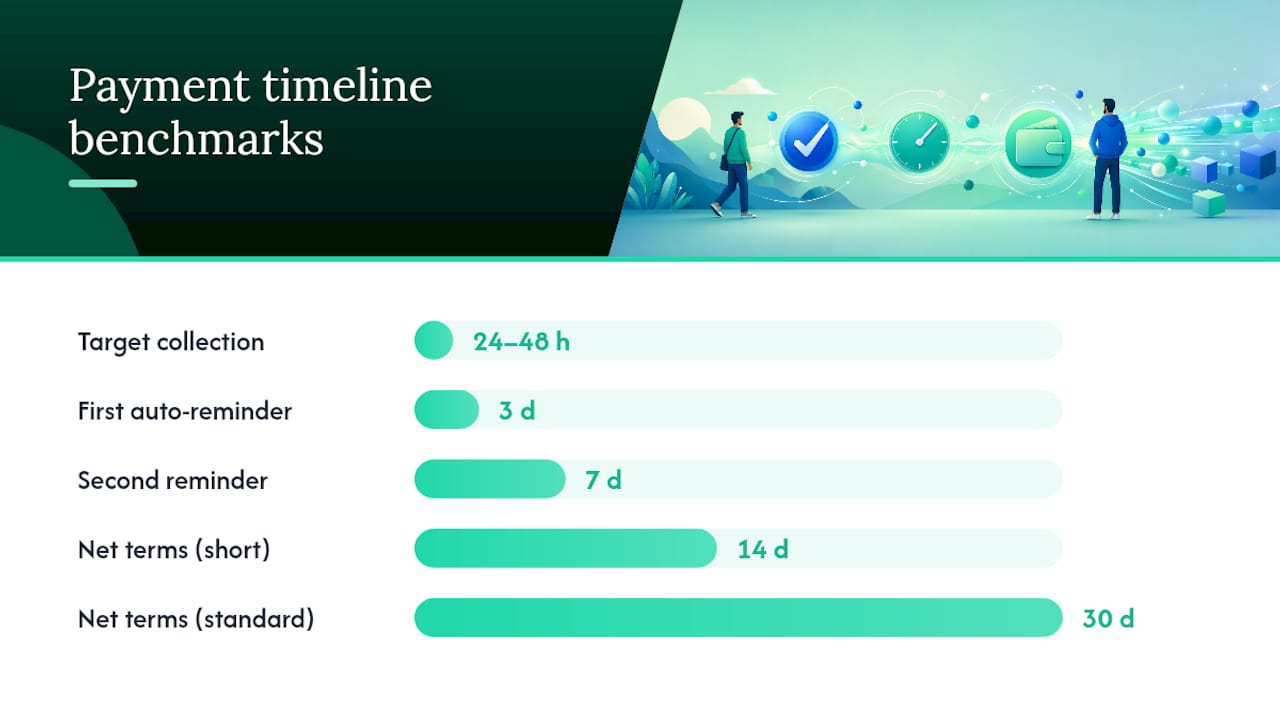
- Require a deposit of 25% to 50% before starting any project. This single habit filters out clients who were never going to pay and gives you working capital while you work. PayPal's freelancer guide lists this as one of the most consistently effective practices freelancers underuse.
- Set net-14 terms instead of net-30. Shorter terms train clients to pay faster without feeling unreasonable.
- Turn on auto-reminders. Most invoicing platforms will nudge a client automatically at three, seven, and fourteen days overdue, so you're not the one sending the awkward follow-up email.
- Add a late-fee clause to your contract, even a modest 1.5% monthly charge. Clients rarely trigger it, but its presence alone moves payments up in priority. Our late fee policy templates give you contract language that actually holds up.
- Save client payment methods where your platform allows it, so recurring or milestone invoices don't require re-entering card details every time.
The tactics work together, not individually. Combining a deposit, net-14 terms, and auto-reminders is what moves freelancers from chasing invoices for a month to collecting payment within 24 to 48 hours, according to the practitioner tactics FreshBooks compiles.
Pro Tip: Bundle your contract signature and first invoice into one step. Clients who sign and pay a deposit in the same sitting almost never become chasing-for-payment clients later. Splitting those into separate emails is where a lot of freelancers lose momentum.
A consolidated client portal model, where contract signing, invoicing, and payment collection all live in one branded space instead of scattered across email threads, removes several of these steps entirely. Our guide to freelancer client portals covers how that structure changes the collection timeline.
What security and tax practices should every freelancer follow?
Security starts with using hosted, PCI-compliant payment pages rather than asking clients to email card numbers or wire details through unsecured channels. Enable two-factor authentication on every financial account you touch, and get in the habit of verifying a payment confirmation before you start work, not after.
On the tax side, keep it simple but consistent:
- Run all client payments through a dedicated business bank account, separate from personal spending.
- Set aside money for quarterly estimated taxes as income comes in, rather than scrambling every April.
- Save every 1099 a client sends you, along with the invoices and contracts tied to that income.
- Keep payment confirmations for every transaction, even the small ones. They're what you'll reference if a client or the IRS ever questions a payment.
A simple folder structure, one per client, with the contract, invoices, and payment confirmations together, saves hours during tax season and makes disputes far easier to resolve if one comes up.
How do you handle payment disputes and chargebacks?
A chargeback happens when a client disputes a card charge directly with their bank instead of contacting you first, and it can freeze the disputed funds while the card network investigates. For freelancers, the best defense is documentation you gather before the dispute ever happens, not after.
Keep a signed contract or statement of work for every project, along with a paper trail showing what was delivered and when. If a client disputes a charge, you'll need to submit evidence to the payment processor showing the work was completed as agreed. Timestamped emails, delivered files, and a signed contract carry far more weight than a verbal agreement ever will.
A few practices reduce dispute risk before it starts:
- Get everything in writing, even for small projects. A one-page scope agreement is enough.
- Bill in stages for larger projects, so a dispute only affects one milestone instead of the entire engagement.
- Respond to a dispute notice immediately. Processors often set tight windows, sometimes just a few days, to submit evidence.
- Avoid processing full payment before any work begins on unfamiliar clients. A deposit limits your exposure if things go sideways.
Escrow and marketplace-style rails exist specifically to reduce this risk for new client relationships, since funds are held by a third party until delivery is confirmed. For clients you've never worked with, that extra layer of protection is often worth the higher fee.
What compliance rules apply to freelancers accepting payments?
Payment processors, not freelancers directly, carry most of the regulatory weight here, but you still need to understand what they require and why. Know Your Customer (KYC) rules require processors like Stripe or PayPal to verify your identity, business details, and banking information before they'll let you accept payments. Expect to submit your Social Security number or EIN, a government ID, and your bank account details when you sign up.
Anti-Money Laundering (AML) monitoring runs in the background on every processor you use. Large or unusual transaction patterns can trigger an automatic review or a temporary hold on funds, which is one more reason to keep your invoicing consistent and well-documented. A freelancer who suddenly receives a $20,000 payment with no invoice trail is far more likely to get flagged than one with a clean paper history.
Beyond KYC and AML, your main compliance responsibility as a US freelancer is tax reporting. Payment processors issue Form 1099-K once you cross certain transaction thresholds, and you're responsible for reporting that income regardless of whether a form arrives. Keeping your business and personal finances separate isn't just good practice. It's what makes any future compliance review, tax season, or processor account check straightforward instead of stressful.
Why the "just use whatever the client offers" approach fails freelancers
Most freelancers don't lose money because they picked the wrong payment processor. They lose money because they never picked one at all, and instead let every client dictate the method, the terms, and the timeline.
That reactive posture feels polite. It's actually the most expensive habit in freelance finance. A client who prefers slow bank transfers costs you weeks of cash flow. A client who insists on card payment for a $5,000 invoice costs you $150 you didn't have to spend if you'd offered ACH as the default. Neither client is doing anything wrong. You're just absorbing the cost of never setting terms in the first place.
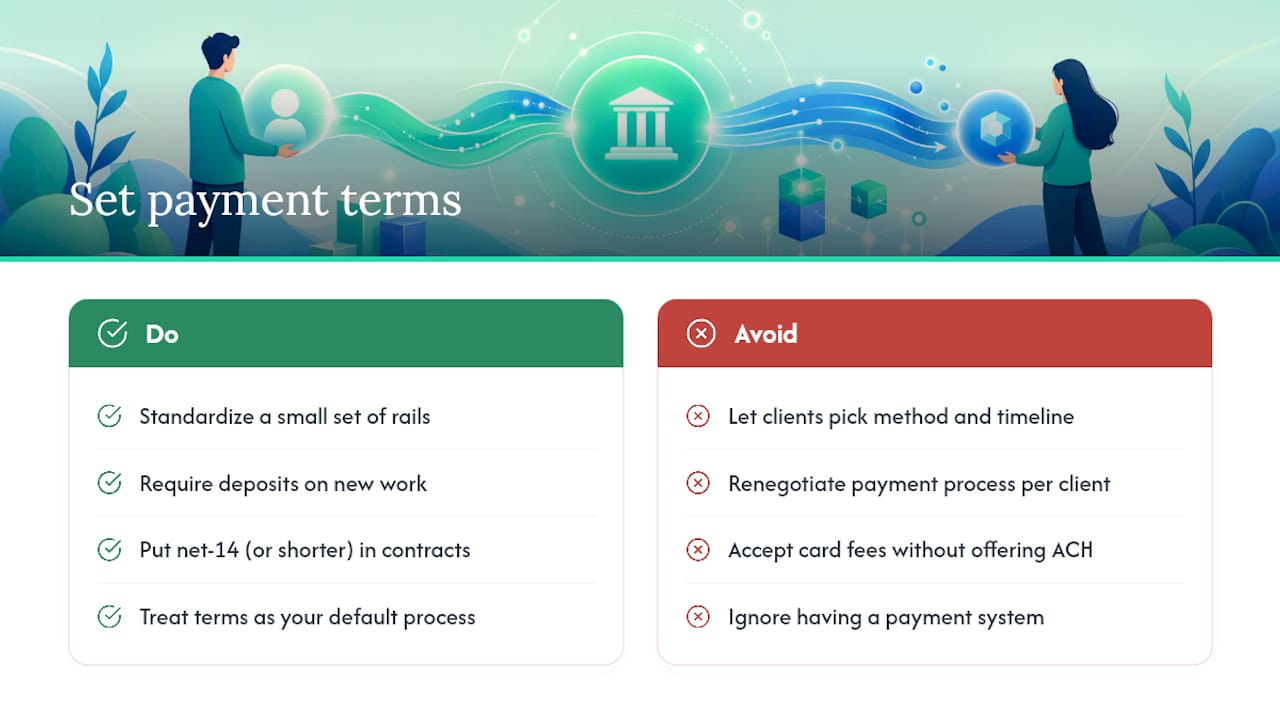
The freelancers who get paid fastest aren't the ones with the fanciest payment stack. They're the ones who standardized a small set of rails, put deposits and net-14 terms in every contract, and stopped treating each new client as a reason to renegotiate their entire payment process from scratch. The proven tactics around deposits and shortened terms work precisely because they remove the negotiation entirely. The terms are just how you operate.
What gets overlooked in most payment advice is that the technical choice (Stripe versus ACH versus Wise) matters far less than the structural choice: whether you have a system at all, or whether you're improvising a new one for every invoice. Fix the structure first. The rails are secondary.
— Real
Consolidate contracts, invoices, and payments in one place
If you've made it this far, you've seen how many moving pieces go into getting paid reliably: invoicing tools, payment rails, contracts, reminders, and recordkeeping, often spread across five different logins. A consolidated client portal exists to collapse that into one branded workspace, where your client signs a contract, sees the invoice, and pays, all inside the same portal they already trust.

The platform integrates e-signatures and payment processing directly into each client's private portal, so there's no separate app for contracts and a separate one for invoices. Freelancers using Realclient's portals invoiced over $48 million last year, a scale that reflects how much friction gets removed when payment collection lives next to the contract and the project files instead of scattered across email. That consolidation matters most for solo freelancers and small studios juggling several active clients at once, where every extra login is one more place a payment can stall.
If your current setup involves chasing signatures in one tool and payments in another, start with Realclient's pricing page to see which plan fits your client volume, and set up your first branded portal this week.
Where these figures and recommendations come from
The fee comparisons, tactics, and payout timing referenced throughout this guide draw on a handful of primary sources worth bookmarking directly:
- PayPal's freelancer payment guide covers invoicing best practices, deposits, and basic tax recordkeeping.
- Stripe's freelancer resources detail card fees, payout timing, and checkout integration.
- FreshBooks' payment methods comparison breaks down speed and cost tradeoffs across rails.
- BizToolkit's freelancer payment roundup provides sample fee math and hybrid international setups.
- Statista's freelance workforce data tracks the scale of the US gig economy.
Fees and payout schedules change. Check each provider's current documentation before you commit to a specific rail.
Sources
- How to get paid as a freelancer | PayPal
- How to accept payments as a freelancer — Stripe
- Best payment methods for freelancers in 2026 | FreshBooks
- Statista: Number of freelancers in the U.S.
- How to Accept Payments as a Freelancer in 2026 | BizToolkit