
If you're required to collect sales tax, VAT, or GST on a transaction, that tax must appear as its own line on the invoice, never folded into the price. Show the taxable subtotal, the exact rate applied, the tax amount in dollars, and the final total, so both your client and any auditor can verify the math in seconds. When you're not sure whether a sale is taxable in your jurisdiction, check with your state's Department of Revenue before you send the bill.
TL;DR:
- Always itemize sales tax, VAT, or GST as a separate line on invoices, showing the rate, tax amount, and total to ensure clarity and compliance.
- Nexus—physical or economic—and the taxability of products determine whether tax must be added, with exemption rules applying to B2B sales using valid certificates.
- When recalculating tax from a tax-inclusive price, divide the total by (1 + tax rate) to find the actual taxable subtotal accurately.
- Use separate lines for shipping and verify state-specific rules, especially when combining taxable goods and shipping charges, to avoid disputes.
- Automate tax calculations with invoice templates or portals that assign tax codes based on client location, reducing manual errors and speeding payment approval.
Table of Contents
- When Must You Add Tax to an Invoice?
- How to Calculate Tax on an Invoice
- How to Display Tax on an Invoice
- Common Pitfalls and Jurisdictional Gotchas
- Practical Pre-Send Checklist for Tax Compliance
- Implementing Tax Lines With Invoicing Tools and Client Portals
- What Tax-Exempt Customers Mean for Your Invoices
- Handling Tax Adjustments, Credits, and Disputed Invoices
- Digital Invoicing and Tax Compliance Today
- Why Clear Tax Presentation Protects Cash Flow and Client Relationships
- Send Tax-Ready Invoices Without the Manual Math
- Where to Verify Tax Rules Before You Invoice
- Sources
When Must You Add Tax to an Invoice?
Tax collection isn't optional once you cross a legal trigger. Two things create that trigger: nexus (a connection to a state or country strong enough to require registration) and the taxability of what you're selling.
Nexus used to mean a warehouse or an office in that state. Now, economic nexus laws mean that hitting a revenue or transaction threshold in a state, even with zero physical presence there, can force you to register and start collecting. Once you're registered, tax invoices become the proof buyers need to claim their own input tax deductions, so skipping the tax line doesn't just risk penalties for you. It creates a paperwork problem for your client too.
Who you're billing changes the math. Selling to a consumer (B2C) usually means charging tax at the point of sale. Selling to another business (B2B) can trigger exemptions if the buyer is reselling the goods, or if they're a registered charity or government entity, but only with a valid exemption certificate on file.
Commonly taxable items include:
- Physical goods and tangible products
- Many digital products and software licenses (rules vary widely by state)
- Certain professional and repair services
Freelancers offering pure consulting or creative services often fall outside sales tax entirely, but the rules differ enough by state that guessing isn't worth the risk.
How to Calculate Tax on an Invoice
The core formula for invoice tax calculation never changes, no matter how complicated the invoice gets:
- Tax amount = taxable subtotal × tax rate
- Invoice total = taxable subtotal + tax amount
- Shortcut for total = taxable subtotal × (1 + tax rate)
Tax comes to $84.00, so the total due is $1,284.00. Simple enough on a single-rate invoice, but two situations trip people up constantly.
Pulling tax out of a tax-inclusive price. If a client paid you a flat $1,000 that already includes 8% tax, you can't just multiply by 8% again. Strip it out first: gross ÷ (1 + rate). That's $1,000 ÷ 1.08 = $925.93 as the real subtotal, with $74.07 as the tax portion. Get this backward and you'll misreport revenue on every return you file.
Discounts and mixed-rate invoices. Apply any discount to the subtotal before calculating tax, never after. And if your invoice has items taxed at different rates, calculate each rate group separately and sum the results. Never average rates across a mixed invoice; a single blended percentage will always be wrong for someone.
Pro Tip: Build your invoice in layers: line items, subtotal, discount, then tax, then shipping and deposits last. Calculating in that order makes every number traceable if a client ever asks how you got there.
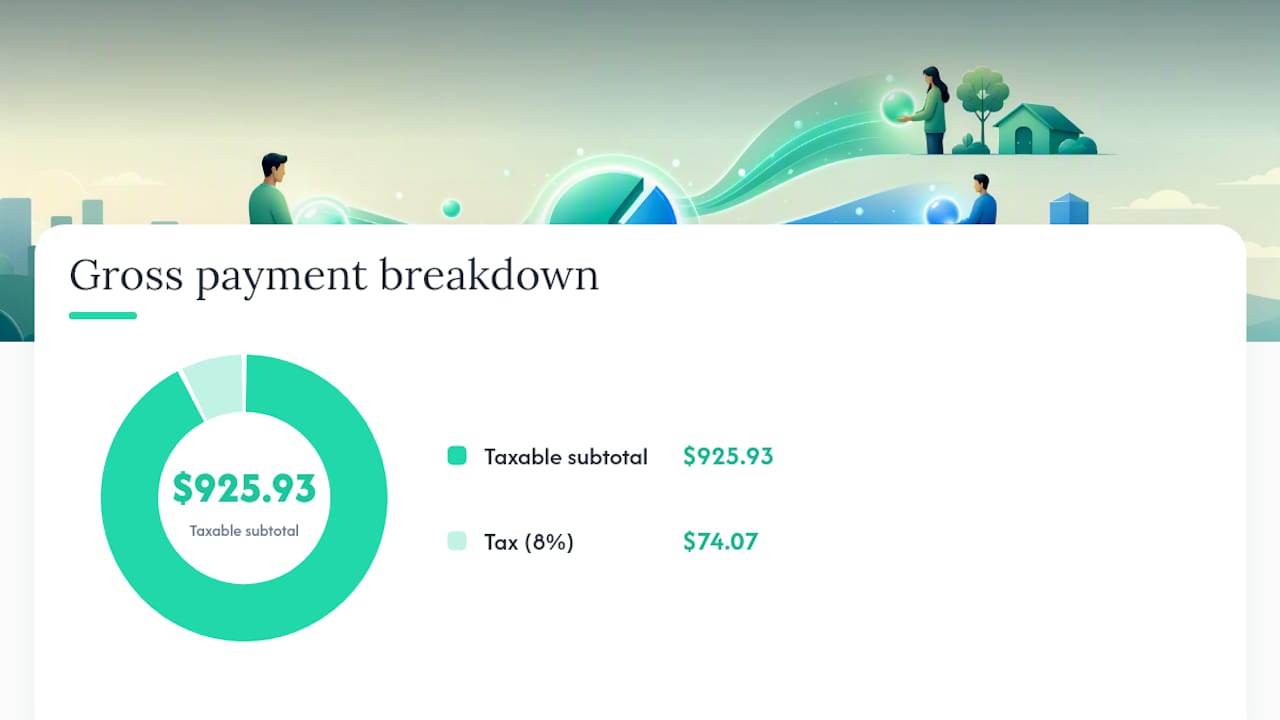
Round each tax line to the cent at the point of calculation, not at the very end, especially on invoices with several rate groups.
How to Display Tax on an Invoice
A well-built invoice reads like a short, honest story: here's what you did, here's what it cost, here's the tax, here's the total. Auditors and clients both want the same thing: to trace every number back to its source without asking you a follow-up question.
Every compliant invoice needs these fields:
- Invoice number and issue date
- Seller and buyer names and addresses
- Description and taxable subtotal for each line item
- Tax rate(s) and the exact tax amount for each rate
- Grand total and payment terms
- Your tax registration ID, when your jurisdiction requires it
Label the tax using the term your market actually expects. "Sales Tax" in the United States, "VAT" in the European Union, "GST" in Canada or Australia. Mixing up the label confuses clients who are used to seeing a specific term on their statements. When an invoice includes items taxed at different rates, group them visually, taxable items together, exempt items together, so the reader isn't hunting for which line got taxed and which didn't.
Pro Tip: Save a locked invoice template with your tax fields pre-formatted. It cuts down on typos in the rate field, which is one of the most common reasons invoices get sent back for correction.
Common Pitfalls and Jurisdictional Gotchas
Shipping charges cause more tax disputes than almost any other line item. Whether shipping is taxable depends entirely on the state, and combining a shipping charge with taxable goods on one line can make the shipping itself taxable even when it would have been exempt on its own. Keep shipping as its own line and check your state's rule before assuming either way.
A few other mistakes show up again and again:
- Blending tax rates across a mixed-rate shipment instead of calculating each group separately
- Charging tax on reimbursed, pass-through expenses that were never yours to mark up
- Missing reverse-charge obligations on certain cross-border B2B services
- Failing to keep a copy of the exemption certificate for every non-taxed sale
Washington's Department of Revenue, for example, requires sellers to state sales tax separately on the invoice and gives specific guidance for reporting use tax when it wasn't collected at the time of sale. Other states have their own quirks. The safest habit is treating every new client's state as its own small research project the first time you bill them.
Practical Pre-Send Checklist for Tax Compliance
Run this before every invoice goes out, especially for new clients or new states:
- Confirm the customer's location and whether they qualify for any exemption.
- Apply the correct rate (or rates) for that jurisdiction and product type.
- Verify discounts were applied to the subtotal before tax was calculated.
- Check that each tax line reconciles cleanly to the subtotal and grand total.
- Attach or file the exemption certificate if you're claiming non-taxable treatment.
Thirty seconds on this checklist saves hours of amended invoices later.
Implementing Tax Lines With Invoicing Tools and Client Portals
Manual tax calculation is where most small errors creep in, a misplaced decimal, a rate applied to the wrong client, a forgotten exemption certificate. Templates with locked tax fields and per-client tax codes remove that guesswork by applying the correct rate automatically based on who you're billing and what you're selling.
The platform has processed millions in invoices through client portals, and businesses using it often report faster payment cycles and higher client satisfaction with the billing process itself. Setup is straightforward:
- Assign a tax code to each client based on their location and exemption status
- Let the portal calculate tax automatically instead of recalculating by hand each time
- Store exemption certificates directly in the client's portal record for easy retrieval
What Tax-Exempt Customers Mean for Your Invoices
A tax-exempt customer doesn't mean you skip the tax section of the invoice. It means you document why tax wasn't charged, which is a very different thing from simply leaving it blank.
Common exemption categories include resellers holding a valid resale certificate, registered nonprofits, and government agencies. Each one needs its own paperwork trail. Before you invoice a claimed exemption, get the certificate first, not after the client asks why there's no tax line. Keep a copy on file tied to that specific client, because if you're ever audited, "the client told me they were exempt" isn't an answer a tax authority accepts.
On the invoice itself, state the exemption plainly rather than just omitting the tax line silently. Something like "Tax exempt, resale certificate #12345 on file" tells anyone reviewing the document exactly why the total looks the way it does. This protects you two ways: it shows you didn't simply forget to charge tax, and it gives you a paper trail if that exemption is ever questioned later.
One nuance freelancers miss: an exemption often applies to specific products or services, not to everything you might ever sell that client. A nonprofit might be exempt on the goods you sell them but still owe tax on an unrelated service. Check the exemption's actual scope every time, not just the first time.
Handling Tax Adjustments, Credits, and Disputed Invoices
Mistakes happen. A rate gets misapplied, a client disputes a charge, or a return triggers a partial refund. The fix is a credit memo, a formal document that references the original invoice number and adjusts the tax and subtotal by the corrected amount, never a silent edit to the original invoice after it's been sent.
If you undercharged tax, issue a supplemental invoice for the difference and explain the correction in plain language. If you overcharged, issue a credit and refund or apply it to the client's next invoice. Either way, keep both documents on file together so your books show the full history, not just the final number.
Disputes over tax specifically (a client claims they're exempt after the fact, or questions why a rate seems high) get resolved fastest when your original invoice already itemized the rate and jurisdiction clearly. This is really where invoice display doubles as its own defense. A vague "tax: $84" invites questions.
For recurring clients, adjustments tend to repeat. If you're managing recurring invoices for ongoing work, build a habit of double-checking that the tax code attached to that client hasn't changed since the last billing cycle, especially if they've moved or their exemption status shifted.
Digital Invoicing and Tax Compliance Today
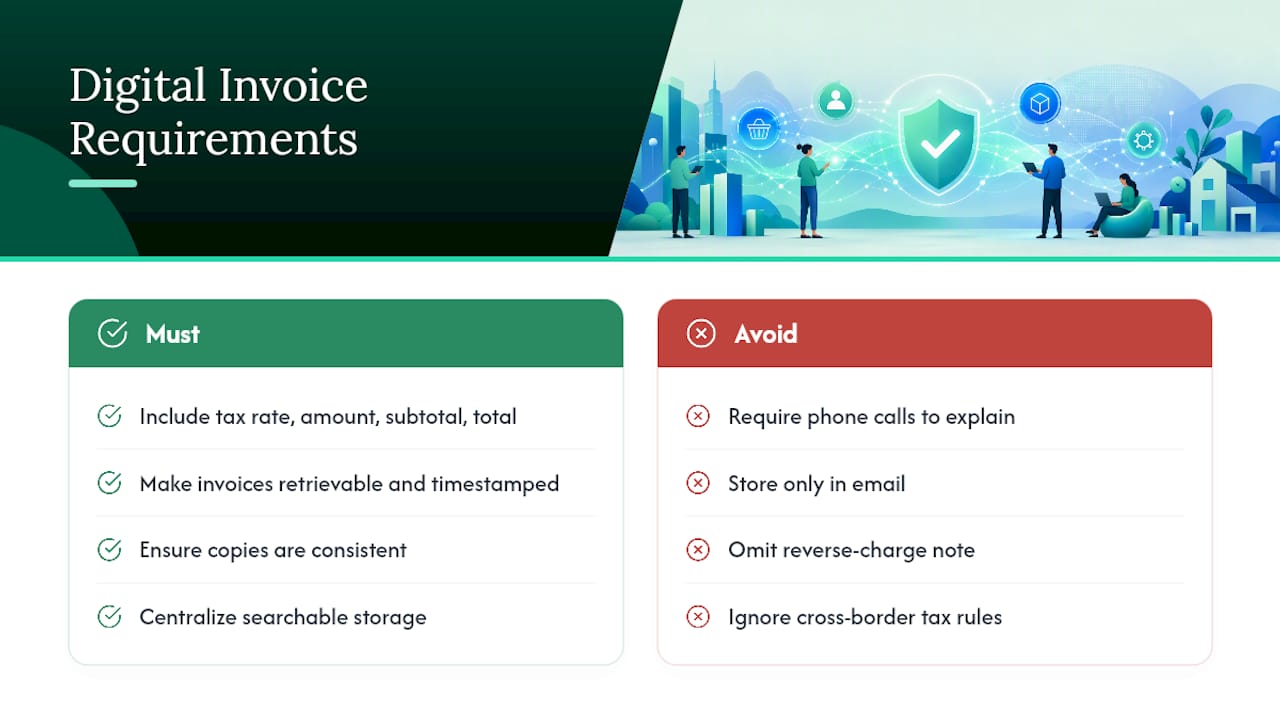
Paper invoices used to be the default proof of a transaction. That's no longer true for most small businesses, and tax authorities have adjusted their expectations accordingly. Digital invoices need the same core fields as paper ones: tax rate, tax amount, subtotal, and total, but they also need to be retrievable, timestamped, and consistent across every copy a client or auditor might pull up.
The European Union's VAT invoicing rules lay out required fields for VAT-registered businesses in detail, and while U.S. sales tax rules differ from VAT structurally, the underlying expectation is the same everywhere: a tax invoice has to stand on its own as proof, without requiring a phone call to explain it.
Cross-border digital invoicing adds another layer. Selling software or digital services internationally can trigger VAT or GST obligations in the buyer's country, not just your own, depending on the transaction type and where the buyer is located. Reverse-charge mechanisms sometimes shift the tax obligation to the buyer in B2B cross-border sales, which changes what your invoice needs to say entirely, often a note stating the reverse charge applies instead of a tax line at all.
Storage matters as much as formatting. Most jurisdictions expect digital invoices to be retained for several years, and having them centralized in one searchable system beats digging through email threads when a return gets questioned.
Why Clear Tax Presentation Protects Cash Flow and Client Relationships
Invoices that show tax clearly get approved faster, in our experience there's a direct line between an itemized tax section and how quickly accounts payable signs off on payment. Vague invoices invite questions, and every question is a delay.
The tax you collect isn't your money the moment it lands in your account. Treat it as held funds earmarked for remittance, not working capital, and you'll never face the ugly surprise of owing more than you have when the filing deadline hits. Pair transparent invoices with automated payment reminders, and collections stop feeling like a guessing game.
— Real
Send Tax-Ready Invoices Without the Manual Math
This solution offers an alternative to spreadsheet invoicing and scattered email threads for freelancers and small agencies who need every tax line right the first time. Instead of recalculating rates by hand or hunting for exemption certificates, the portal can assign a tax code once per client and apply it automatically on future invoices.

The platform bundles invoice templates, per-client tax codes, and payment collection into one branded portal, so clients see a clean, itemized bill and can pay it without leaving the page. That combination helps businesses report faster payment cycles: the invoice already answers the questions that usually cause delays. If you're onboarding new clients, pairing a client questionnaire with your portal setup makes it easy to capture location and tax status upfront, before the first invoice ever goes out. Billing patterns matter here too, and understanding how B2B payment behavior differs from consumer transactions helps explain why clear tax itemization speeds up approval on the business side specifically.
Check the pricing page to find the plan that fits your client volume, or visit Realclient to set up your first tax-ready invoice template today.
Where to Verify Tax Rules Before You Invoice
Your state's Department of Revenue is the final word on rate and registration questions specific to you. Washington's sales tax invoice guidance is a useful model for what a state DOR page typically covers. For cross-border sales, the EU's VAT invoicing rules outline required fields for VAT-registered sellers. For calculation walkthroughs, Aviy's invoice tax calculator guide and CleverInvo's tax invoice examples both offer worked formulas worth bookmarking.
Sources
- What Is a Tax Invoice? Requirements, Formats & Compliance — QuickBooks (Intuit)
- Sales tax not listed on the invoice — Washington Department of Revenue
- Invoice Tax Calculator: How to Calculate Tax on an Invoice | Aviy
- How much tax do I add to my invoice? Rates & rules — LegalClarity