
The most effective client handoff process runs through one branded client portal instead of scattered emails and file links. That single hub handles intake, contract signing, deliverable approvals, and payments, and every milestone invoice fires only after the client signs off inside it. RealClients alone has processed over $48 million invoiced through its portals in a single year, proof that this approach holds up at scale. This guide walks through every phase, from pre-kickoff to final delivery.
TL;DR:
- Using a single branded client portal for handoffs ensures consistency and reduces time-consuming back-and-forth, especially when managing multiple clients.
- Structuring the process into four clear phases—pre-kickoff, setup, handoff to production, and final delivery—helps prevent delays and scope creep.
- Tying milestone payments to client approvals via the portal accelerates cash flow, with typical splits including 15% at discovery and 25% at design.
- Launching the portal immediately with a brief walkthrough and clear initial tasks increases client engagement and minimizes login obstacles.
- Securing the handoff relies on least-privilege access, time-limited credentials, clear permission levels, and an archive policy for legal and dispute resolution purposes.
Table of Contents
- What Are the Phases of a Client Handoff Process?
- What Belongs on Your Client Handoff Checklist?
- How Should You Structure Milestone Payments?
- How Do You Get Clients to Actually Use the Portal?
- How Do You Keep Client Handoffs Secure?
- How Do You Formally Close a Client Handoff?
- What We've Learned From $48M in Portal Handoffs
- Get Your Own Handoff Process Running This Week
- Templates and Guides to Copy Right Now
- Sources
What Are the Phases of a Client Handoff Process?
A repeatable client handoff process breaks into four phases, each with a clear trigger for moving to the next one. Skipping a phase, or blurring the line between them, is where most freelancers lose time and money.
- Pre-kickoff. Send the portal link the moment the contract is signed. Build in an intake form and a document collection area so the client uploads brand assets, credentials, and reference material before you touch the project.
- Setup. Verify you actually have what you need. Confirm access to every account or file the client promised, lock in a timeline, and assign internal tasks. Do not start production until this checklist is clean.
- Handoff to production. Mark onboarding complete, share the first real deliverable inside the portal, and switch the portal's mode from "welcome" to "active project." This is also the point where standardizing what goes into every client's portal starts paying off, because the client already knows where to look.
- Final delivery. Publish finished files, hand over any credentials the client now owns, and set the acceptance criteria and support window in writing before you call the project done.
A client onboarding portal that centralizes welcome materials, uploads, and task tracking removes the back-and-forth that usually eats the first two weeks of any engagement.
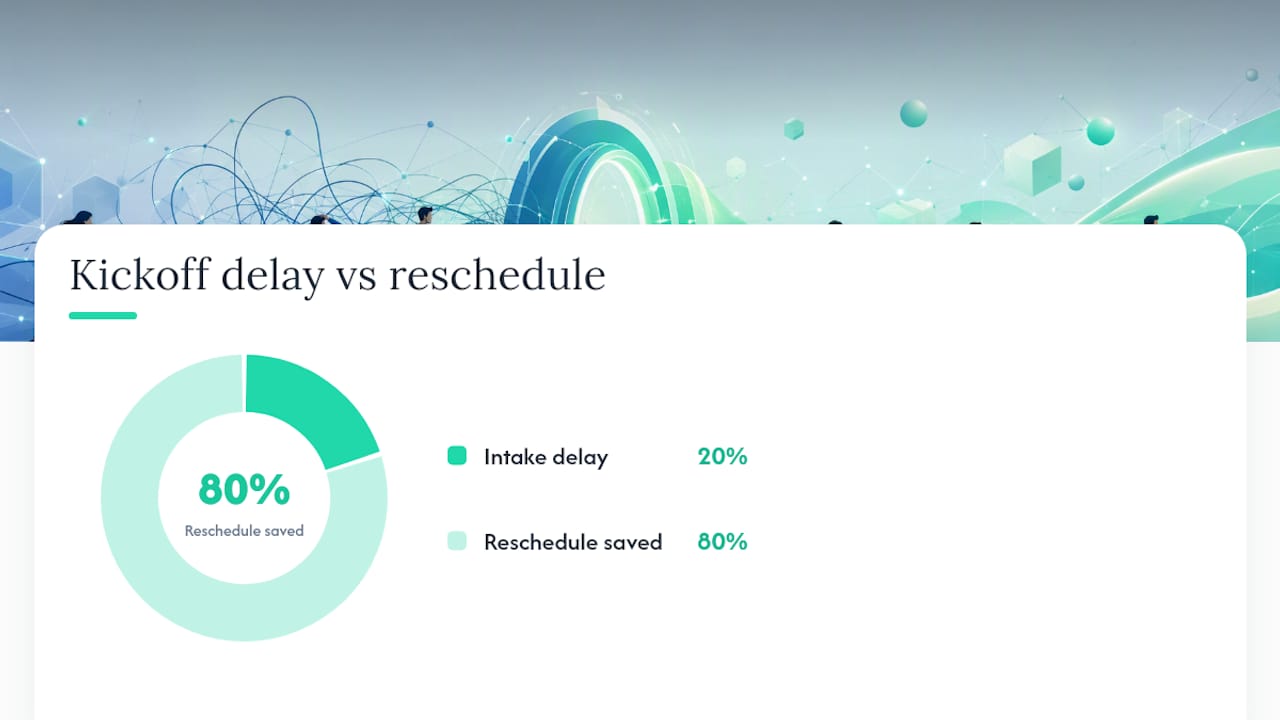
Pro Tip: Never send the kickoff call invite before the intake form is filled out. A 15-minute delay on your end saves an hour of rescheduling on theirs.
What Belongs on Your Client Handoff Checklist?
A reusable checklist keeps handoffs consistent even when you are juggling five clients at once. Recommended checklist items for kickoff include a signed agreement, primary contact, deliverables list, and access inventory, all stored in one place from day one.
- Signed contract or statement of work, with acceptance criteria spelled out in plain language.
- Completed intake questionnaire covering brand assets, tone, and project goals.
- Login credentials, API keys, and technical access details, uploaded once and never emailed again.
- Final deliverable files alongside source files, tagged with version numbers.
- A short archive policy stating how long files stay live in the portal after project close.
Store everything by category, not by date. A client hunting for their logo files six months later should not have to scroll through a timeline to find them. RealClients' onboarding checklist template and free questionnaire templates both work as starting points if you are building this from scratch.
How Should You Structure Milestone Payments?
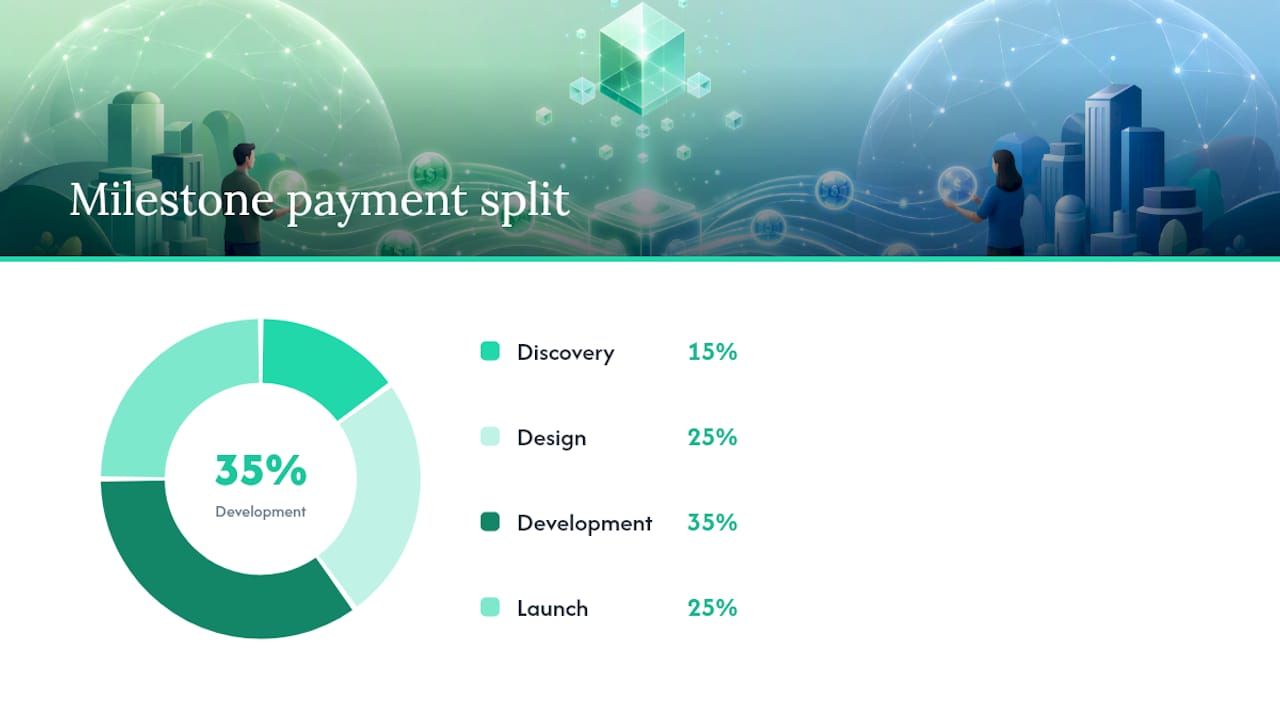
Payments tied to specific deliverables, rather than a flat deposit and a final invoice, protect your cash flow and give clients a reason to approve work quickly. A common split for a website project runs 15% at discovery, 25% at design, 35% at development, and 25% at launch, with the invoice triggering at the start of each phase rather than the end.
- Discovery (15%). Invoice on contract signing, before any work begins.
- Design (25%). Invoice once wireframes or concepts are approved in the portal.
- Development (35%). Invoice at the start of build, the largest and longest phase.
- Launch (25%). Invoice on final approval, before credentials transfer.
Your contract should specify a defined approval window (typically 3 to 5 business days), a cap on revision rounds per milestone, and an automatic approval clause: if the client does not respond within the window, the deliverable is considered accepted. Connecting approval status directly to invoice creation matters more than the split itself. Agencies that link milestone approval to instant payment links have seen average payment times drop from roughly 31 days to about 7 days. For scope changes mid-project, generate a change order with its own milestone and price, rather than folding new work into an existing invoice.
Pro Tip: Write "approval or written feedback within 5 business days constitutes acceptance" directly into your SOW. It ends the endless email chase for sign-off.
How Do You Get Clients to Actually Use the Portal?
A portal only works if the client opens it. The first message you send sets the tone for the entire project.
- Send the portal link within minutes of contract signing, paired with a 60 to 90 second walkthrough video.
- List the first 3 to 5 tasks you need from the client, so their first visit has a clear purpose.
- Use guest or no-login access wherever the platform allows it. Every extra password is a reason to bail.
- Set automated reminders and status summaries so neither you nor the client has to chase updates manually.
Portals built around live status updates and a single file home see higher engagement than tools that just store documents. The habit forms fast: making the portal the first place a client sees a real deliverable, rather than a PDF attached to an email, trains them to check it by default for the rest of the project.
How Do You Keep Client Handoffs Secure?
Security lapses during handoff usually come from convenience shortcuts, not carelessness. Sending a password over email feels fast until that email gets forwarded three times.
- Grant least-privilege access by default. Give clients viewer permissions until they need to edit or approve.
- Use time-limited credentials for any temporary access, and revoke them the day the project closes.
- Adopt a consistent naming and versioning system for every deliverable and source file, so "final_v2_ACTUAL.zip" never happens again.
- Assign clear permission tiers (viewer, editor, admin) instead of giving every collaborator the same access level.
- Keep an activity log of uploads, approvals, and downloads. It settles disputes faster than memory ever will.
An archive policy that keeps files accessible for a defined window after project close, rather than deleting them immediately, gives you a paper trail if a dispute surfaces months later.
How Do You Formally Close a Client Handoff?
Closing the loop requires more than a "looks good, thanks" email. Define measurable acceptance criteria before the project starts, not after the deliverable lands, and record them inside the portal so approval is a discrete action rather than a vague conversation.
- Attach a sign-off checklist or e-signature confirmation to the final deliverable.
- Set approvals as a checklist item that triggers the final invoice and any permission changes automatically once checked.
- Send a short feedback survey within 48 hours of sign-off, while the experience is still fresh.
- Schedule any agreed follow-up or support window explicitly, with an end date attached.
RealClients' approvals workflow guide covers how to automate this handoff from approval to invoice without manual chasing.
What We've Learned From $48M in Portal Handoffs
Watching over $48 million move through RealClients portals in a year taught us that payment speed tracks almost perfectly with how early the client sees a real deliverable. The freelancers who struggle usually make one of three mistakes: they launch the portal silently with no walkthrough, they ask for a dozen documents in the first session instead of five, or they skip acceptance criteria entirely and hope for the best.
If you're rebuilding your process from scratch, don't roll it out to every client at once. Run it with one project, track time-to-first-value, and adjust before you scale it.
— Real
Get Your Own Handoff Process Running This Week
A branded client portal platform is built for exactly the workflow this guide describes: one portal where clients see project updates, download files, sign contracts, and pay, without juggling multiple tools.

That consolidation is precisely why freelancers using it have moved $48 million through their portals in a single year, and why payment cycles shrink once approvals and invoices live in the same place instead of separate apps. If you're still stitching together a signature tool, a file drive, and an invoicing app, every one of those seams is a place a client can stall.
Start with a single active project. Set up your portal, upload your first client's intake form, and connect a milestone to an invoice. Check RealClients' pricing to find the plan that fits your current client load, and adjust as your roster grows.
Templates and Guides to Copy Right Now
- Client Onboarding Checklist
- Portal Adoption Plan
- Contract Management Guide
- Client Interview Best Practices
Sources
- How to Build a Client Onboarding Portal for Your Agency | Fastio
- Client portals for agencies: The complete guide | Forge
- How to set up milestone billing for your agency (step by step)